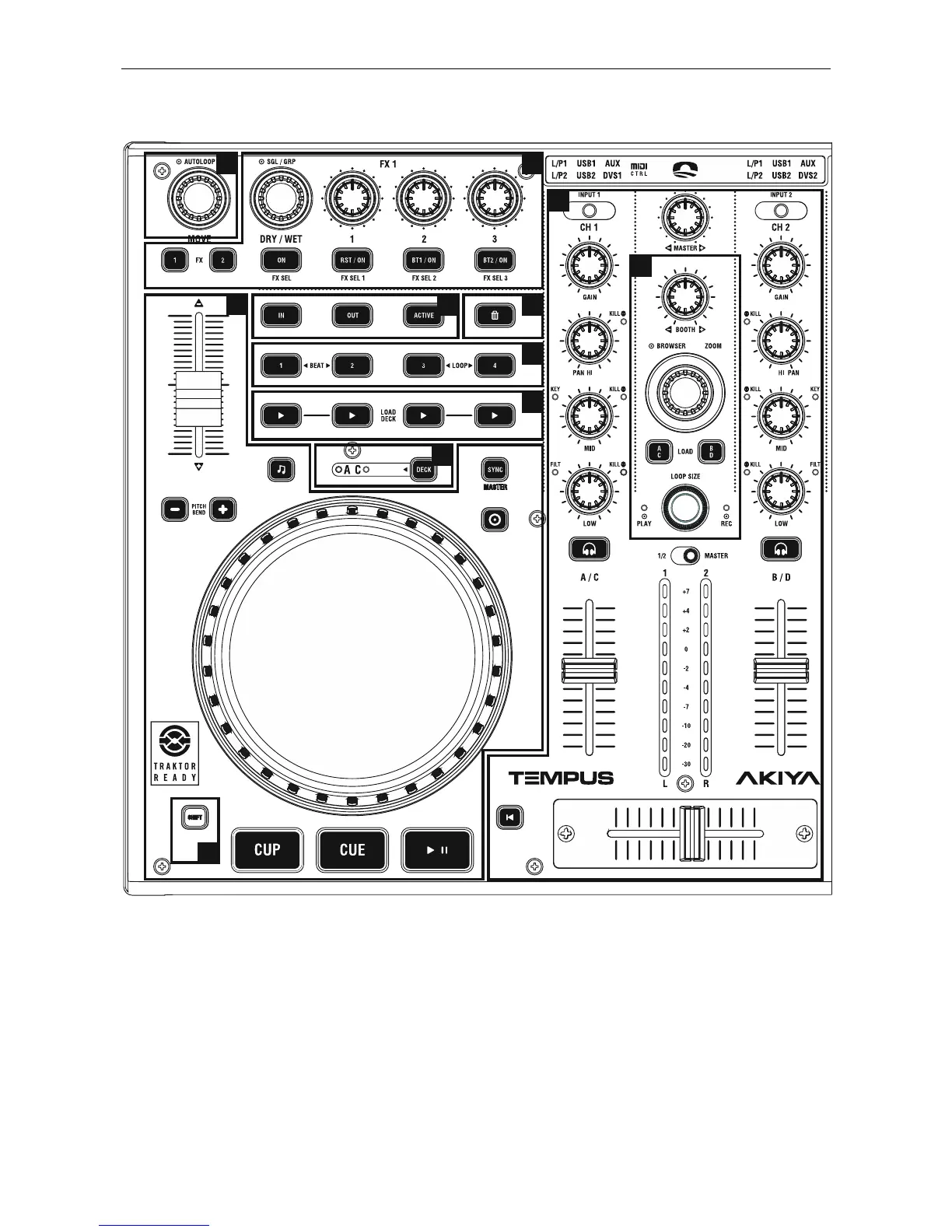
TRACK DECK
1. AUTOLOOP
- AUTOLOOP: Turn the control to select loop size. Press the
control to set the loop.
Shift (Move): Turn the control to move the loop through the
track. The shift depends on the loop size. This function only
works when a loop is playing.
2. EFFECTS
There is SINGLE and GROUP modes.
In SINGLE (SGL) mode we modify different parameters of a
given effect. GROUP mode (GRP) you can use three effects
simultaneously with a one-knob control.
- DRY/WET (SGL & GRP): This parameter controls the mix
between the original direct signal (Dry; full left position) and the
processed effect signal (Wet; full right position).
Shift (SGL): Turn the control to select the effect desired.
- SGL / GRP: Switch between Single and Group mode.
- ON (SGL): FX units On/Off.
- BUTTONS 1, 2 & 3 (SGL): You can change the 1st, 2nd and
3rd parameter of the selected effect.
- BUTTONS 1, 2 & 3 (GRP): You can change the amount of
the 1st, 2nd and 3rd effect of the unit.


 To Next Page