TEMPUS. User Manual
14
3. FUNCTIONS AND CONTROLS
3.1. Mixer Mode
The mixer part of the controller can work as a MIDI controller
as well as a stand-alone mixer. You can swap from one mode
to the other using the switch you can find in the point 1.4-11 of
this manual. In the Select Display MIDI CTRL indicates if the
mixer section is in MIDI controller mode to control the mixer
section in the DJ software. In the following points it will be
explained how to configure inputs and outputs in both modes.
3.1.1. MIDI Control
In this mode the USB 1&2 outputs are routed to the master
output of the controller (1.4-5&6) and USB 3&4 outputs are
routed to the headphones outputs of the controller (1.3-9).
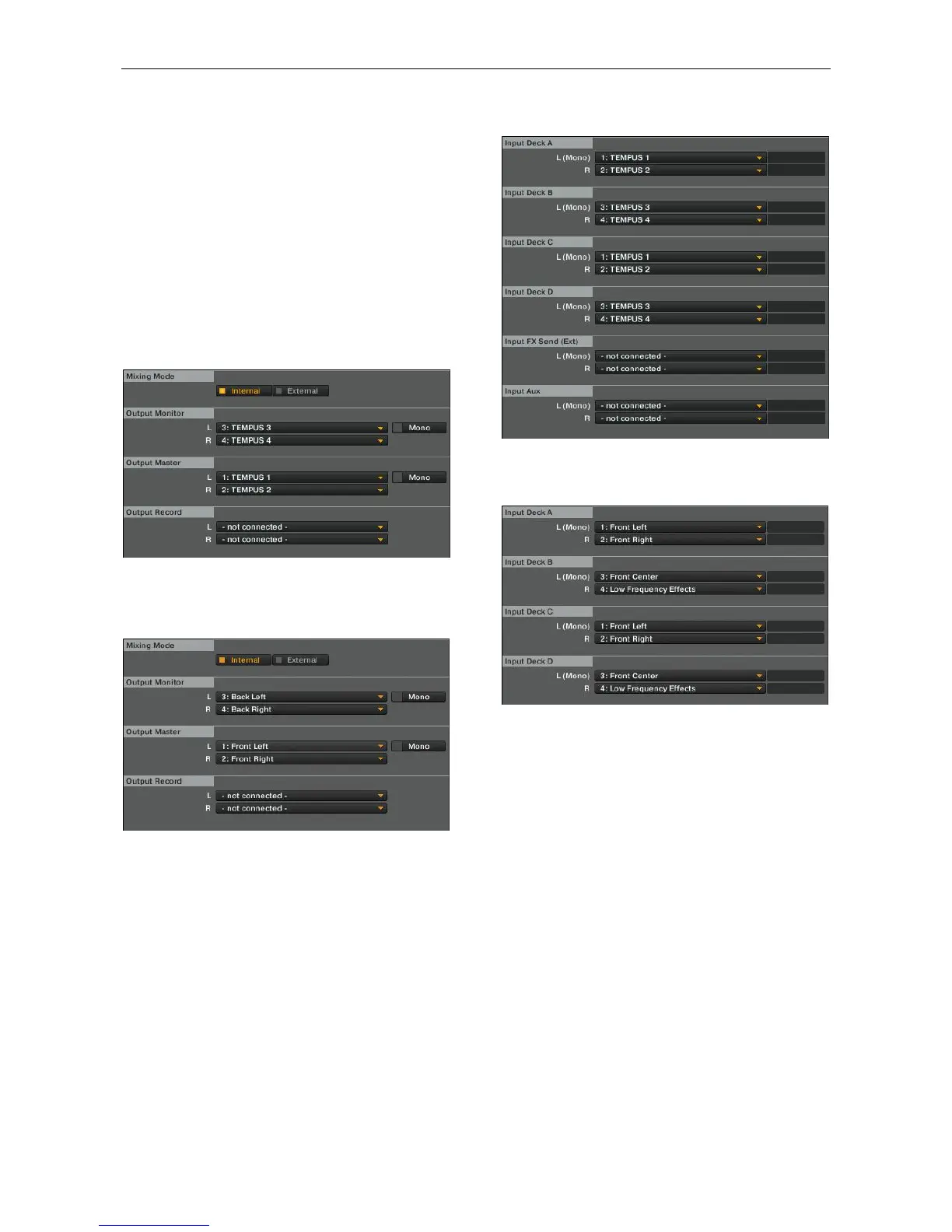
Traktor have to be configured accordingly:
“TEMPUS” 1 and 2 must be assigned to Master and
“TEMPUS” 3 and 4 to Monitor.
On MAC, Output Monitor is routed to “Back Left” / “Back Right”
and Output Master is routed to “Front Left” / “Front Right”.
The control “Channel Input Source Switch” (1.2-2) selects
which input will be sent across the USB. The left control will
select which input is routed to USB 1&2 inputs while the right
one will select which input is routed to USB 3&4 inputs. It is
possible to send any analog input of the controller to any USB
stereo input. Under MIDI Control Mode You can switch the
input selections among L/P1 (Line1/Phono1), L/P2
(Line2/Phono2) and AUX. If AUX is selected on the right
channel (CH 2), microphone signal will be send to the sound
card.
For instance if you select L/P2 in the left side and AUX in the
right side and configure Traktor as it is in the following image,
the signal coming from the input 2 of the controller will be
available on the decks A and C if you select Live Input in those
decks. Microphone input will be available on decks B and D
when Live input is selected.
On MAC, the names of the USB inputs 1 and 2 are “Front Left”
and “Front Right” and the names of the USB inputs 3 and 4 are
“Front Center” and “Low Frequency Effect”.
NOTE: USB outputs are the channels that go from the PC to
the controller (They could be considered as controller inputs).
USB inputs are the channels that go from the controller to the
PC (They could be considered as controller outputs).
3.1.2. Stand-alone Mixer
In this mode the USB 1&2 inputs are the Master outputs of the
controller or Input 1 and USB 3&4 inputs the microphone input
or Input 2 depending on if DVS is selected or not.
On the other hand, USB outputs can be chosen as input
signals to the mixer.
The control “Channel Input Source Switch” (1.2-2) selects the
input source for each channel. You can switch among
Line/Phono 1 (L/P1), Line/Phono 2 (L/P2), USB1 (from
computer), USB2 (from computer), AUX and DVS (from
computer).
The difference between USB and DVS (Digital Vinyl System
Direct Mode) is the signals the device sends across the USB. If
USB is selected MASTER and BOOTH are send to the
computer while if DVS is selected L/P is send instead.
When you use time code vinyl to control DJ software you have
to switch to the input channel corresponding to the physical
input where the CD or turntable is connected to DVS mode.
NOTE: In order to use time code vinyl with TEMPUS, you will
have to use DJ software compatible with any soundcard. You
only can use time code with Traktor Scratch PRO if you use
one of the compatible Native Instruments sound cards.
If you wish to apply some effects of your software to any input
before mixing them you have to switch to the DVS mode as


 To Next Page