TEMPUS. User Manual
7
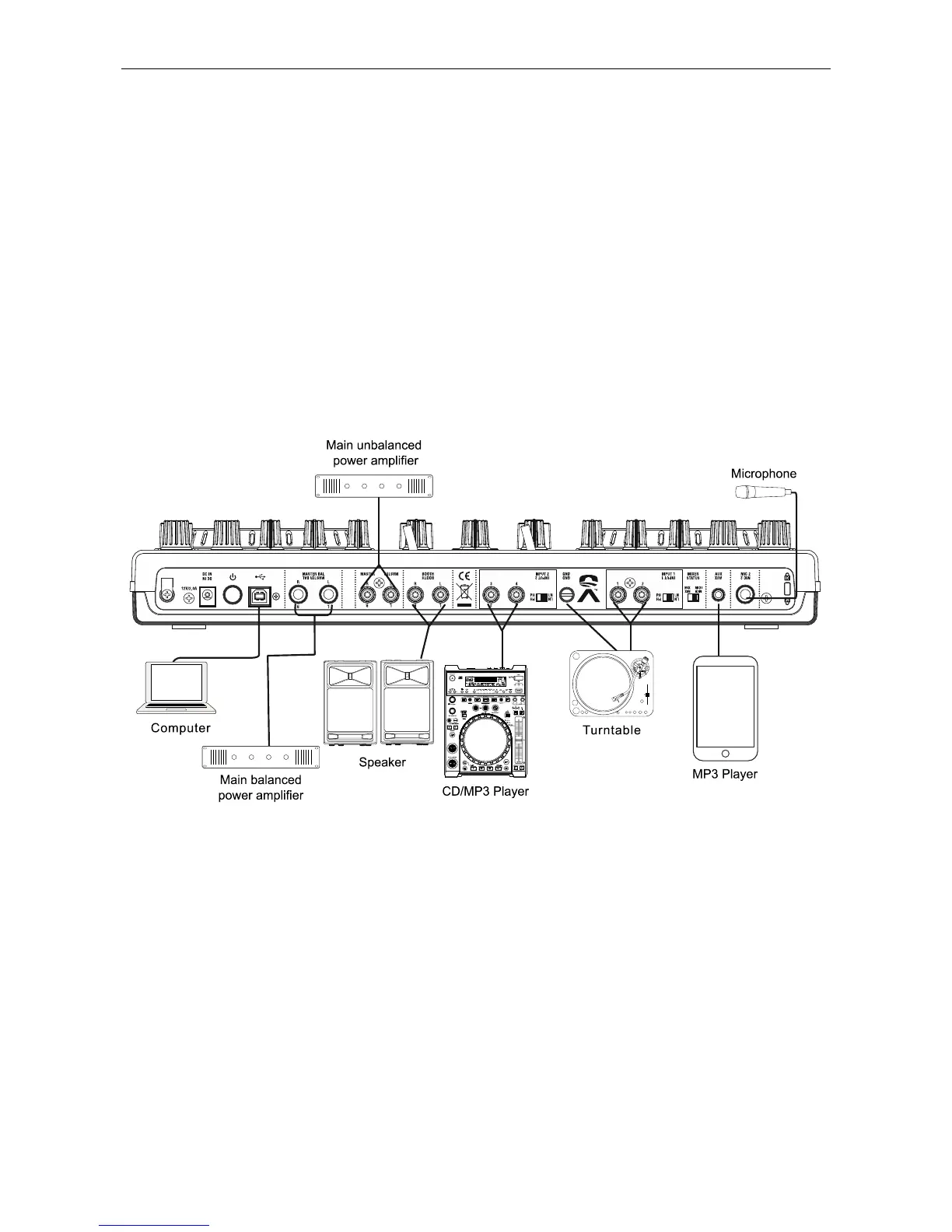
6. RCA MASTER OUTPUT Jacks: The RCA jacks send a
low current unbalanced output signal.
CAUTION: These jacks should only be used for shorter cable
runs to signal processors or looping to another mixer. For
cable runs greater than 15 feet use the XLR BALANCED jacks.
7. BOOTH OUTPUT Jacks: Connect to inputs of your active
monitors using cables with RCA connectors.
8. PHONO/ LINE SELECTOR Switch: These switches are
used to change the voltage line levels of the respected
PHONO/ LINE RCA inputs jacks. When connecting turntables
with magnetic cartridges to these jacks be sure the
corresponding switch is in the “PHONO” position, and when
using line level input devices be sure the switch is in the “LINE”
position.
CAUTION: Always be sure main power is shut off before
change the position of the Line Level Selector Switch.
9. GND (GROUND TERMINAL): Be sure to connect turntable
ground leads to either or both of the two available ground
terminals. This will reduce the humming and popping noises
associated with magnetic phono cartridges.
10. CHANNEL PHONO/ LINE INPUT Connectors: Turntables
equipped with MM pickup cartridge (All DJ turntable use MM
pickup cartridges) may be connected to these jacks as long as
the PHONO/ LINE selector switches is in the “PHONE”
position. CD players, Tape Decks and other line level
instruments may only be connected to these jacks as long as
the PHONO/ LINE selector switches is in the “LINE” position.
Input volume will be controlled by the Channel gain control
knob.
11. MIXER STATUS Switch: You change the Mixer section
as a software controller instead of a real mixer. Under software
control mode the input select display show “MIDI CTRL”.
12. AUX IN Jack: CD players, MP3 Player, Tablet Pad and
other line level instruments may only be connected to this jack.
Input volume will be controlled by the channel fader. The
channel Source Selector Switch must be in the "Aux" position,
to monitor any source connected to this jack.
13. MIC 2 Jack: This jack is used to connect a microphone to
the mixer. Connect your microphone via 1/4 inch jack. The
volume output level for microphone will be controlled by its
own respective volume knob.
1.5. Connections
1. Before making or changing connections, switch off the
power and disconnect the power cord from the AC outlet.
2. Quality cables make a big difference in fidelity and punch.
Use high-quality, audio cables.
3. Do not use excessively long cables. Be sure plugs and jacks
are securely fastened. Loose connections cause hum, noise,
or intermittence that could damage your speakers.
4. Connect the RCA pin cords to the inputs on your amplifier.
CAUTION: Be sure to use the supplied control cord. Using
another type of cable may result in damage.
5. Connecting to a Computer – Support computer operating
systems include Windows Vista, Window XP, and MAC OS X
or later.


 To Next Page