19
Version 1.01
How to view the list of vehicles supported by K-TAG
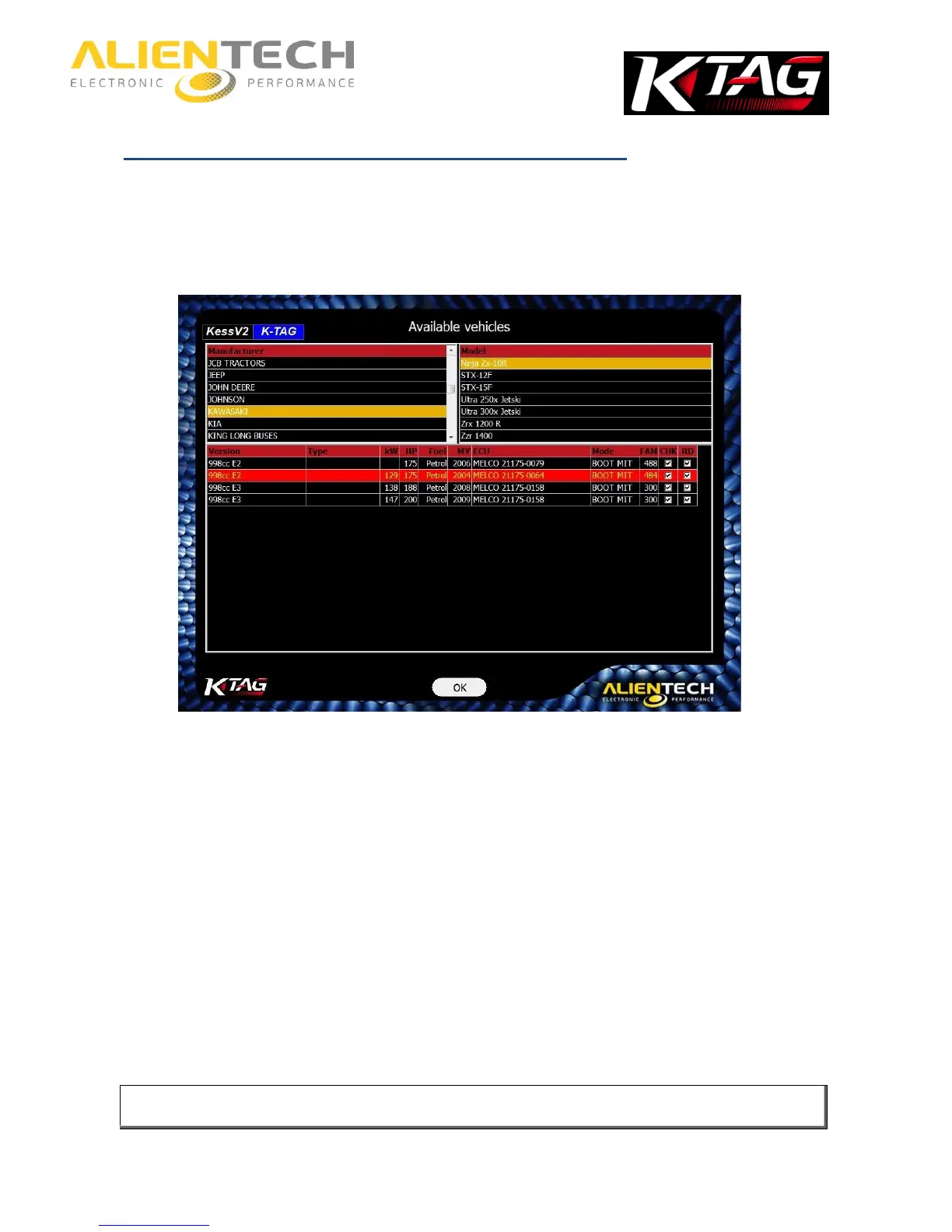
1. Click on the Options button in the main window of the K-Suite software.
2. In the Available vehicles pane, click View.
3. Select the Brand of the vehicle.
4. Select the Model of the vehicle.
At the bottom of the window, a list of all versions of the selected vehicle is then displayed. For
each version is detailed:
Type: The type of engine installed.
kW: The engine power expressed in kilowatt.
HP: The engine power expressed in horsepower.
Fuel: The type of fuel: Petrol or Diesel.
MY: The year when the vehicle’s version has been launched on the market (short for Model
Year)
ECU: The type of ECU installed on the vehicle.
Mode: The connection mode to the ECU.
FAM: The number of the Family to use to communicate with the ECU.
CHK: Check mark indicates that checksum correction is carried out automatically by all the
Families of K-TAG, but only for the file containing the maps.
RD: The check mark indicates that the ECU supports the reading.
It is possible to consult the list of vehicles supported by K-TAG at any time, even if the tool is not
connected to your computer and / or the computer does have an active Internet connection.



 To Next Page