14
1.
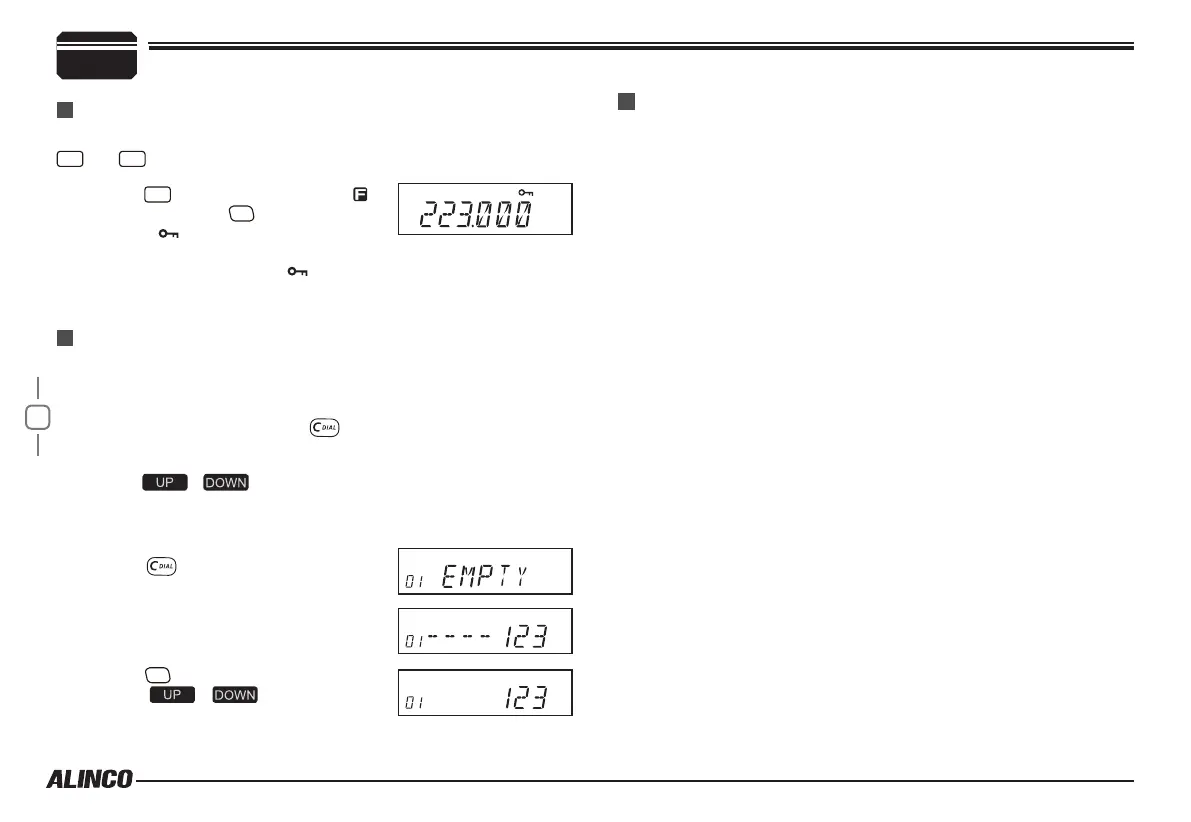
Press
FUNC
key until LCD displays
icon, then press
P3
key until LCD
displays icon.
Auto-dialer is to automatically transmit preprogrammed and stored DTMF
tone codes. Easier way is to use "
DTMF set
" menu in the PC utility
software.
To program codes manually, press key on your microphone. 2 digit
numbers and EMPTY or codes appear on the display.
5
To avoid unintentional operations, this function will lock all keys except
FUNC
and
PWR
.
KEYPAD LOCKOUT
Auto-Dialer Setup
2.
Repeat above operation, icon disappears, indicating keypad
lockout function is invalid.
1.
Press / key to choose group you wish to edit. Up to
16 Auto-dialer memories are available. The display scrolls when
the 7th digit is entered. The numbers 0-9, --, A-D, * and # can be
stored up to a total of 24 digit in a group.
2.
Press key to program the DTMF
codes you wish by using microphone's
keypads.
3.
After editing, press [PTT]
key to send
programmed codes.
4.
Press
P4
to store the codes and exit,
or use / keys to continue
programming.
KEY OPERATIONS
This transceiver has 4 optional Alarm modes that can only be set using
programming software. Press pre-programmed key to display "
ALARM
"
to operate. Repeat above operation or turn off the transceiver to cancel
the alarm.
Emergency Alarm


 To Next Page