23
Following operatins are available using keypads on the EMS-74
microphone.
Keypad Lock
SLIDE the switch to lock position, The lamp is turned off and all keys
are locked except PTT.
Transmitting DTMF By Microphone KeyPAD
Switches between VFO and MEMORY mode
FREQUENCY STEP
Optional signaling
In standby, press , then press to add
optional signaling, repeat above operation to
set DTMF, 2TONE or 5TONE signaling.
Slide DTMF key to DTMF position, press and hold the [PTT] key,
transmitting the desired DTMF signaling by the numeric key directly.
Function Setup By Microphone Keypad
Squelch off
:In standby, press key, the
squelch is disabled when icon ashed
in LCD, Press again to enable squelch
and the icon disappears.
8
Microphone Operation
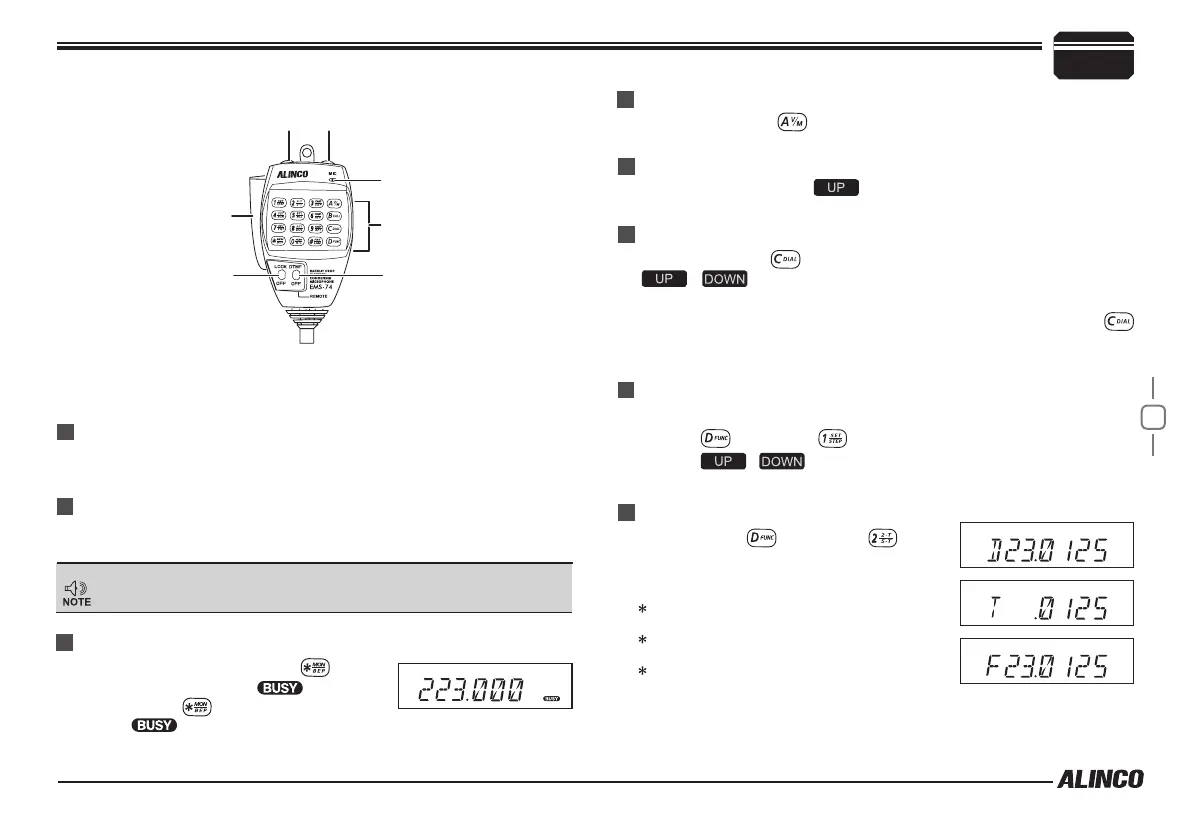
PTT
DOWN
UP
Lock Switch
MIC
Numeric Keys
DTMF ON/OFF
Only in VFO mode, this function is valid.
1. Press , then press , LCD displays "
STP--10
".
2. Press / to select the desired frequency channel step.
3. Press any numeric keys to save and exit.
The keypad operation is suspended in DTMF position.
The transmitting tone doesn't sound from the mic or your radio.
D: DTMF
T: 2-tone
F: 5-tone
Short Calling
In standby, press key to switch between memory mode and
Frequency mode (VFO).
Press and hold [PTT] + [UP] to transmit Optional signal.
See P15 "RECEIVING DTMF, DTMF ANI, 2TONE OR 5TONE SIGNALING".
Press PTT switch and key to transmit the selected DTMF/
2TONE /5TONE in current channel.
Transmitting DTMF Code
In standby, press , LCD displays DTMF data and group. Press [
/ ] key to select the desired transmitting DTMF group,
then Press PTT to transmit.
If no DTMF data in current group, LCD displays "EMPTY", press
key again and input desired DTMF code by keypad, press PTT to
transmit and store DTMF data.


 To Next Page