17
Signaling Combination setup
This function is to improve the level of protecting the radio against
receiving irrelative signal.
1.
Press and hold
FUNC
key for over 2 seconds to enter setting menu.
2.
Press
P3
/
P4
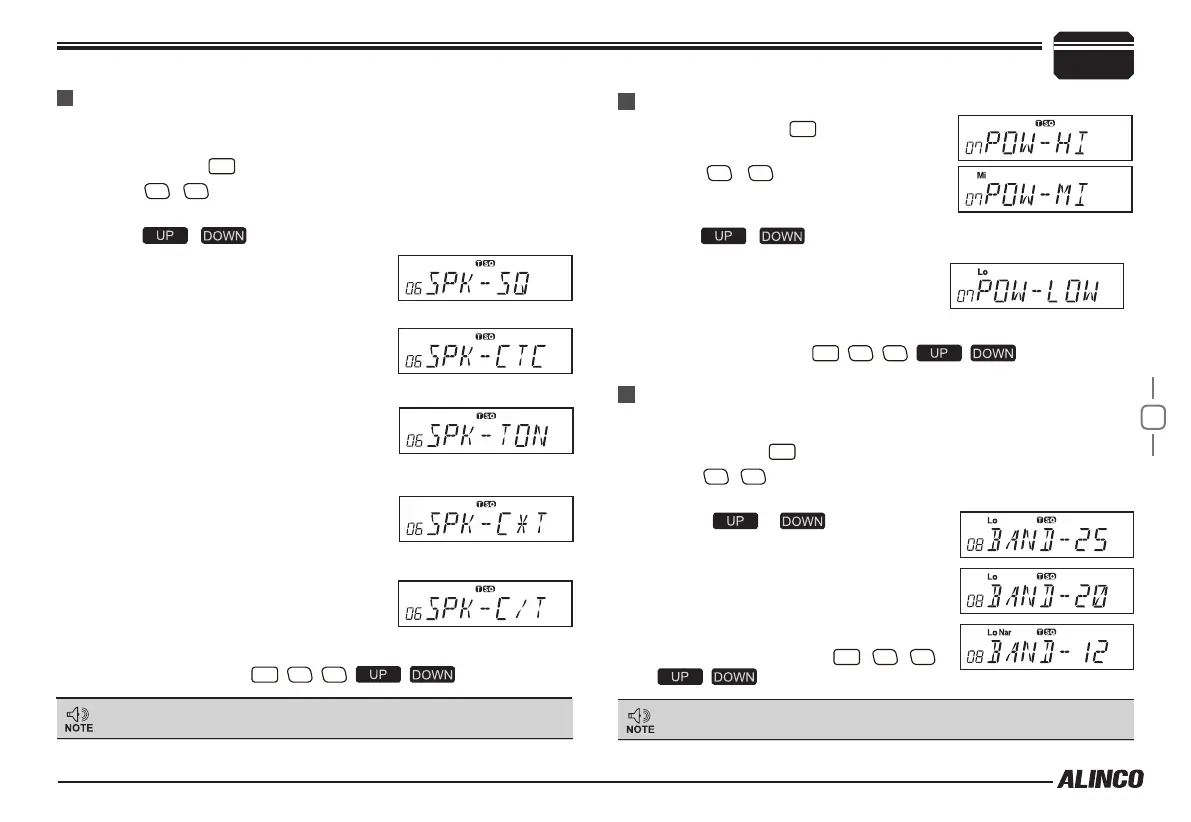
key to choose No.06 menu, LCD displays "
SPK--
SQ
".
3.
Press / to select the desired combination.
If select "
SQ
", it indicates you can hear
the calling from caller when receive a
matching carrier.
7
If LCD displays "CTC", it indicates
you can hear the calling from caller
when receive a matching carrier and
CTCSS/DCS signaling .
If LCD displays "TON", it indicates
you can hear the calling from caller
when receive a matching carrier and
DTMF/2TONE/5TONE signaling .
If LCD displays "C/T", it indicates
you can hear the calling from caller
when receive a matching carrier and
CTCSS/DCS and DTMF/2TONE/5TONE signaling.
If LCD displays "C/T", it indicates you
can hear the calling from caller when
receive a matching carrier and either
CTCSS/DCS DTMF/2TONE/5TONE signaling.
4.
Press any key except
PWR
,
P3
,
P4
, , key to exit.
HIGH/MID/LOW Power Selection
1.
Press and hold
FUNC
key for over 2
seconds to enter setting menu.
2.
Press
P3
/
P4
key to choose No.07
menu, LCD displays "
POW--HI
".
Band-width Selection
Select suitable bandwidth in accordance with your local band-plans.
1.
Press and hold
FUNC
key for over 2 seconds to enter setting menu.
2.
Press
P3
/
P4
key to choose No.08 menu, LCD displays "
BAND--
25
".
3.
Press / to select the
desired setting.
25:Band width is 25KHz(Wide band)
20:Band width is 20KHz(Middle band)
12:Band width is 12.5KHz(Narrow band)
4.
Press any key except
PWR
,
P3
,
P4
,
, key to exit.
This function is available only for pre-programmed units with
Tone-signals and CTCSS/DCS selective calling.
"25" is hardly used in amateur radio. Be sure to select 20 or 12
to avoid interferring stations nearby. Default setting is 20.
3.
Press / to select the desired setting.
HI: High TX Power (50W)
MI: Middle TX Power (20W)
LOW: Low TX Power (10W)
4.
Press any key except
PWR
,
P3
,
P4
, , key to exit.
FUNCTION MENU SETUP


 To Next Page