126 Rockwell Automation Publication 1734-UM013C-EN-P - August 2010
Chapter 8 Considerations When Replacing POINT Guard I/O Modules
If the project is configured for ‘Configure Always’, follow the appropriate steps to
replace a POINT Guard I/O module based on your scenario.
1. Remove the old I/O module and install the new module.
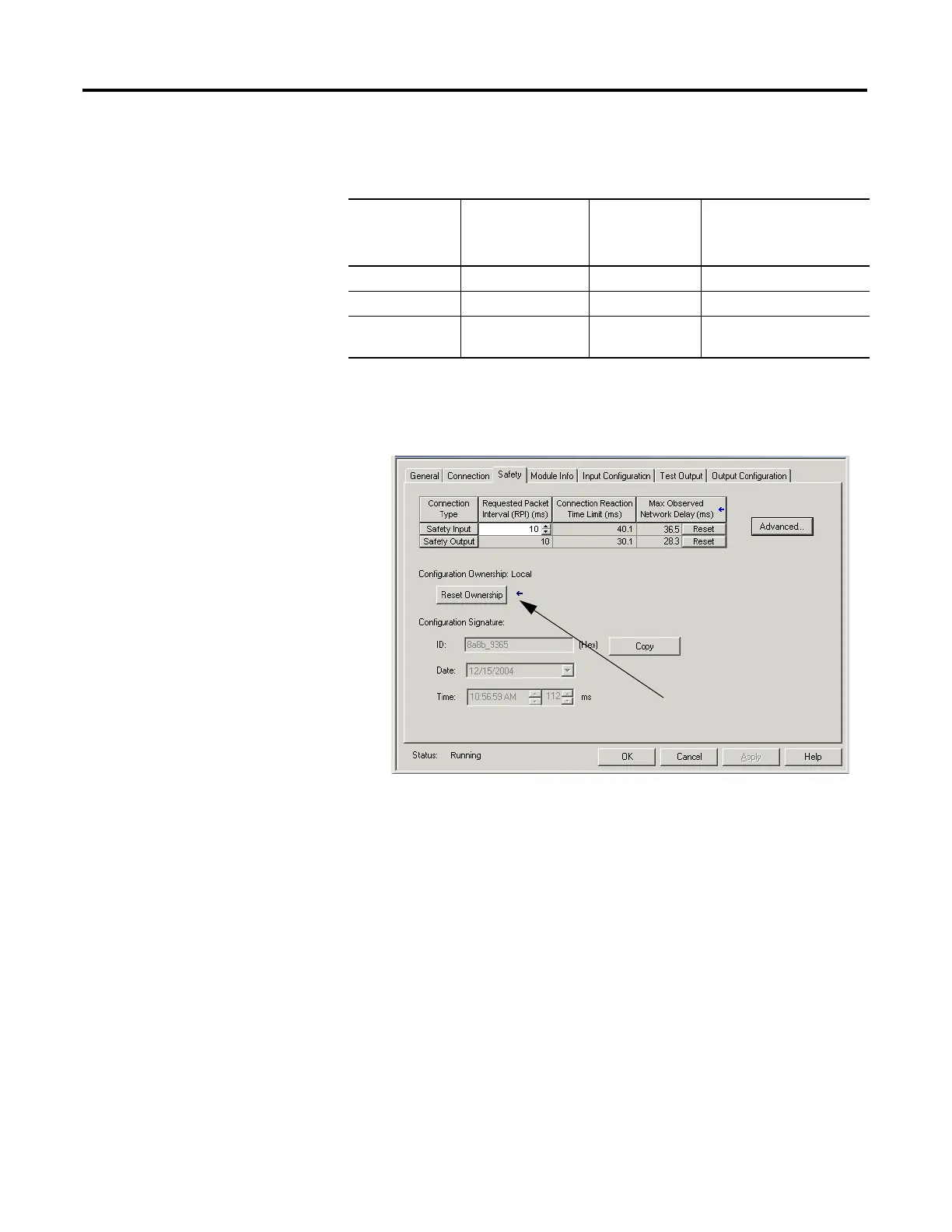
2. Right-click your POINT Guard I/O module and choose Properties.
3. Click the Safety tab.
4. Click Reset Ownership.
5. Click OK.
6. Follow your company-prescribed procedures to functionally test the
replaced I/O module and system and to authorize the system for use.
GuardLogix/
RSLogix 5000
Safety Signature
Exists
Replacement
Module SNN
Fault Action Required
Yes or No Out-of-box None None.
Yes or No Same as original None None.
Yes or No Different from original SNN mismatch Click Reset Ownership.
Follow the steps below.


 To Next Page
 Loading...