Allworx Phone Model 9224 User Guide
+1 866 ALLWORX * +1 585 421 3850 Page 7
www.allworx.com
Version: L Revised: October 11, 2018
Chapter 3 Overview
The Allworx Server Administrator pre-configures the phone for either PBX (Private Branch Exchange) or
Key System mode of operation. This affects the functionality of each PFK on the phone.
The phone LCD screen backlight turns off after 2 minutes of inactivity. To turn it on, lift the handset off
the hook or press a button.
In addition to English, the Allworx phone supports Canadian French and Castilian Spanish on the
phone display. Contact the Allworx Server Administrator to configure the phone to display the
preferred language; users cannot change the phone display language within the phone configuration
menu. After making the change, the preferred language displays during the phone reboot.
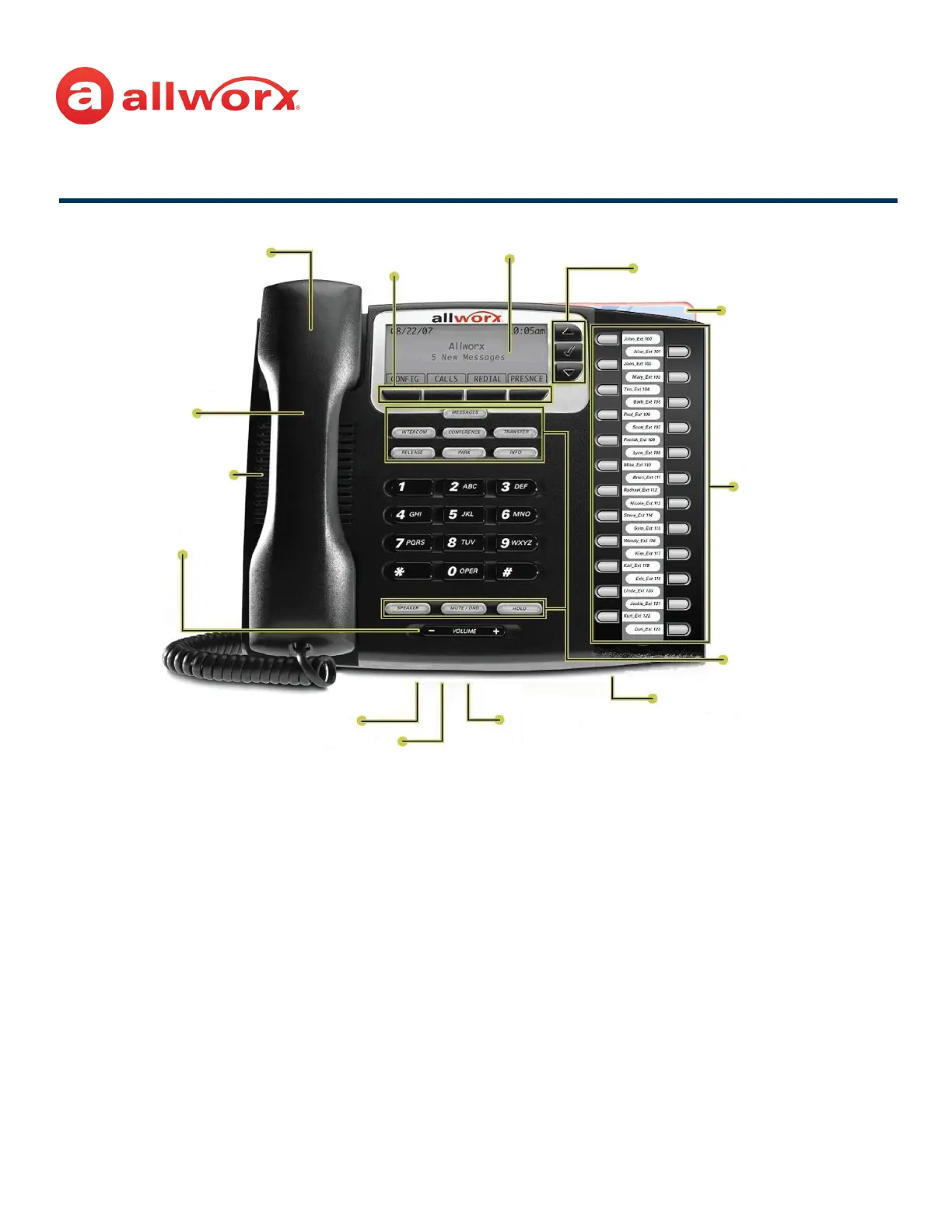
Scroll and Select keys
Visual ring
indicator
24
Programmable
Function Keys
(PFKs)
Backlit graphical LCD screen
Four soft keys
Higher audio
fidelity
Handset with cord
expandable up to
nine feet
Full-duplex
speakerphone
Volume
control
Two 10/100 switched Ethernet ports
Headset jack
Ten function
buttons
Multiple position tilt
base (also wall
mountable)
Power:
• 802.3af PoE
• 24V DC adapter



 To Next Page