10
Subject to change without notice | 83030100dUK | ait-deutschland GmbH
Example 3:
Lowering the flow temperature (mixing circuit) in cool-
ing mode
Flow temperature, mixing circuit, cooling = 18 °C
Underfloor heating
Current room temperature = 24 °C
Target room temperature = 22 °C
Influencing factor RT: 50 %
Calculation: (22 °C - 24 °C)
x
50 % = -1 K
⇒ Check < 2 K ⇒ YES ⇒ Cooling flow temperature
adjustment ⇒ 17 °C
● if minimum cooling ow temperature 17 °C
allowed ⇒ YES
● if not, no adjustment
9 Operation
9.1 Basics
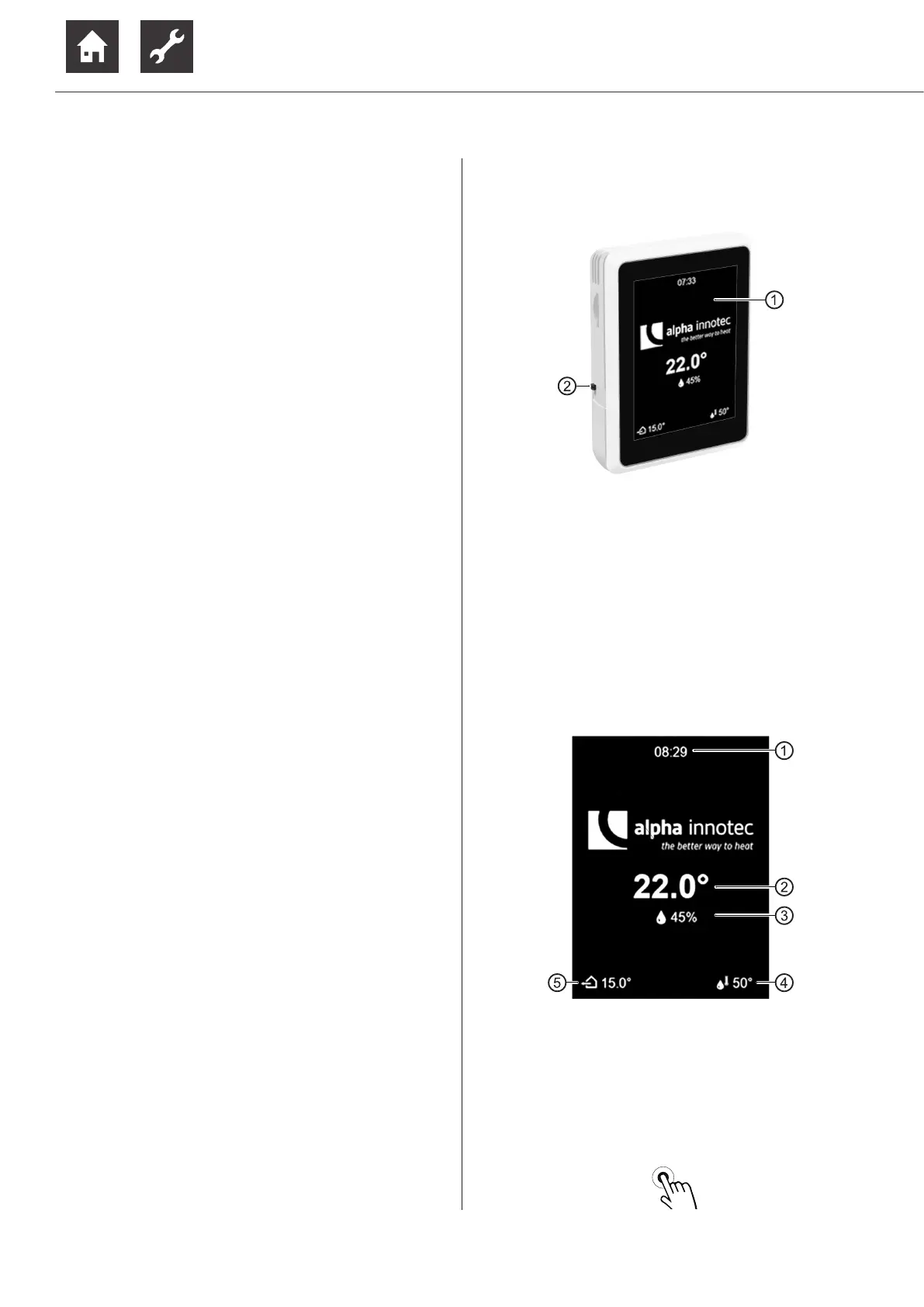
1 Touch display
2 Operating switch (Top position = On)
9.1.1 Touch display
Operation informations and instructions appear on the
touch display. Modes of operation and settings can be
selected and made.
Standby screen
If the touch display is not touched for 5 minutes, the
standby screen appears. After another 15 minutes, the
brightness of the display is dimmed.
1 Current time
2 Current room temperature
3 Current room humidity
4 Current domestic hot water temperature
5 Current outdoor temperature
► End the standby mode by lightly touching the
touch display with your finger.


 To Next Page