14
Subject to change without notice | 83030100dUK | ait-deutschland GmbH
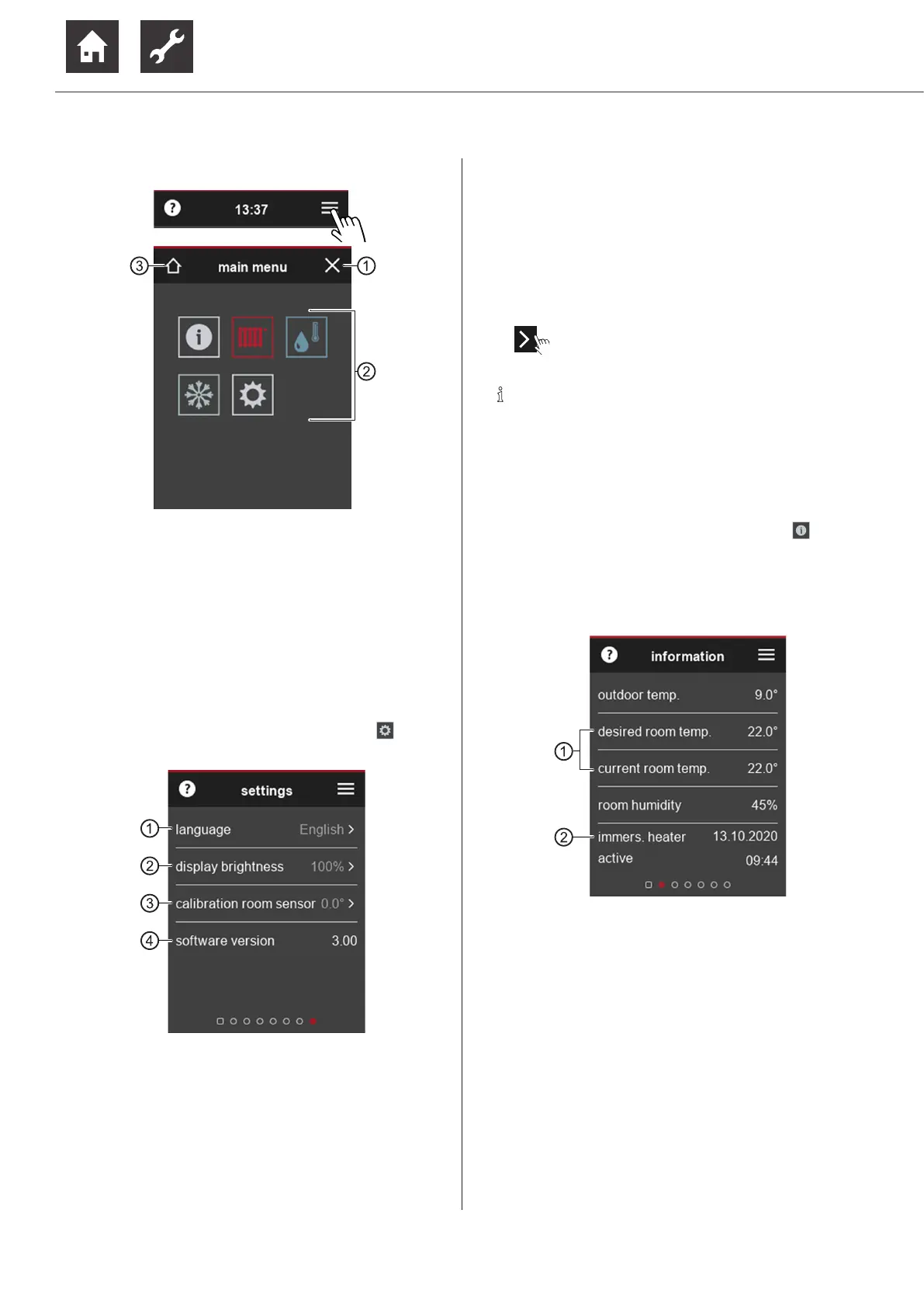
9.2.3 Fast navigation
1 Close main menu
2 Symbols of the available function pages
The visibility of symbols depends on the programme
areas set up in the heating and heat pump controller.
3 to Start screen
► Touch the symbol of the desired function page.
9.2.4 Settings of the room control unit
► Wipe right in the start screen or select in the
main menu.
1 Display language of the room control unit
When it is started up for the first time the room
control unit is set to the language set in the
heating and heat pump controller at that time.
If a different language is later set on the control
unit of the heating and heat pump controller,
this language is not automatically adopted by
the room control unit.
2 Display brightness of the touch display
3 If the measured value of the integrated room
temperature sensor differs from the measured
values of other temperature measuring devices
in the room, the value can be adjusted by man-
ually setting a temperature deviation to these
measured values.
4 Version of the room control unit software
► ⇒ Scroll and save changes.
NOTE
Settings made on this function page have
no effect on settings of the heating and heat
pump controller.
9.2.5 Infomations
► Wipe left in the start screen or select in the
main menu.
The information page provides basic informations in
tabular form. Changing of settings / values is not pos-
sible on this function page.
1 “desired room temp.” (= target room
temperature) and “current room temp.”
(= current room temperature”) are only
displayed if influencing factor RT > 0 %.
If influencing factor RT = 0 %, “desired return
temp.” (= return setpoint temperature) and
“Return temp.” (= current return temperature)
are displayed.
“7.1 Influencing factor RT”, page 8
2 The time information (date, time) for the last
activation of an existing immersion heater (=
electric heating element) only appears in con-
junction with a software version of the heating
and heat pump controller ≥ V3.86.


 To Next Page