13
Subject to change without notice | 83030100dUK | ait-deutschland GmbH
9.2 Function pages
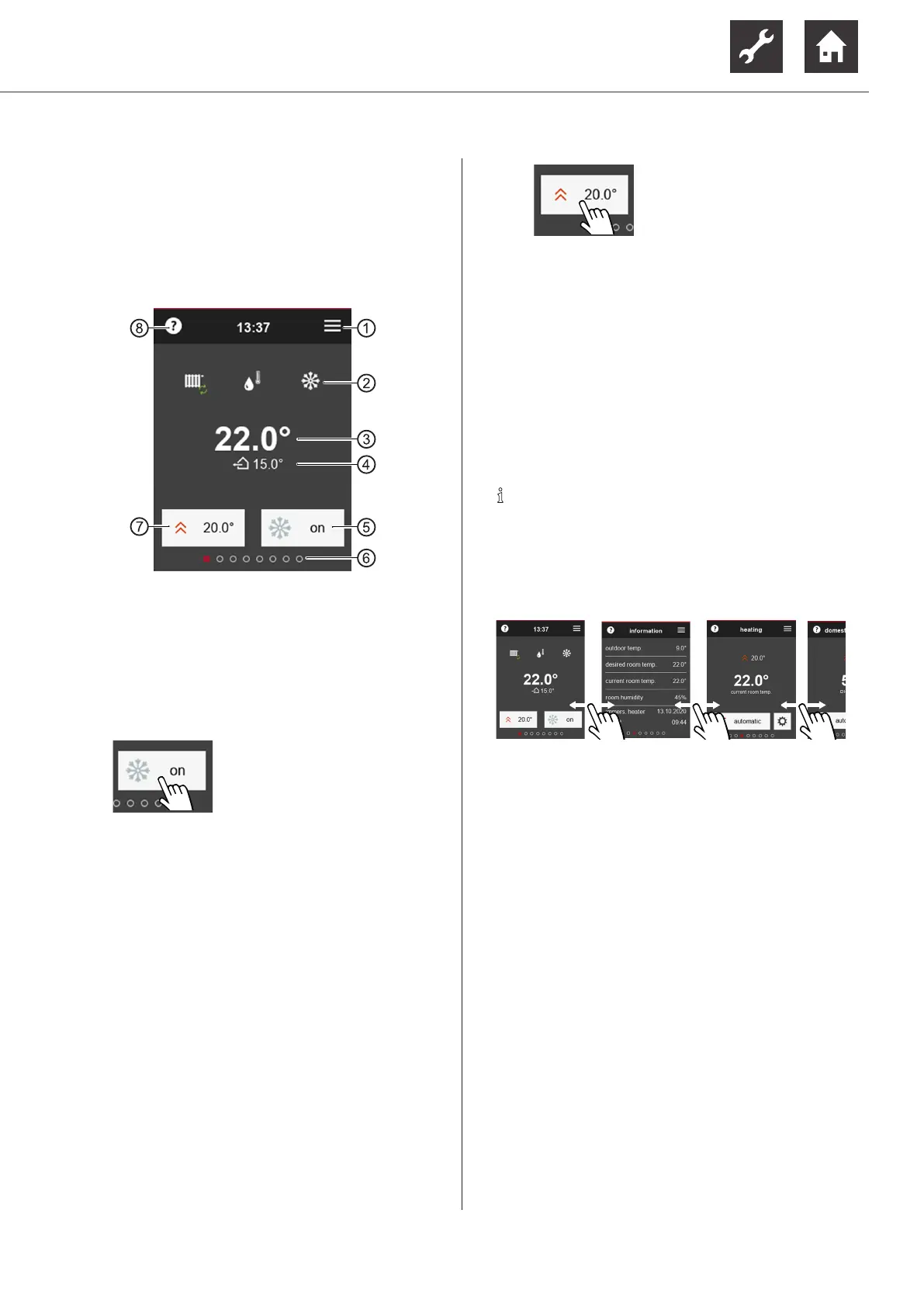
9.2.1 Start screen
The start screen displays information on the current
status of the program areas set up in the heating and
heat pump controller. In addition, some settings can
be made here in a simple manner.
1 to the main menu
2 program areas set up in the heating and heat
pump controller
3 current room temperature
4 current outdoor temperature
5 manual release / blocking of cooling function
(only displayed for heat pumps with passive or
active cooling function)
on = cooling function released
the heat pump cools as soon as
the criteria for cooling release
set in the heating and heat pump
controller are met
off = cooling function blocked
The heat pump generally does
not switch over to cooling mode,
even if the criteria for cooling re-
lease set in the heating and heat
pump controller should be met
6 Number of available function pages (currently
accessed page is highlighted)
7 Room setpoint temperature that is currently set
for control including the room temperature
“7.1 Influencing factor RT”, page 8
If “Infl. factor RT = 0 %” is set (pure outdoor
temperature-dependent control), the heating
curve stored in the heating and heat pump
controller can be adjusted here by a maximum
of +/- 5 K (parallel offset of the heating curve)
Change room setpoint tem-
perature
or
Parallel offset of the heating
curve
8 to help text
IMPORTANT
The thermostats of the underfloor heating or the ra-
diators can hinder the value that was set under ⑦
from being reached.
► Completely open the thermostat valves (except in
rooms where a lower temperature is required – for
example in bedrooms).
NOTE
Before changing the room setpoint tempera-
ture again, wait at least 24 hours so that the
temperatures can stabilise.
9.2.2 Scroll to pages
or use the Fast navigation ( “9.2.3 Fast naviga-
tion”, page 14).


 To Next Page