15
Subject to change without notice | 83030100dUK | ait-deutschland GmbH
9.2.6 Function page “Heating”
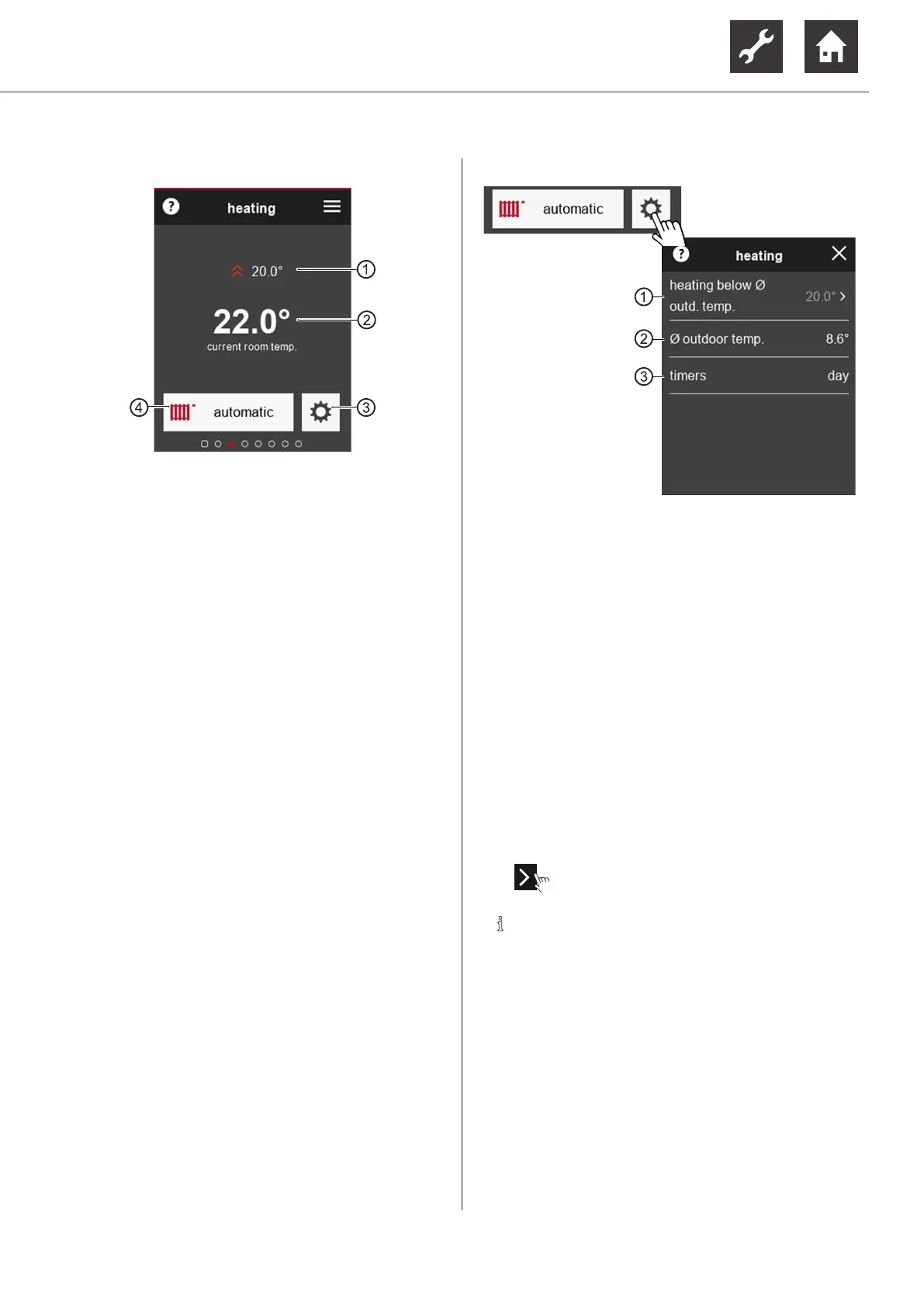
1 Currently set target room temperature
This menu item only appears if the room
temperature is taken into account
“7.1 Influencing factor RT”, page 8
Changing target room temperature
“9.2.1 Start screen”, page 13, ⑦
2 Current room temperature
3 to the settings and information page “Heating”
4 Symbol of the programme area and mode of
operation that is set
Changing the mode of operation
“9.1.3 Making settings”, page 11, variant 2
Settings and information page “Heating”
1 currently set heating limit
(is only displayed if the “heating limit” function
is activated in the heating and heat pump con-
troller)
If the temperature falls below the set temper-
ature, the heat pump switches to the mode of
operation “Heating”
2 average outdoor temperature
The average outdoor temperature is made up of
the outdoor temperature curve over the past 24
hours and forms the reference variable for the
heating and heat pump controller, in order to
active / deactivate the mode of operation “Heat-
ing”
3 current mode of the time programs
(day-time or night-time mode)
► Set the time programs on the control unit of
the heating and heat pump controller.
► ⇒ Scroll and save changes.
NOTE
High temperatures reduce the efficiency of
the system and increase running costs.


 To Next Page