12
Subject to change without notice | 83030100dUK | ait-deutschland GmbH
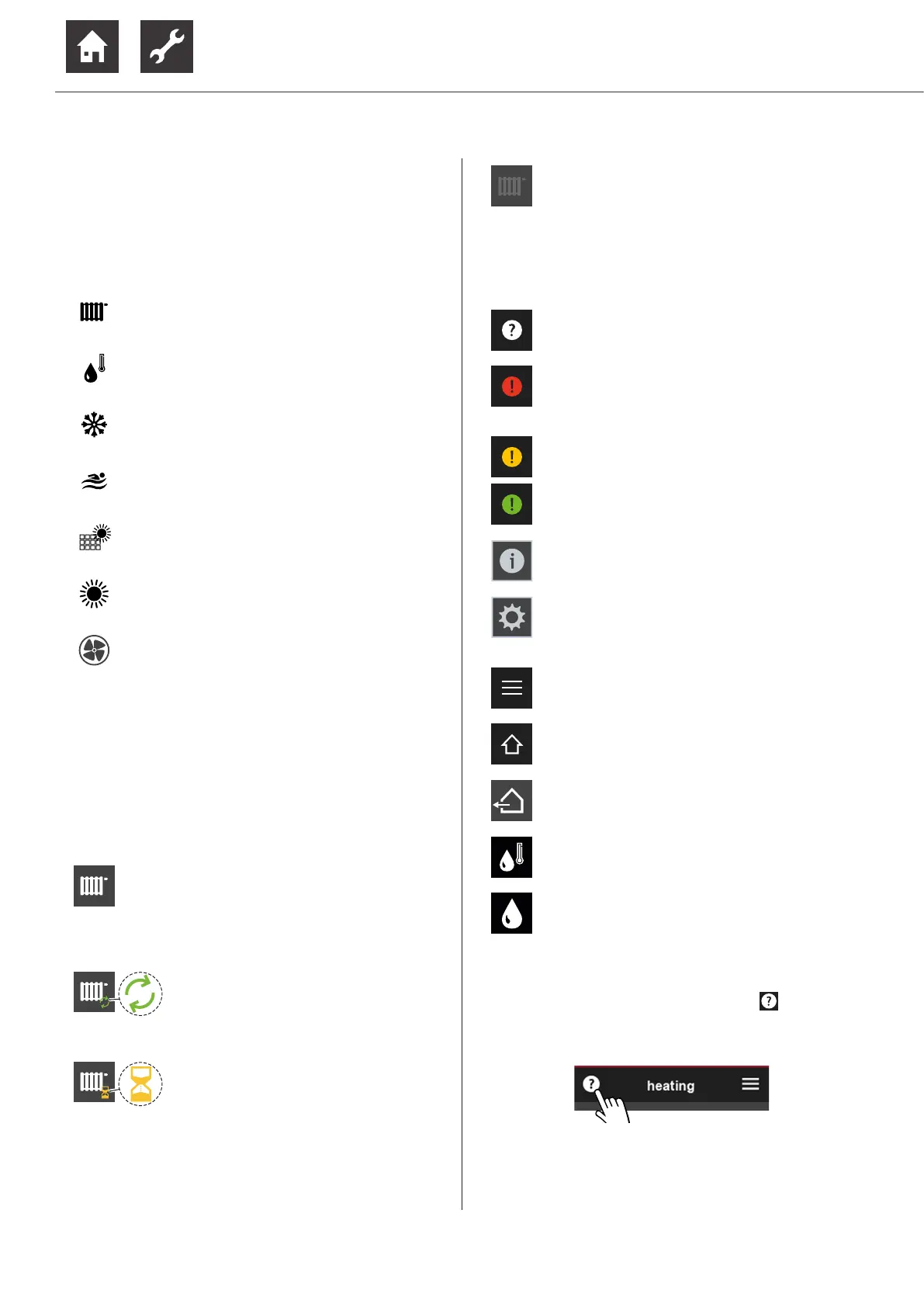
9.1.4 Symbols
Program areas
Depending on the program areas set up in the heating
and heat pump controller, the following symbols may
appear:
Heating
Domestic hot water
Cooling
Swimming pool heating *)
Photovoltaics *)
Solar heating *)
Ventilation *)
*)
“Hardware requirements for some pro-
gramme areas”, page 5
Mode of operations
The appearance of a program area symbol indicates
the respective operating status of this program area.
Example “Heating”:
normal
brightness
Mode of operation active, however
there is no query at this time
(Symbol of the program area ap-
pears in normal brightness without
additional symbols)
additional symbol
green arrows
There is a query and it is currently
operated by the heat pump.
Here: Heat pump is currently run-
ning in heating mode
additional symbol
yellow sand
glass
There is a query, however it cannot
be met because a request with a
higher priority (e.g. preparation of
domestic hot water) from the heat
pump is being serviced.
reduced
brightness
Operating mode = switched off
manually
(Symbol of the program area ap-
pears in dimmed brightness)
Further symbols
Help
“9.1.5 Help“, page 12
Red symbol:
Permanent operation error
“11.4 Operating error“, page 21
Yellow or green symbol:
Temporary interruption of operation
“11.3 Operating interruption“, page 21
Information page
“9.2.5 Infomations“, page 14
Settings “Room control unit”
“9.2.4 Settings of the room control unit“,
page 14
Main menu
“9.2.3 Fast navigation“, page 14
Start screen
“9.2.1 Start screen“, page 13
current outdoor temperature
current domestic hot water temperature
current humidity
9.1.5 Help
For pages with a help text, the symbol appears in
the upper left corner.
► Display help text


 To Next Page