11
Subject to change without notice | 83030100dUK | ait-deutschland GmbH
9.1.2 Navigation
Gestures
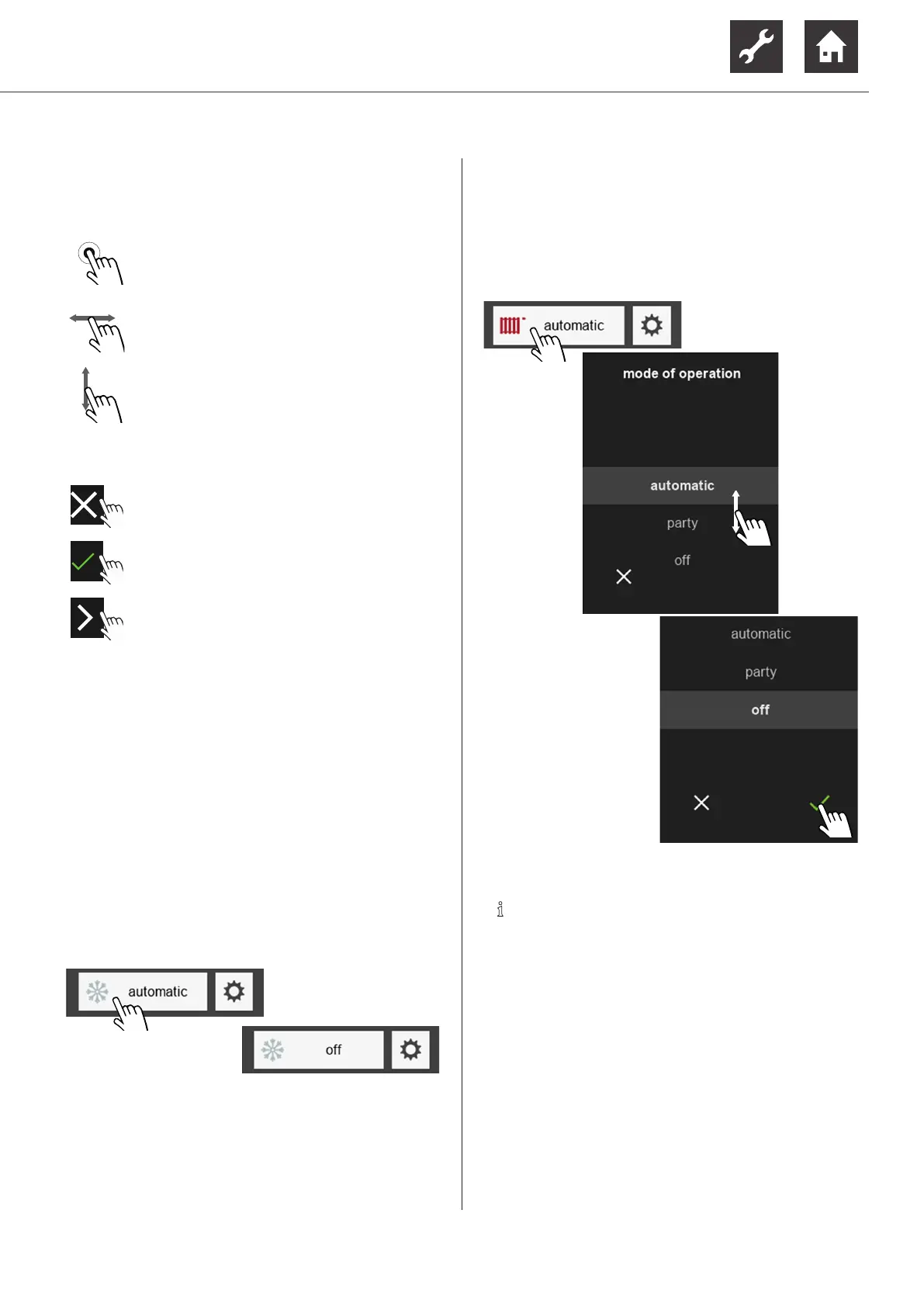
Select
Lightly tap the touch display with your finger
Browse
Lightly tap the touch display and wipe your
finger left or right
Scroll
Lightly tap the touch display and wipe your
finger up or down
Actions
Close page / view or
cancel changes
Confirm / save changes
Navigate to the subordinate page
9.1.3 Making settings
Description of the respective setting options
Operating manuals of the heating and heat pump
controller and of the respective additional board (if
installed)
Variant 1: Setting without the selection wheel
► In case of a setting that only offers the alternative
between 2 options, these options can be switched
by touching.
Example: Switching the mode of operation for “Cool-
ing”
Variant 2: Setting with the selection wheel
If there are more than 2 options for a setting, a selec-
tion wheel appears in the display.
► Scroll vertically until the required option is shown,
then confirm.
Example: Changing the mode of operation for “Heating”
AANWIJZING
There are modes of operation (e.g. the mode
of operation “holidays”) that can only be set
directly on the control part of the heating and
heat pump controller.
These kinds of modes of operation are not
available as options in the selection wheel.


 To Next Page