%5HY
Dry contact functions are not programmable through the LCD. Use the RS-232 GUI or the HyperTerminal instead.
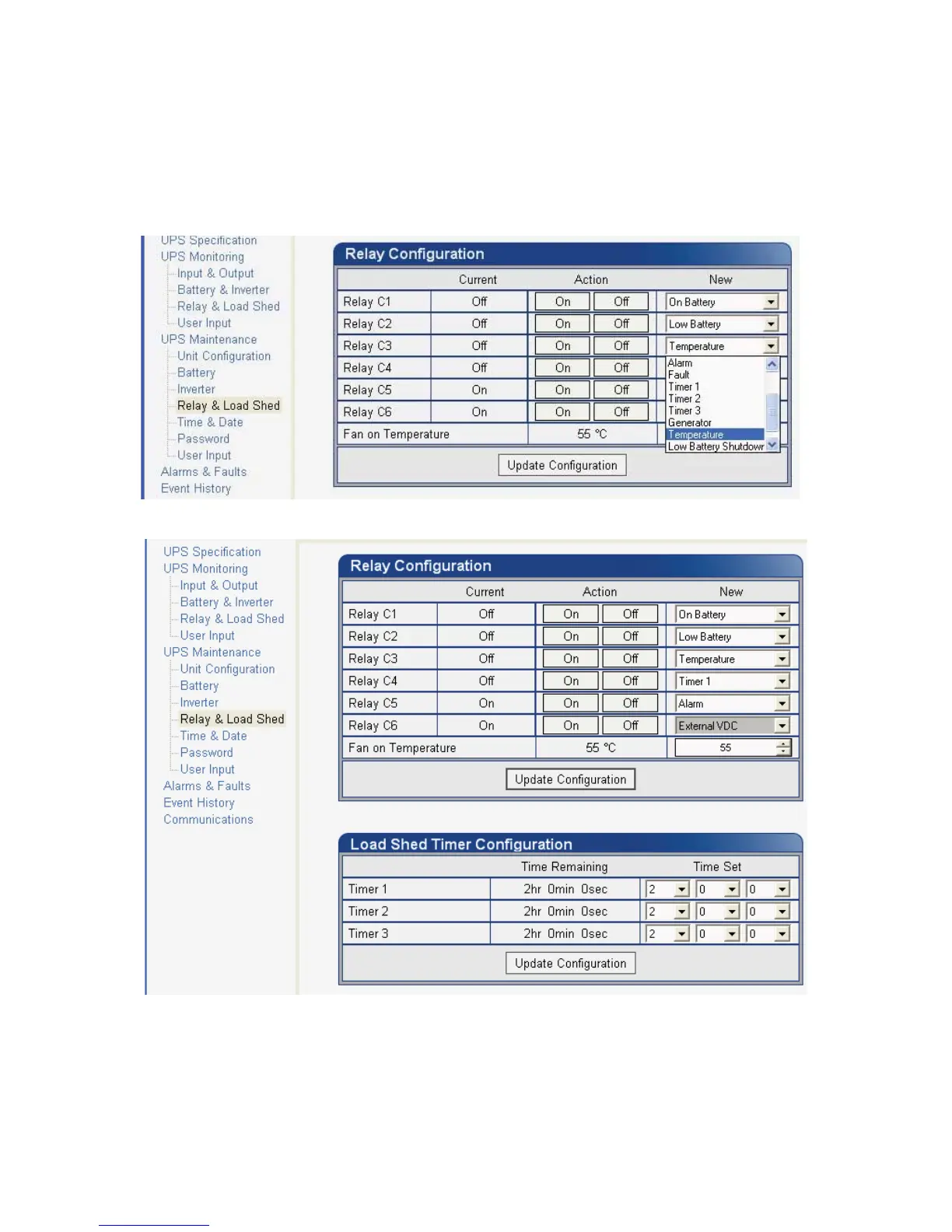
2. RS-232 GUI – Figure 26a shows the Relay Configuration window under the UPS Maintenance > Relay &
Load Shed screen. As an example, to assign C1 as the Temperature trigger, select Temperature from the
drop down menu. Click Update Configuration and the current status will update momentarily. In the example
shown below, the fan on temperature threshold is set at 55°C. To change this value, simply type the new
value into the Fan On Temperature box (or use the up/down arrow keys) and click Update Configuration to
update the current status display.
)LJXUH ² 7HPSHUDWXUHWULJJHUIXQFWLRQYLD$OSKD8360RQLWRU
a. Assigning the Temperature trigger function to a dry contact.
b. Setting the Temperature trigger value.



 To Next Page