%5HY
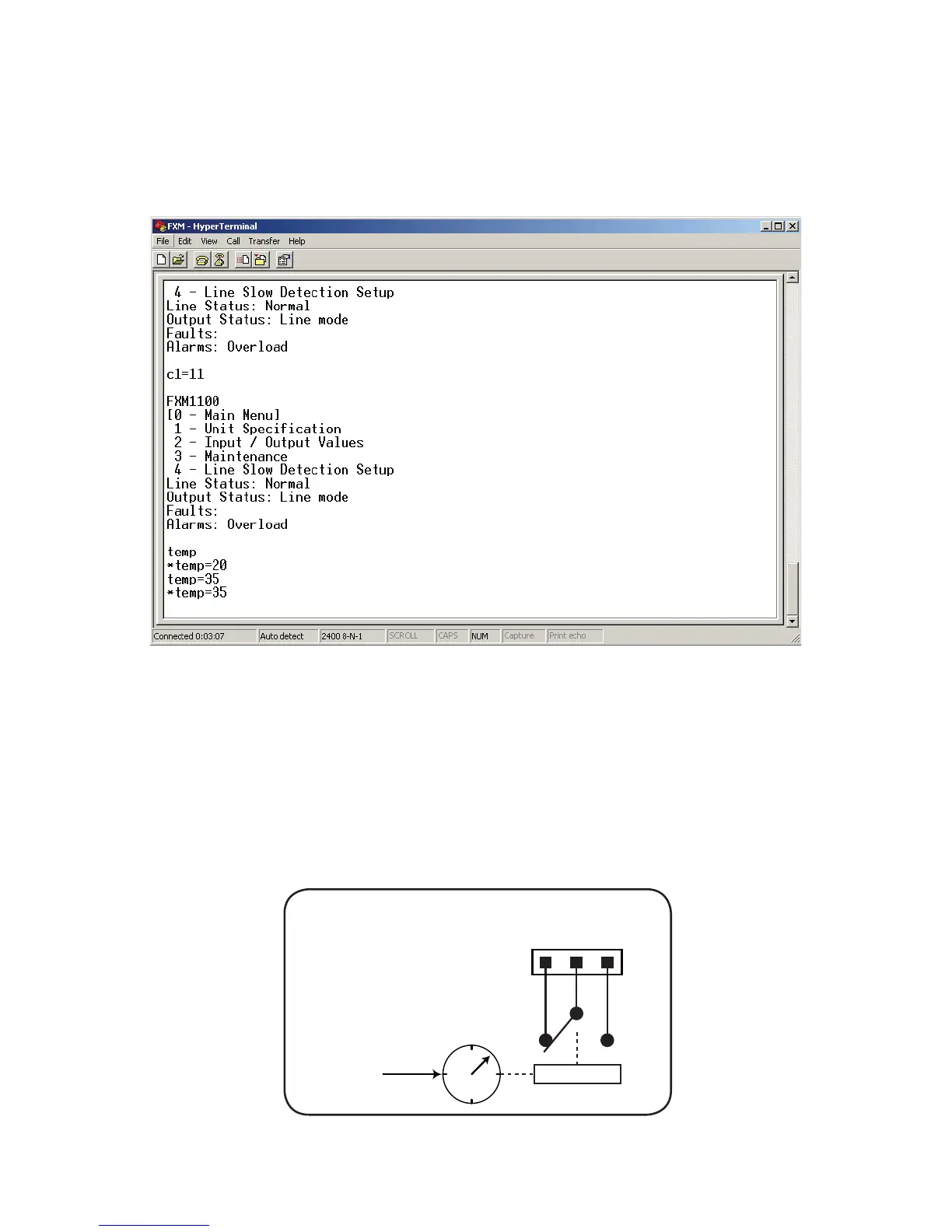
3. RS-232 HyperTerminal – the Temperature trigger function can be assigned to any available dry contacts as
described in "Programming the Dry Contacts" (e.g. c1=11, where 11 is the assigned index for the Temperature
trigger function.)
After establishing an RS-232 connection with the Alpha FXM at the HyperTerminal screen prompt, type Temp
and press Enter to display the current temperature setting (Alpha FXM returns *temp=20). To change the
value to +35°C, type temp=35 and press Enter. The Alpha FXM returns *temp=35 as confirmation.
)LJXUH ² 7HPSHUDWXUHWULJJHUIXQFWLRQYLD+\SHU7HUPLQDO
Programmable Dry Contact Time of Day Action
You can assign a dedicated timer to a dry contact. Upon entering the Inverter operating mode, the timer is acti-
vated and begins to count down from a user defined value. When the timer reaches zero, the programmed dry
contact relay will be activated (Status = ON).
n
,QYHUWHU
PRGH
HQWHUHG
p
'U\FRQWDFW
DFWLYDWHVZKHQWLPHU
FRXQWVGRZQWR]HUR
o
7LPHU
VWDUWVWR
FRXQWGRZQ
0LFURSURFHVVRU
)LJXUH ² 3URJUDPPDEOH7LPHU2SHUDWLRQ



 To Next Page