%5HY
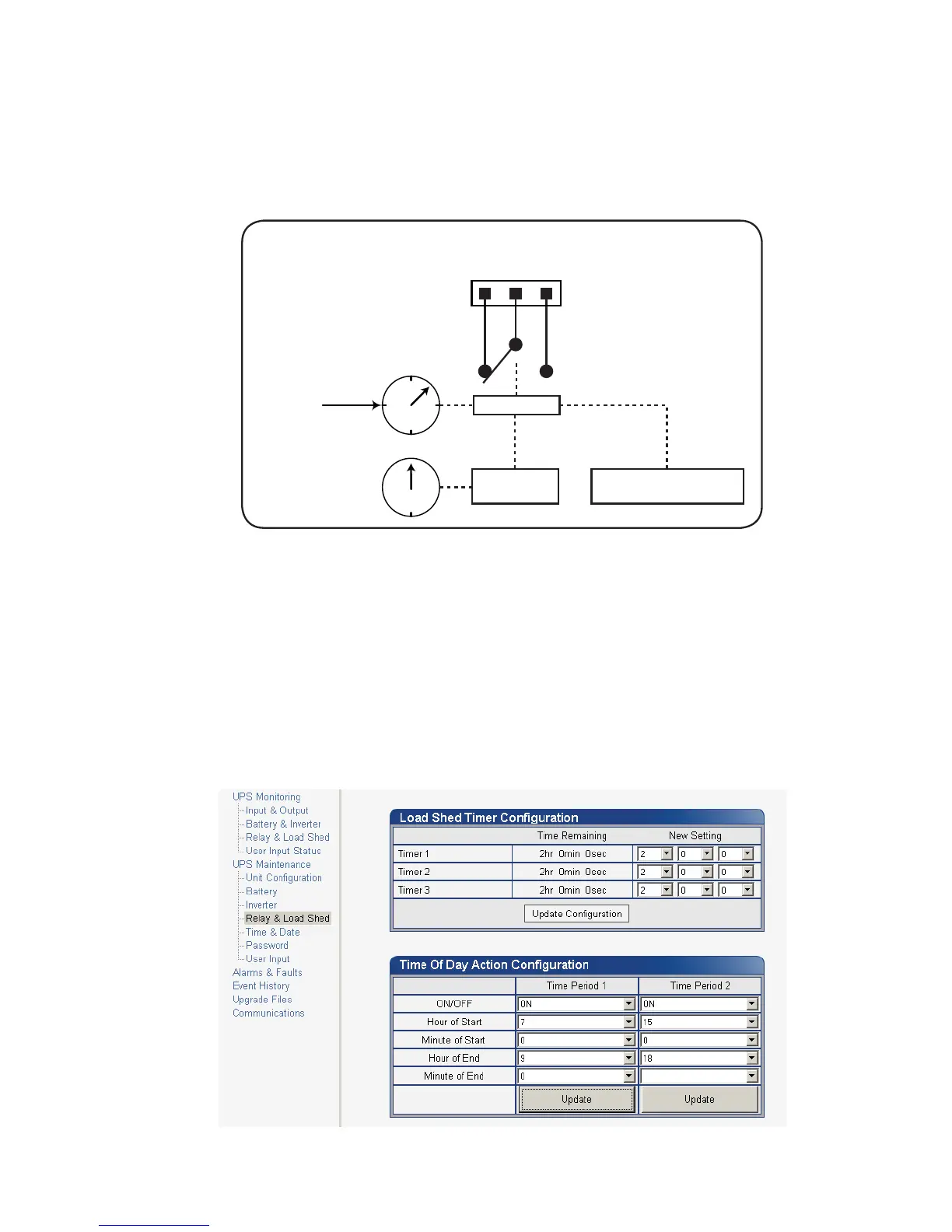
A typical application of this timer controlled dry contact function is to control a traffic light. When the grid power
fails, the Alpha FXM goes into the Inverter mode and continues supplying backup power to the traffic light. Since
the batteries supplying the backup power have limited capacity, a timer controlled dry contact is usually config-
ured to switch the traffic light into the flashing amber or flashing red mode after a user-defined period to conserve
battery power. This setup works fine during non rush hour traffic, but during rush hour, it may be more desirable
to keep the traffic light running normally for as long as backup power is available. To address this issue, a new
feature called the Time of Day Action has been added to deactivate the timer during a user defined time period
up to twice each day.
n
,QYHUWHU
PRGH
HQWHUHG
p
'U\FRQWDFWDFWLYDWHV
ZKHQHQDEOHGWLPHU
FRXQWVGRZQWR]HUR
o
7LPHUVWDUWVWR
FRXQWGRZQ
LIHQDEOHG
0LFURSURFHVVRU
5HDOWLPHFORFN
3HDNSHULRG
VHWWLQJV
'LVDEOH7LPHU$FWLRQ 21RU
(QDEOH7LPHU$FWLRQ 2))
)LJXUH ² 7LPH2I'D\$FWLRQ2SHUDWLRQ
You can define up to 2 peak time periods of the day:
1. Go to the UPS Maintenance > Relay & Load Shed screen.
2. In the Time of Day Action Configuration dialogue box, set up the start and end time of the first rush hour
under Time Period 1 and the second rush hour under Time Period 2. In this example, during the first time
period (7 AM to 9 AM), all 3 timers are disabled (they do not count down at all). Similarly, all timers are
disabled during the second time period (3 PM to 6 PM).
3. Select ON under each time period. Click the Update button under each time period to store the settings.
Confirm your settings in the UPS Monitoring > Relay & Load Shed > Time of Day Action Status screen.
)LJXUH ² 7LPH2I'D\&RQILJXUDWLRQ



 To Next Page