46
DJM-V10
1
2 3 4
A
B
C
D
E
F
1
2 3 4
5.7 CONNECTION CHECK WITH EACH INTERFACE
[1. USB B connector]
Whether communication between the PC connected via the USB B connector and this unit is properly performed or not can
be confirmed on the PC.
Note: The driver software must be installed beforehand.
[2. USB A connector]
Check that communication between this unit and the external device
connected via the USB A connector is properly performed.
Note: A USB memory device is required for checking.
Light on : The indicator lights when the driver is recognized after connection with the PC is established.
Flashing :
If the driver cannot be recognized after PC connection, the indicator flashes (Intervals: 500 ms [light on: 250 ms/light off: 250 ms]).
Light off : When communication between the PC and the unit is interrupted, the indicator light off.
" For checking, use the USB connection indicator of the unit.
1 Start the unit in Test mode.
2 Open "DEVICE" in “MODE 11: DEVICE CHECK.”
3 The IP Add and Subnet are indicated.
4 Check if the LAN is properly connected.
" Check the LAN conditions, using Test mode of this unit:
Light on : The USB memory device was properly recognized.
Flashing : The unit is in the process of recognizing the connected
USB memory device.
(Flashing intervals: 500 ms [light on: 250 ms, light off: 250 ms])
Light off : No USB memory device is plugged in.
" For checking, use the USB connection indicator of the unit.
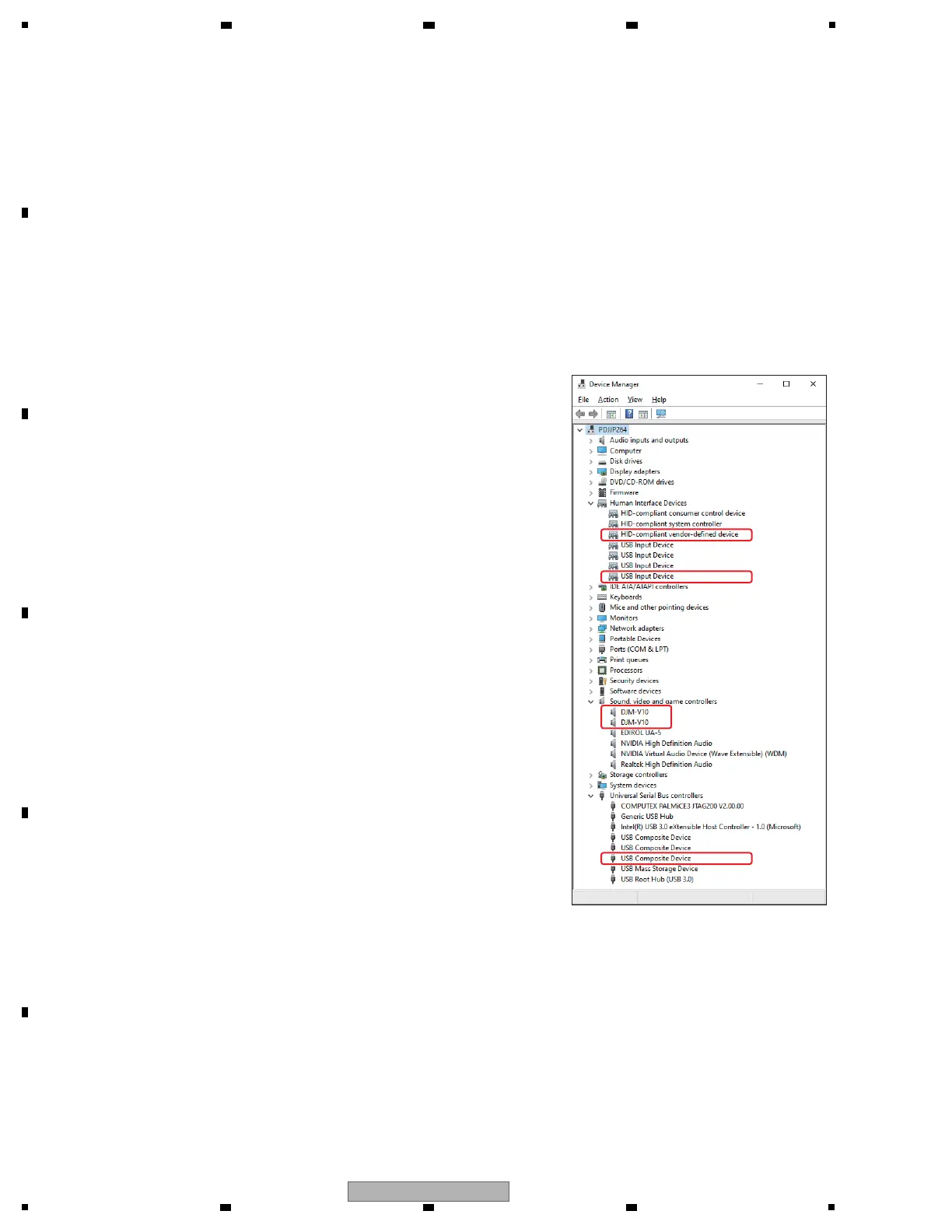
If the PC and this unit are properly connected, the components of this unit are added in Device Manager (under Hardware)
as devices. If all components are properly displayed, the PC and this unit are properly communicating via the USB connector.
In a case of Windows 10:
Input with "Device Manager" in the search box of the task bar.
Devices to be added:
" Universal Serial Bus controllers
USB Composite Device
" Under “Sound, video and game controllers”
DJM-V10
DJM-V10
" Human Interface Device
HID-compliant vender-defined device
USB Input Device
A communication check may be easily performed if connection is
made with Device Manager displayed on the PC screen.
" Use Device Manager for checking.
When the LAN is properly connected:
IP Add: xxx . xxx . xxx . xxx
Subnet: yyy . yyy . yyy . yyy
The above x’s and y’s mean any numeric digits 0–9.
Four blocks of numerical string delimited by dots
When the LAN is not properly connected:
IP Add: EE . EE . EE . EE
Subnet: EE . EE . EE . EE
All four blocks are filled with “EE.”
You can check from this unit if the mixer can properly communicate via LAN.
*Use a Category 5 cable or a cable with higher specifications for connection.
Either a straight or cross LAN cable can be used when the unit is directly
connected with the PC, but when the unit is connected with the PC via a hub,
be sure to use a straight cable.
g



 To Next Page