6. SERVICE MODE
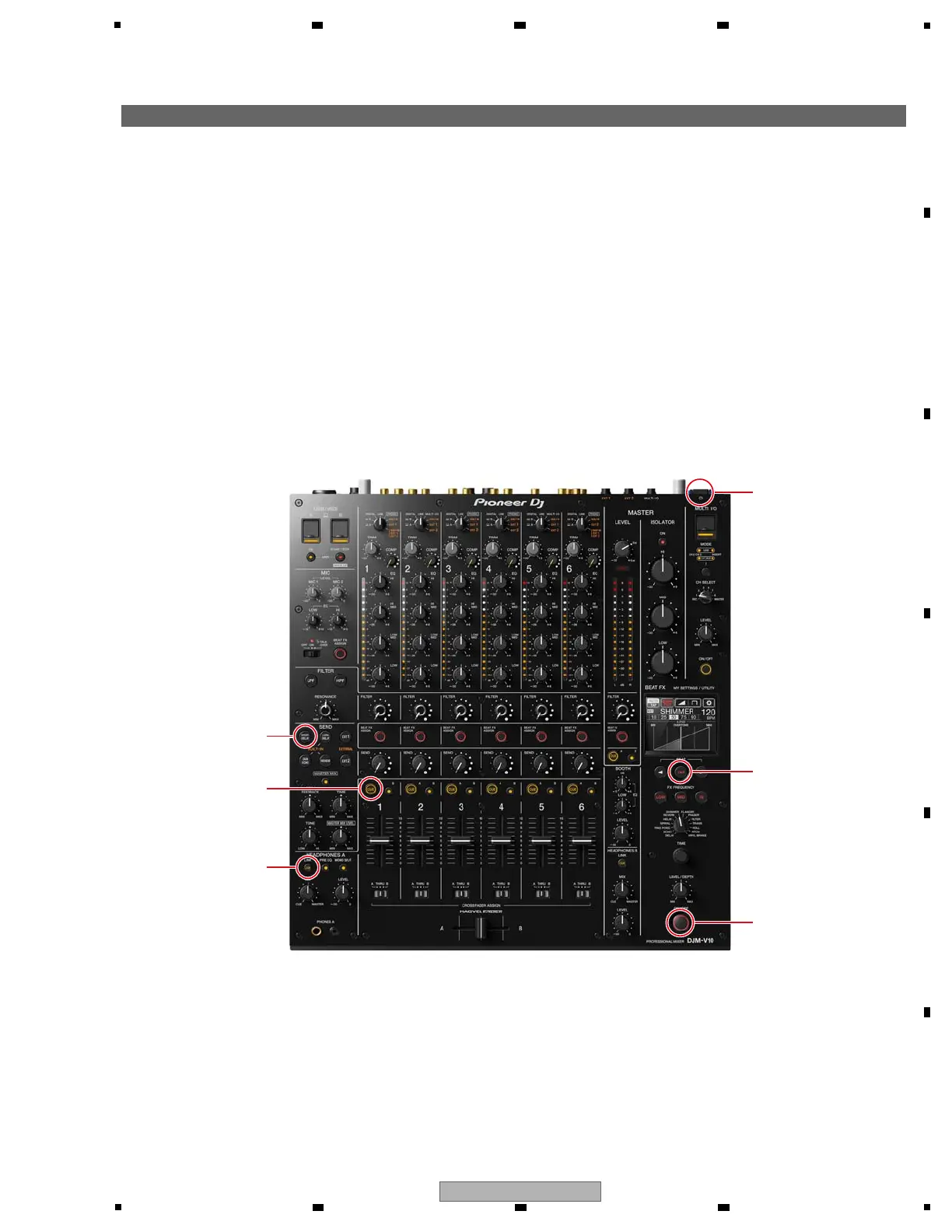
While holding the LINK CUE, CH1 CUE and SEND (SHORT DELAY) buttons pressed, press the u button to turn the unit on.
(Be sure to hold the u button pressed until the unit starts up.)
Start up the unit in Mode 1 of Test mode.
To exit from Test mode; press the u button to turn the unit off.
g How to Enter/Exit Test Mode
The Following seven test modes are provided for this unit:
1 Mode 1 : Firmware version checking mode
2 Mode 2 : Crossfader setting mode
3 Mode 3 : All-LED lights-off mode
4 Mode 4 : All-LED lights-on mode
5 Mode 5 : KEY checking mode
6 Mode 6 : SW checking mode
7 Mode 7 : VOL checking mode
8 Mode 8 : Fader checking mode
8 Mode 9 : LCD checking mode
0 Mode 10 : Touch panel checking & calibration mode
! Mode 11 : Device checking mode
@ Mode 12 : Level meter LED checking mode
# Mode 13 : VOL A/D checking mode
$ Mode 14 : Fader A/D checking mode
Others : Standby checking mode
Others : Checker mode
Others : Factory Reset



 To Next Page