AlphaVision ML User manual Rev. 2.60 – 01-01-2015 15
Proximity Reader
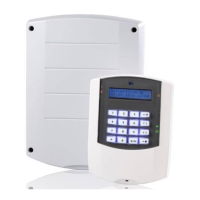
The AlphaVision ML control panel with LCD/Proximity keypad can be expanded with an external proximity
reader. The external proximity reader can be mounted outside, allowing arming and disarming with a
proximity key from outside the premises. The external proximity reader can also be used for a simple form
of access control. Proximity keys enrolled on the LCD/Proximity keypad will automatically be recognized by
the external proximity reader.
►! When an external proximity reader is used, the system MUST have at least one LCD/Proximity
keypad
Arming and disarming with a tag on an external proximity reader
Arming and disarming the system with a proximity tag on an external proximity reader only works with level
4 user (tag) codes. When the tag is presented to the reader, the section(s) programmed to this tag will arm
or disarm. If an electric door strike is also connected to the proximity reader the door strike will be
activated for 3 seconds.
The external proximity reader has a bi-color LED, which provides information about the system when
arming or disarming. The following indications can be given:
LED lights continuously RED
LED flashes red (approx. 3 sec.) then returns to idle state
LED flashes green (approx. 3 sec.) then returns to idle state
LED turns green (approx. 3 sec.) then returns to idle state
LED slowly flashes red (approx. 5 sec.) then returns to idle state
Cannot arm (e.g. open zones)
Communication error proximity
reader
Access control with a proximity tag on an external proximity reader
The external proximity reader can be used for simple access control of employees and family members. The
proximity reader has an output which is activated for three seconds when a valid tag is presented. This
output can be used to activate an electric door opener. For access control the following criteria applies:
Proximity tags programmed with authorization level 1 will activate the output of the proximity reader, but
only when the section(s) programmed to this tag are disarmed. Use this option only for simple access
control to allow users to enter the building or house, but not allowed to arm or disarm the system. Level 1
codes or tags cannot arm or disarm sections from the keypad.
Proximity tags programmed with authorization level 4 will arm or disarm the section(s) that are
programmed to this tag. Also the output of the proximity reader will be activated to activate the electric
door strike.
When a proximity tag with authorization level 3, 5 or 7 is presented, the system will first check which
section(s) are armed. As the same time the system checks if the proximity tag that is presented is
authorized for the section(s) that are armed. If the tag is authorized for the section(s) that are armed the
output will be activated and access is granted. The user must now present the proximity tags to the
LCD/PROX keypad inside to disarm the system.


 To Next Page