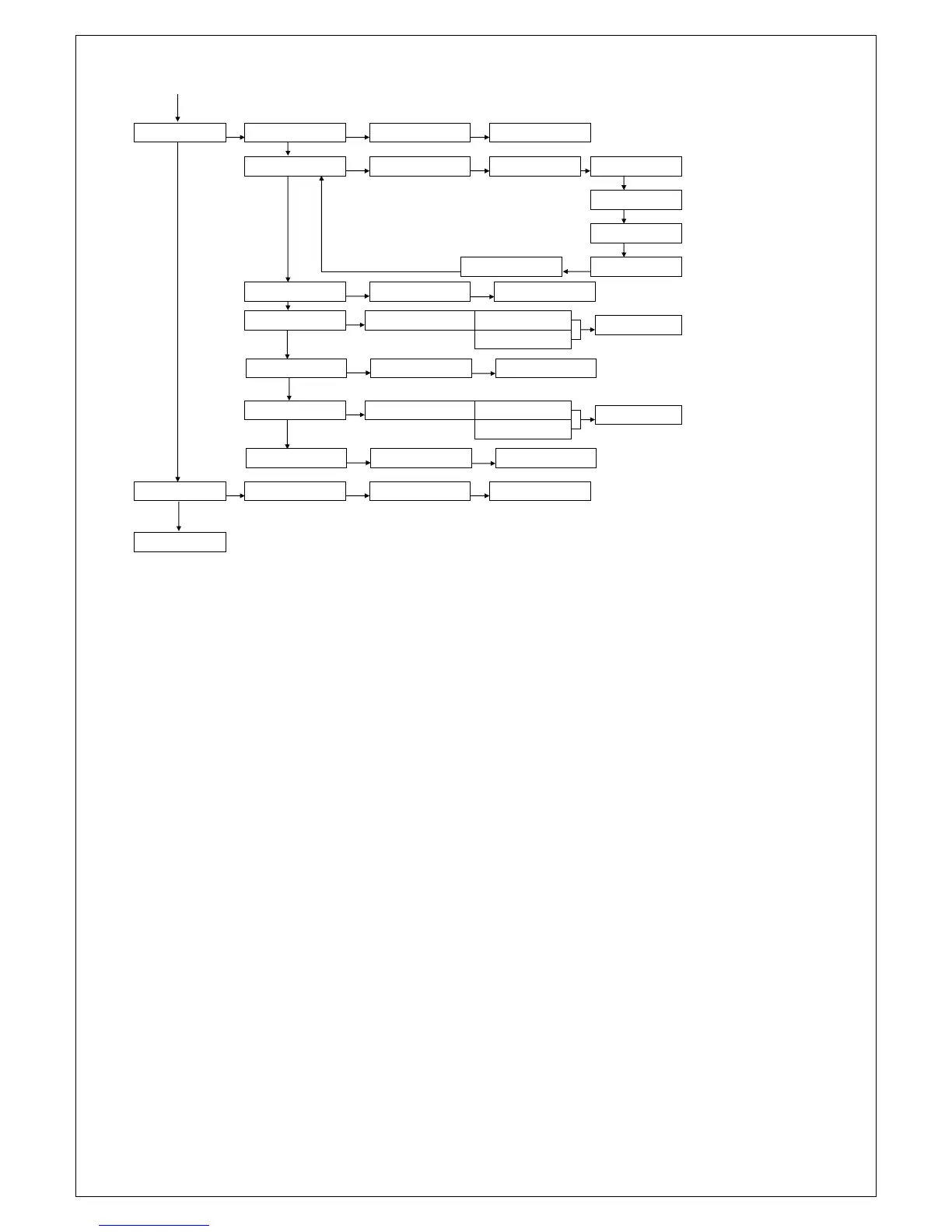
MAINTENANCE
OK
WALKTEST ZONES
OK
START WALKTEST
OK
VIEW WALKTEST
PREVIOUS MENU
TEST LED & LCD
OK
ALL LEDS ON
OK
ALL LEDS OFF LCD LINE 2 ON
LCD LINE 2 OFF
OK
OK
LCD LINE 1 ON
LCD LINE 1 OFF
OK
OK
OK
TEST KEYS
IP CONNECTION
OK
CONNECT VIA IP
OK
IP CONNECTING…
ACCESS INSTALL. INSTALLER: NO ACCESS
ACCESS
STORED
OK
OK
SEND TESTREPORT
OK
SEND TESTREPORT:
OK
TESTREPORT SENT…
ACCESS VIA APP ACCESS VIA APP: NO ACCESS
ACCESS
STORED
OK
APP KEY
OK
APP KEY:
OK
STORED
BYPASS
OK
ZONE xx
OK
BYPASS <OK>
OK
BYPASSED
Date and Time
In the Date and Time menu the following options can be changed:
Adjust time
Adjust date
To change the time setting, select the “Adjust Time” option and press <#/OK>. Enter the new time; the time
is displayed as hh:mm in a 24h notation. Press <#/OK> to confirm the new time.
To change the date, select the “Adjust Date” option and press <#/OK>. Enter the new date; the date is
displayed as dd-mm-yyyy. Enter the correct date and press <#/OK> to confirm the new date.
From firmware version 3.20 a NTP timeserver option was added in which the time and date is automatically
synchronized via an Internet time server. Using the programming option Date / Time NTP can be
determined whether the NTP time server function is active or not. The address of the NTP server is available
from your internet provider and is often published on their website, ask you installer to enter the correct
NTP server address.
Time switch
From firmware version 3.20 a time switch function has been added to the Alpha Vision ML to automatically
arm/disarm the system at pre-programmed times. The time switch function can be programmed in the user
menu and is accessible for all users codes level 5 and higher. An arming and disarming time can be
programmed for each day of the week including the section(s) that must be armed/disarmed.
In order to alert users that an automatic arming will take place the time switch function is equipped with a
pre-arming signal. The pre-arming signal is heard through the loudspeaker ( LS output) and in practice it will
usually be heard a few minutes before the actual automatic arming takes place. When programming the
switching on and off the alarm time is also programmed.


 To Next Page