AlphaVision ML User manual Rev. 2.60 – 01-01-2015 4
INTRODUCTION
Purpose of this manual
The purpose of this manual is to introduce the user to the AlphaVision ML burglary alarm system. The
manual explains about controlling and dealing with the control panel. Several of the special options
explained in this manual can only be executed by the main user.
By taking into account several guidelines, your system will function properly for a very long time:
Never panic when the alarm sounds. Simply disarm the system with your PIN code, proximity tag or wireless
keyfob transmitter and view the information shown on the LCD display.
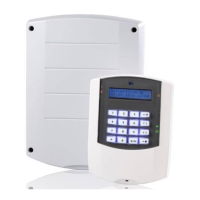
The control panel is equipped with a keypad with LCD display, section LED’s and status LED’s. THE LCD and
LED’s provide information about the system’s status. If the information on the display is not clear, consult
your user manual first.
Never give your PIN-code, proximity tag or keyfob transmitter to another user, this might lead to unpleasant
situations.
In case of a malfunction, first consult your user manual. When the malfunction persists, then immediately
contact your installation company. The installation company will give you further instructions.
Write down important events (false alarm, user errors, etc.) in a logbook, together with the zone number,
date and time. Your installation company might be able to take additional steps to prevent the situation
from occurring in the future.
The AlphaVision ML control panel has been designed and is tested according to all current regulations on
stability, reliability and insensitivity from external electrical influences.
General Guidelines
The AlphaVision ML control panel can be used for detecting and reporting burglary, fire, hold up, tamper
and social alarms. The control panel can be armed and disarmed using a PIN-code or with Proximity tag. If
your AlphaVision ML has been equipped with the optional wireless receiver, up to eight wireless keyfob
transmitters can be used for arming and disarming. The LCD or LCD/Proximity keypad has numerical keys
and navigator keys. The navigator keys are used to arm and disarm the system and to navigate through the
programming menu’s. The various status LED’s and the integrated LCD display give the user information on
the system status.
The heart of your security system is a sophisticated electronic device placed in a metal casing, which has
been professionally installed by your installer. This device is called the “control panel”. On this control
panel the detectors, the sirens and flashlights, the telephone line and the power line is connected.
A detector is also known as a “sensor”. A detector is a device that is designed to detect a certain
phenomenon. There are for instance, detectors that detect smoke. When such a detector detects smoke, it
will report this to the control panel. There are also detectors that detect motion. When these detectors
‘see’ motion, they will report this to the control panel. For windows and doors, usually magnetic contacts
are used. These magnetic contacts are used to signal whether a door or window is open or closed.
When the control panel receives an alarm, it will take further actions. This can be for instance triggering the
alarm sirens or flashlights or initiate a call to a central station or private (mobile) telephone number.
The detectors are connected to the “inputs” of the control panel, so that the control panel knows which
detector triggered an alarm. These “inputs” are also called “zones”.


 To Next Page