AlphaVision ML User manual Rev. 2.60 – 01-01-2015 6
Mobile application: a mobile application (APP) is available to arm and disarm the alarm system using a
smartphone. Ask your installer for the availability and capabilities of the mobile application.
►! The use of a mobile application (APP) is not permitted in certified installations.
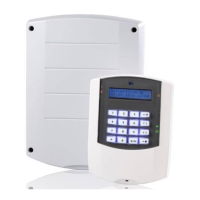
Both to the left and to the right side of the LCD display, status LED’s can be found.
LED’s 1 to 8 on the left side of the display indicate which sections are armed or disarmed. When all LED’s are
off, the system is disarmed. When one or more LED’s are on, those specific sections are armed. Not all
situations will require 8 separate sections. When the system is armed Partial or Total with the navigator
keys, this is also shown by the status LED’s on the right side of the LCD display. The meaning of all the status
LED’s is explained further in this manual.
Example of an installation with sections:
An installation in a house has 8 zones. Zones 1 to 6 are used for detectors on the first floor and are
programmed to section 1. Zones 7 and 8 are used on the second floor and are programmed to section 2.
When the users leave the house, both sections are armed so that all detectors are active. When the users
go to bed, they can use Partial arming for arming section 1. In this case only zones 1 to 6 on the first floor
are active and the users can walk freely on the second floor, without activating the alarm.
When the installer programs the detectors, he will assign a “zone type” to each zone, depending on which
detector is used and at what location it has been installed. The following zone types can be programmed:
A direct zone has no entry or exit delay and will, if the system is armed, cause an alarm as soon as the
detector is triggered.
A delayed zone has an entry and exit delay. The delay times can be programmed as desired. When the
system is armed and a delayed zone is triggered, the entry delay will start. During the entry delay time, the
system must be disarmed or an alarm will follow. The same occurs during the exit delay. When you arm the
system, the exit delay starts. Depending on the programming your installer has done, delayed zones must
be closed before arming the system. In some cases delayed zones may be open during arming, for instance
the front door can be open during arming.
A follower zone will respond as a direct or as a delayed zone, depending on whether the control panel’s
entry or exit delay is triggered or not. When the entry delay time is triggered, a follower zone will function
like a delayed zone (thus not causing a direct alarm when triggered). When the entry delay is not triggered,
the zone will function like a direct zone and cause an alarm as soon the zone is triggered. Your installer can
inform you which zones are programmed as follower zones.
A Follower delayed zone is equal to the regular follower zone, with the exception that the follower delayed
zone always functions as a delayed zone when the system is Partial armed. The system must be armed with
the Partial key. The installer will program the appropriate sections.
An Emergency Door zone is a zone type used for emergency doors. An emergency door zone is a 24-hour
loud zone type but will only activate the alarm outputs when the system is disarmed. When the system is
armed, this zone type will activate the alarm outputs and also report the alarm to the monitoring station.
A 24-hour zone is always triggered, regardless if the control panel is armed or not. This zone type can be
used for glass break detectors or emergency push buttons. The AlphaVision ML control panel has a 24H
silent and a 24H loud zone type. Only with the 24H loud zone type the siren and flashlight will be activated.
In both cases an alarm will be reported directly to the monitoring station or to the programmed private
telephone number.


 To Next Page