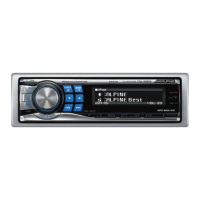
2 Turn the
Rotery
encoder
to select the Memory
mode, and then press
~/ENT.
Memory H Delete
3 Turn the
Rotery
encoder
to select the Song
Memory or Artist Memory, and then press
~
lENT.
4 Press and hold
~IESC
for at least 2 seconds to
return to normal mode.
•
If
you try
to
store when the memory area isfull, "Memory Full" is
displayed.
If
you want to replace a Song title
or
Artist name that's
already been saved in step
3,
tum
the Rotary encoder
to
select
"Replace YES", and then press
~IENT.
•
Ifno
operation is performedfor 10 seconds, the selling mode is
canceled.
Recalling
the
stored
information
(SIRIUS
only)
Whenever the stored sports team, song(s) or artist(s) are playing, an
interruption ALERT appears
in
the display
of
the unit.
1 Turn the
Rotery
encoder
to select the desired
Information.
2 Press
~
lENT.
•
If
no operation is performedfor 10 seconds, the unit returns to
normal mode.
• Only a single sports team, song or artist can be displayed as an
interruption ALERT.
For
example, both song
and
artist cannot be
displayed as an
ALERT
at the same time.
Canceling
the
stored
Alert
Memory
(SIRIUS
only)
1 During usual reception, press F/SETUP to activate
the MemorylDelete selection mode.
2 Turn the
Rotery
encoder
to select the Delete mode,
and then press
~IENT.
Memory H Delete H Memory
The Memory List appears after DELETE MODE has been
displayed.
3 Turn the
Rotery
encoder
to select a list you want
to delete, and then press
~/ENT.
4 Turn the
Rotery
encoder
to select Delete YES, and
then press
~
lENT.
Delete
NO
H Delete
YES
Select "Delete NO" the unit will return
to
the Memory List
display.
5 Press and hold
~IESC
for at least 2 seconds to
return to normal mode.
•
Ifno
operation is performedfor 10 seconds, the selling mode is
canceled.
24-EN
Search
Function
You
can search for programs
by
Category, Channel, Artist
or
Song.
1 Press
~
lENT In the XM or SIRIUS mode.
2 Turn the
Rotery
encoder
to select search mode,
and then press
~/ENT.
Category H Channel H Artist" H
Song"
H Category
" SIRIUS Only.
3 Turn the
Rotery
encoder
to select the desired
Category, and then press
~
lENT.
4 Turn the
Rotery
encoder
to select the desired
Channel Name, and then press
~IENT.
• While in Category Search mode, press
~/ESC
to
return
to
the
selecting search mode.
• The Search mode is canceled
if
you press
and
hold
~/ESC
for
at
least
2 seconds.
or
no operation
is
performed
for
10 seconds in
Category Search mode.
•
If
ALERT
interruption occurs
in
the search mode. the search mode
is
canceled.
3 Turn the
Rotery
encoder
to select the desired
ChanneVArtlstlSong Name, and then press
~IENT.
• While in Channel Search mode,
press.
or
~
to
select another
Category.
• While in Channel/Artist/Song Search mode. press
~IESC
to
return
to the selecting search mode.
• The Search mode
is
canceled ifyou press and hold
~/ESC
for
at
least
2 seconds.
or
no operation is performed
for
10 seconds
in
Channel/Artist/Song Search mode.
•
If
ALERT
interruption occurs
in
the search mode. the search mode is
canceled.
Quick
Search
Function
You
can search for all channels in numerical order.
1 Press and hold
~IENT
for at least 2 seconds In
XM
or SIRIUS mode to activate Quick Search mode.
2 Turn the
Rotery
encoder
to select the desired
Channel within 10 seconds.
The selected Channel is received.
2 Turn the
Rotery
encoder
to select the Memory
mode, and then press
~/ENT.
Memory H Delete
3 Turn the
Rotery
encoder
to select the Song
Memory or Artist Memory, and then press
~
lENT.
4 Press and hold
~IESC
for at least 2 seconds to
return to normal mode.
•
If
you try
to
store when the memory area isfull, "Memory Full" is
displayed.
If
you want to replace a Song title
or
Artist name that's
already been saved in step
3,
tum
the Rotary encoder
to
select
"Replace YES", and then press
~IENT.
•
Ifno
operation is performedfor 10 seconds, the selling mode is
canceled.
Recalling
the
stored
information
(SIRIUS
only)
Whenever the stored sports team, song(s) or artist(s) are playing, an
interruption ALERT appears
in
the display
of
the unit.
1 Turn the
Rotery
encoder
to select the desired
Information.
2 Press
~
lENT.
•
If
no operation is performedfor 10 seconds, the unit returns to
normal mode.
• Only a single sports team, song or artist can be displayed as an
interruption ALERT.
For
example, both song
and
artist cannot be
displayed as an
ALERT
at the same time.
Canceling
the
stored
Alert
Memory
(SIRIUS
only)
1 During usual reception, press F/SETUP to activate
the MemorylDelete selection mode.
2 Turn the
Rotery
encoder
to select the Delete mode,
and then press
~IENT.
Memory H Delete H Memory
The Memory List appears after DELETE MODE has been
displayed.
3 Turn the
Rotery
encoder
to select a list you want
to delete, and then press
~/ENT.
4 Turn the
Rotery
encoder
to select Delete YES, and
then press
~
lENT.
Delete
NO
H Delete
YES
Select "Delete NO" the unit will return
to
the Memory List
display.
5 Press and hold
~IESC
for at least 2 seconds to
return to normal mode.
•
Ifno
operation is performedfor 10 seconds, the selling mode is
canceled.
24-EN
Search
Function
You
can search for programs
by
Category, Channel, Artist
or
Song.
1 Press
~
lENT In the XM or SIRIUS mode.
2 Turn the
Rotery
encoder
to select search mode,
and then press
~/ENT.
Category H Channel H Artist- H
Song-
H Category
- SIRIUS Only.
3 Turn the
Rotery
encoder
to select the desired
Category, and then press
~
lENT.
4 Turn the
Rotery
encoder
to select the desired
Channel Name, and then press
~IENT.
• While in Category Search mode, press
~/ESC
to
return
to
the
selecting search mode.
• The Search mode is canceled
if
you press
and
hold
~/ESC
for
at
least
2 seconds.
or
no operation
is
performed
for
10 seconds in
Category Search mode.
•
If
ALERT
interruption occurs
in
the search mode. the search mode
is
canceled.
3 Turn the
Rotery
encoder
to select the desired
ChanneVArtlstlSong Name, and then press
~IENT.
• While in Channel Search mode,
press.
or
~
to
select another
Category.
• While in Channel/Artist/Song Search mode. press
~IESC
to
return
to the selecting search mode.
• The Search mode
is
canceled ifyou press and hold
~/ESC
for
at
least
2 seconds.
or
no operation is performed
for
10 seconds
in
Channel/Artist/Song Search mode.
•
If
ALERT
interruption occurs
in
the search mode. the search mode is
canceled.
Quick
Search
Function
You
can search for all channels in numerical order.
1 Press and hold
~IENT
for at least 2 seconds In
XM
or SIRIUS mode to activate Quick Search mode.
2 Turn the
Rotery
encoder
to select the desired
Channel within 10 seconds.
The selected Channel is received.



 To Next Page