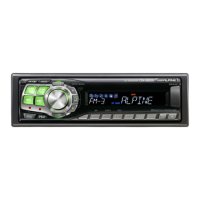
iPod@
(Optional)
An iPod@ can be connected to this unit by using the proprietary
ALPINE FULL
SPEEDTM
Connection Cable (KCE-422i) (sold
separately). When this unit is connected by using the cable, the controls
on the iPod are not functional.
Fast forward through the current song:
Press
and hold
~.
Advance to the beginning
of
the next song:
Press
~.
An iPod can contain hundreds
of
songs. By using file tag infonnation
and keeping these songs organized in playlists, this unit's search
functions will ease song searches.
Each music category has its own individual hierarchy. Use the Playlistl
ArtistlAlbumlSong/PodcastlGenrelComposerlAudiobook search mode
to narrow searches based on the table below.
Searching
for
a
desired
Song
3
To pause playback, press
~/II.
Pressing
~
III
again will resume playback.
A song playing on the iPod while
it
is connected
to
this unit will
continue to playfrom where it was paused after disconnection.
"
If
you listen to an episode from a selected podcast
or
audiobook, the
episode can be changed by pressing
....
or
~.
"
An
episode may have several chapters. The chapter can be changed
by
pressing'"
or
~.
6
~
lENT
':::>
4 5
GQ
~
IESC Preset buttons
(1
through 6)
~/II
Rotary encoder
~
VIEW
...
~
SOURCElc!>
" Set AUX+ Setup to
OFF
when an iPod
is
connected (refer to "Setting
the AUX+ Setup Mode" on page 20).
"
If
the Bluetooth
Box
and
an iPod are connected
at
the same time, be
sure to disconnect the iPodfrom the Bluetooth
Box
while turning
ACC
to
OFF.
iPods usable with this unit
" The unit can
be
used with the fourth generation and above
iPod, iPod photo, iPod mini or iPod nano. iPod Shuffle cannot
be
used, however.
• Touch wheel or scroll wheel type iPods without the
dock
connector cannot
be
connected to the unit.
• The unit can
be
used with the following iPod.
Fourth generation iPod
Fifth generation iPod
iPod
photo
iPod mini
First generation iPod nano
Second generation iPod nano
"
If
the unit is used with iPod software versions
of
iTunes earlier than
7.
1.0.59, correct function
and
peiformance are not guaranteed.
Hierarchy 1 Hierarchy 2 Hierarchy 3 Hierarchy 4
Playlisl
Song
-
-
Artist" Album"
Song
-
Album'
Song
- -
Song
- - -
Podcast Episode
-
-
Genre· Artist*
Album" Song
Composer'
Album'
Song
-
Audlobook
- - -
For example: Searching by Artist name
The
following example explains how an ARTIST search is perfonned.
Another search mode can be used for the same operation, although the
hierarchy differs.
1 Press ~ lENT to activate the search selection
mode.
2 Turn the
Rotary
encoder
to select the Artist search
mode, and then press
~
lENT.
3
4
Playback
1 Press SOURCElc!> to switch to the iPod mode.
TUNER
~
XM/SIRIUS,I
~
DISC
~
USB
~
iPod,2/AUX+,3
~
Bluetooth Audio,4
~
CHANGER,5
~
TUNER
,J
Only when
XM
Radio
or
SIRIUS Radio is connected.
02
Displayed only when the iPod is connected
and
AUX
+ Setup
is
set to
OFF,
refer to "Setting the AUX+ Setup Mode" (page 20).
03
Displayed only when the AUX+ Setup is set to ON, refer
to
"Setting
the AUX+ Setup Mode" (page 20).
04
Displayed only when Bluetooth IN is set to ADAPTER, refer to
"Bluetooth Setting" (page 19).
,5
Only when the
CD
changer is connected.
2
Press'"
or
~
to select the desired song.
Return to the beginning
of
the current song:
Press
....
Fast backward through the current song:
Press
and
hold
....
Playlist H Artist H Album H Song H Podcast H Genre
H Composer H Audiobook H Playlist
Turn the
Rotary
encoder
to select the desired
Artist, and then press
~
lENT.
Turn the
Rotary
encoder
to select an album, and
then press
~
lENT.
5 Turn the
Rotary
encoder
to select a song and
press
~
lENT.
The selected song is played back.
" Afterpressing
and
holding
~
lENT
for
at
least 2 seconds while in
each hierarchy (except Song
and
Audiobook hierarchy), ali songs
of
the selected hiemrchy are played back.
" Afterselecting
[AUl
in the search mode with
"''',
press
and
hold
~
lENT
for
at
least 2 seconds to play back ali songs in the iPod
or
selected search mode.
While in the search mode,
if
you press
and
hold
~IESCforat
least
2 seconds,
or
no operation is peiformed
for
10 seconds, the search
mode is canceled.
"
In
the search mode, pressing
~/ESC
will return to the previous
mode.
" When search is made during M.J.X. play, the M.J.X. play mode will be
canceled.
27-EN
iPod@
(Optional)
An iPod@ can be connected to this unit by using the proprietary
ALPINE FULL
SPEEDTM
Connection Cable (KCE-422i) (sold
separately). When this unit is connected by using the cable, the controls
on the iPod are not functional.
Fast forward through the current song:
Press
and hold
~.
Advance to the beginning
of
the next song:
Press
~.
An iPod can contain hundreds
of
songs. By using file tag infonnation
and keeping these songs organized in playlists, this unit's search
functions will ease song searches.
Each music category has its own individual hierarchy. Use the Playlistl
ArtistlAlbumlSong/PodcastlGenrelComposerlAudiobook search mode
to narrow searches based on the table below.
Searching
for
a
desired
Song
3
To pause playback, press
~/II.
Pressing
~
III
again will resume playback.
A song playing on the iPod while
it
is connected
to
this unit will
continue to playfrom where it was paused after disconnection.
"
If
you listen to an episode from a selected podcast
or
audiobook, the
episode can be changed by pressing
....
or
~.
"
An
episode may have several chapters. The chapter can be changed
by
pressing'"
or
~.
6
~
lENT
':::>
4 5
GQ
~
IESC Preset buttons
(1
through 6)
~/II
Rotary encoder
~
VIEW
...
~
SOURCElc!>
" Set AUX+ Setup to
OFF
when an iPod
is
connected (refer to "Setting
the AUX+ Setup Mode" on page 20).
"
If
the Bluetooth
Box
and
an iPod are connected
at
the same time, be
sure to disconnect the iPodfrom the Bluetooth
Box
while turning
ACC
to
OFF.
iPods usable with this unit
" The unit can
be
used with the fourth generation and above
iPod, iPod photo, iPod mini or iPod nano. iPod Shuffle cannot
be
used, however.
• Touch wheel or scroll wheel type iPods without the
dock
connector cannot
be
connected to the unit.
• The unit can
be
used with the following iPod.
Fourth generation iPod
Fifth generation iPod
iPod
photo
iPod mini
First generation iPod nano
Second generation iPod nano
"
If
the unit is used with iPod software versions
of
iTunes earlier than
7.
1.0.59, correct function
and
peiformance are not guaranteed.
Hierarchy 1 Hierarchy 2 Hierarchy 3 Hierarchy 4
Playlisl
Song
-
-
Artist" Album"
Song
-
Album'
Song
- -
Song
- - -
Podcast Episode
-
-
Genre· Artist*
Album" Song
Composer'
Album'
Song
-
Audlobook
- - -
For example: Searching by Artist name
The
following example explains how an ARTIST search is perfonned.
Another search mode can be used for the same operation, although the
hierarchy differs.
1 Press ~ lENT to activate the search selection
mode.
2 Turn the
Rotary
encoder
to select the Artist search
mode, and then press
~
lENT.
3
4
Playback
1 Press SOURCElc!> to switch to the iPod mode.
TUNER
~
XM/SIRIUS,I
~
DISC
~
USB
~
iPod,2/AUX+,3
~
Bluetooth Audio,4
~
CHANGER,5
~
TUNER
,J
Only when
XM
Radio
or
SIRIUS Radio is connected.
02
Displayed only when the iPod is connected
and
AUX
+ Setup
is
set to
OFF,
refer to "Setting the AUX+ Setup Mode" (page 20).
03
Displayed only when the AUX+ Setup is set to ON, refer
to
"Setting
the AUX+ Setup Mode" (page 20).
04
Displayed only when Bluetooth IN is set to ADAPTER, refer to
"Bluetooth Setting" (page 19).
,5
Only when the
CD
changer is connected.
2
Press'"
or
~
to select the desired song.
Return to the beginning
of
the current song:
Press
....
Fast backward through the current song:
Press
and
hold
....
Playlist H Artist H Album H Song H Podcast H Genre
H Composer H Audiobook H Playlist
Turn the
Rotary
encoder
to select the desired
Artist, and then press
~
lENT.
Turn the
Rotary
encoder
to select an album, and
then press
~
lENT.
5 Turn the
Rotary
encoder
to select a song and
press
~
lENT.
The selected song is played back.
" Afterpressing
and
holding
~
lENT
for
at
least 2 seconds while in
each hierarchy (except Song
and
Audiobook hierarchy), ali songs
of
the selected hiemrchy are played back.
" Afterselecting
[AUl
in the search mode with
"''',
press
and
hold
~
lENT
for
at
least 2 seconds to play back ali songs in the iPod
or
selected search mode.
While in the search mode,
if
you press
and
hold
~IESCforat
least
2 seconds,
or
no operation is peiformed
for
10 seconds, the search
mode is canceled.
"
In
the search mode, pressing
~/ESC
will return to the previous
mode.
" When search is made during M.J.X. play, the M.J.X. play mode will be
canceled.
27-EN



 To Next Page
 Loading...