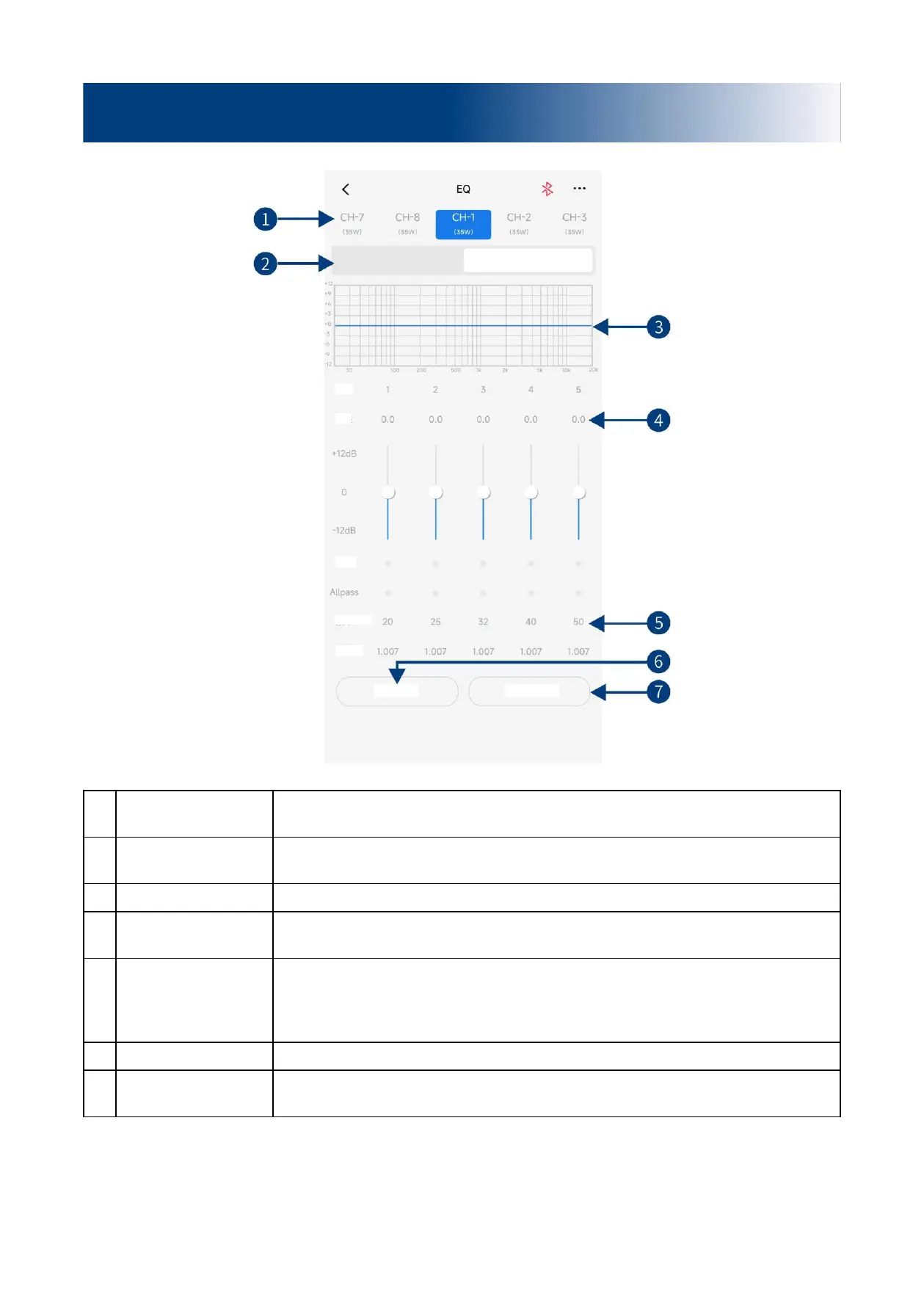
Slide left and right to select the output channel for EQ adjustment. There are 8 channels
to choose from.
Parametric EQ,
Graphic EQ
Switch between Parametric EQ mode and Graphic EQ mode. Mode switch would lead
to loss of all settings.
Display the current EQ curve status, set the frequency, Q value and gain.
Pull the fader up and down to adjust the gain. The adjustable range is: -12.0dB ~
+12.0dB.
Allpass, Frequency, Q
value, Gain
Adjust the frequency, Q value and gain of the output channel. The frequency and Q
value are adjustable in the Allpass mode. The gain is adjustable but the frequency and
Q value are fixed in the Graphic EQ mode. The frequency, Q value and gain are all
adjustable in the Parametric EQ mode.
Switch the tuned EQ data to direct state, click it again to restore the EQ data before
Direct EQ setting.
Description of mobile APP - EQ


 To Next Page