External Bluetooth input
interface
Select HD Bluetooth as the input signal, or connect to the PXE-R80-8
mobile tuning APP. After the APP is successfully connected, the
Bluetooth icon is constant on.
A USB2.0 cable can be used to connect the computer and perform
tone tuning and setting in detail.
Wired controller interface
Volume adjustment, audio source selection and data recall can be
performed by connecting the wired controller.
Connecting the ambient light interface to control the operation of
ambient light.
One set of RCA audio signal input which can connect the RCA audio
signal output of the vehicle audio player.
High-voltage-level input
interface
Connected to the high-voltage-level output of the vehicle audio
player.
Input select switch interface
If the switch is put to “ACC,” the device will be started by ACC. If
put to “HOST,” the device will be started by the high-voltage-level
input signal H1-/H1+.
High-voltage-level output
interface
Connect the power amplifier output of the device to speakers.
Four sets of RCA audio signal output which can be connected to the
external power amplifier.
Connect the vehicle audio player.
Connect the external power amplifier
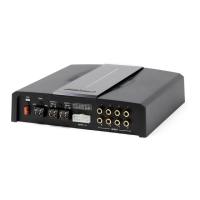
Description of device interfaces and their functions


 To Next Page