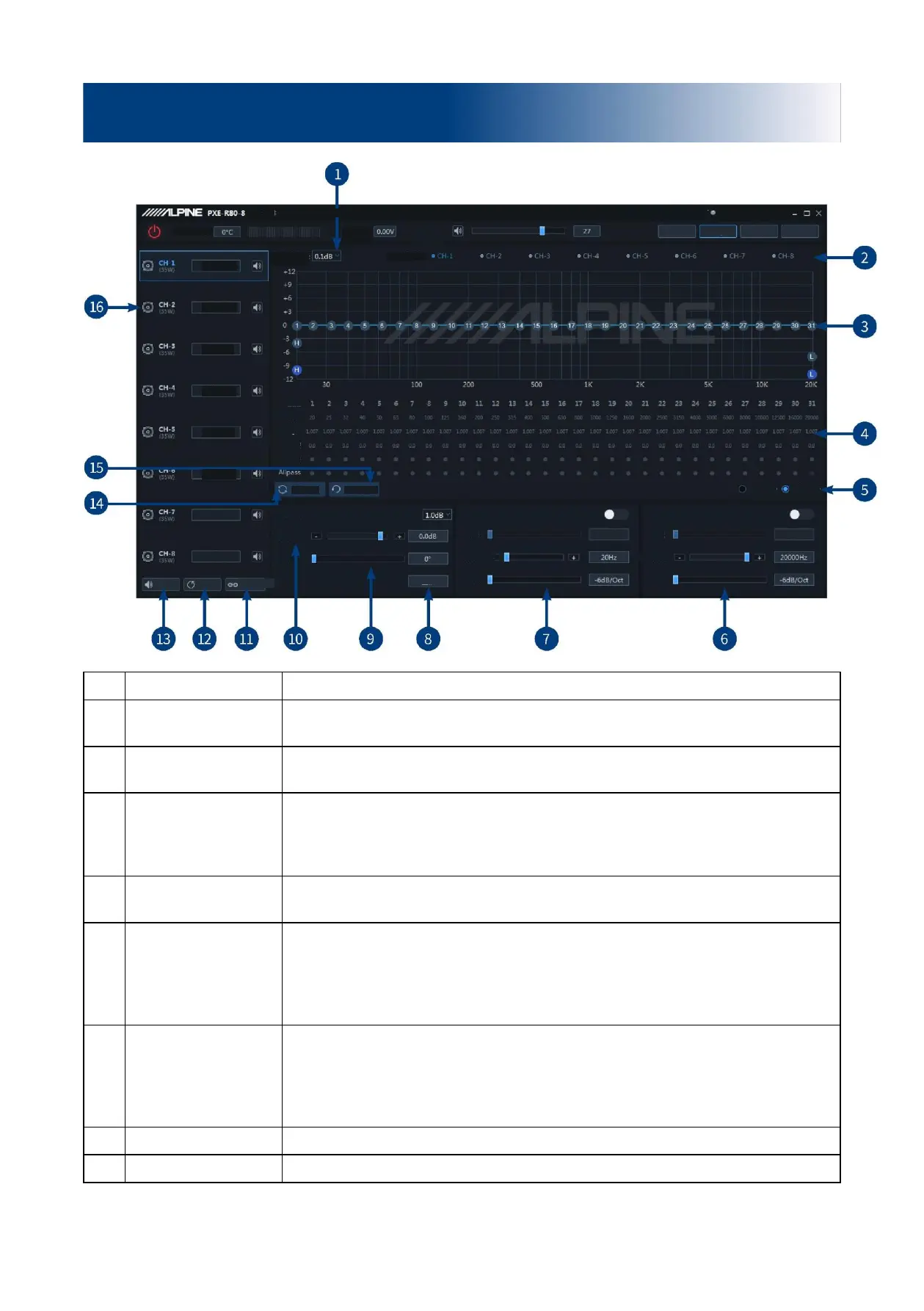
Step size can be chosen from the range: 0.1dB ~ 0.5dB ~ 1.0dB.
Display the output channel curve.
Display the current EQ curve status, adjust EQ graphics, set the frequency, Q value
and gain.
Allpass, Frequency, Q
value, Gain
Adjust the frequency, Q value and gain of the output channel. The frequency and Q
value are adjustable in the Allpass mode. The gain is adjustable but the frequency
and Q value are fixed in the Graphic EQ mode. The frequency, Q value and gain are
all adjustable in the Parametric EQ mode.
Parametric EQ,
Graphic EQ
Switch between Parametric EQ mode and Graphic EQ mode. Mode switch would
lead to loss of all settings.
Turn on or off the low-pass filter to cut off high frequency.
Select filter type (Linkwitz-Riley, Butterworth or Bessel).
Select the divider frequency (between 20Hz and 20kHz).
Select the divider slope (-6dB/Oct, -12dB/Oct, -18dB/Oct, -24dB/Oct, -30dB/Oct, -
36dB/Oct, -42dB/Oct, or -48dB/Oct).
Turn on or off the high-pass filter to cut off low frequency.
Select filter type (Linkwitz-Riley, Butterworth or Bessel).
Select the divider frequency (between 20Hz and 20kHz).
Select the divider slope (-6dB/Oct, -12dB/Oct, -18dB/Oct, -24dB/Oct, -30dB/Oct, -
36dB/Oct, -42dB/Oct, or -48dB/Oct).
Select the channel phase (normal phase or reverse phase).
Adjust the low pitch phase of output channel in the range of 0° ~ 360°.
Description of PC software - EQ
Clipping distortion indicator
Front left full
frequency
Front right full
frequency
Rear right full
frequency


 To Next Page