16
FIOPTICS+ - Mobile Streaming App
5
4
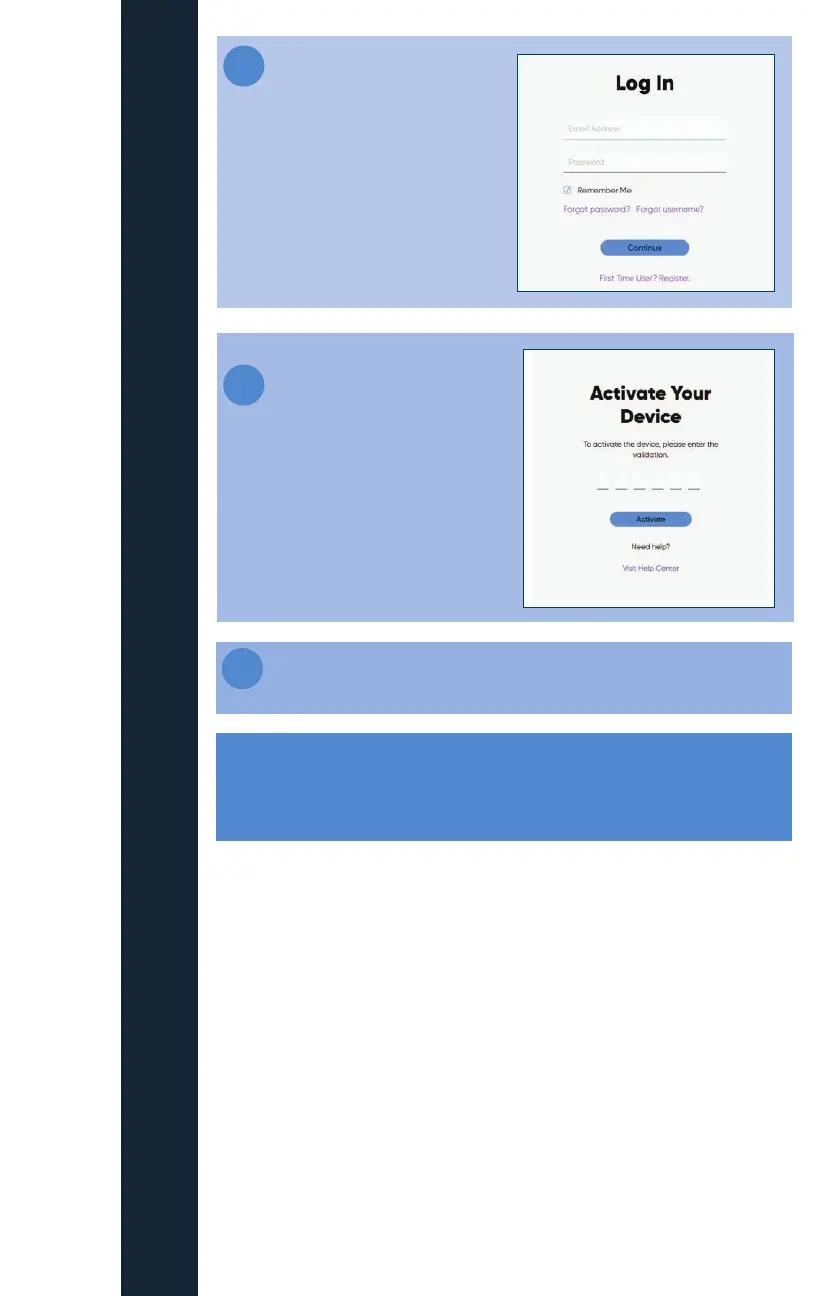
Log into your My altafiber
account (If you have not yet set
up your My altafiber account,
please do so at this time by
visitng http://my.altafiber.com)
Enter the code displayed
on your TV screen into the
fields on this screen
Note: It may take between 2 and 24 hours from Fioptics+ order
completion for your credentials to activate your Fioptics+ app on
your personal devices.
6
Once your code is entered successfully, your device will launch the
Fioptics+ app and you will have access to your video service
What features are available in the Fioptics+
streaming device/mobile app?
» Fioptics+ user experience streamed to your mobile or streaming device
with the Fioptics+ app
» Recordings and favorite channels, all on your tablet, phone or streaming
device
» Log in with your My altafiber account credentials
» In-home and out-of-home streaming (based on channel content rights)
» Voice search for both iOS and Android mobile
» What to Watch
» Guide
» VOD Browse
*Some channels may restrict concurrent streams to 3 devices.



 To Next Page