24
FIOPTICS+ - TiVO Remote Control
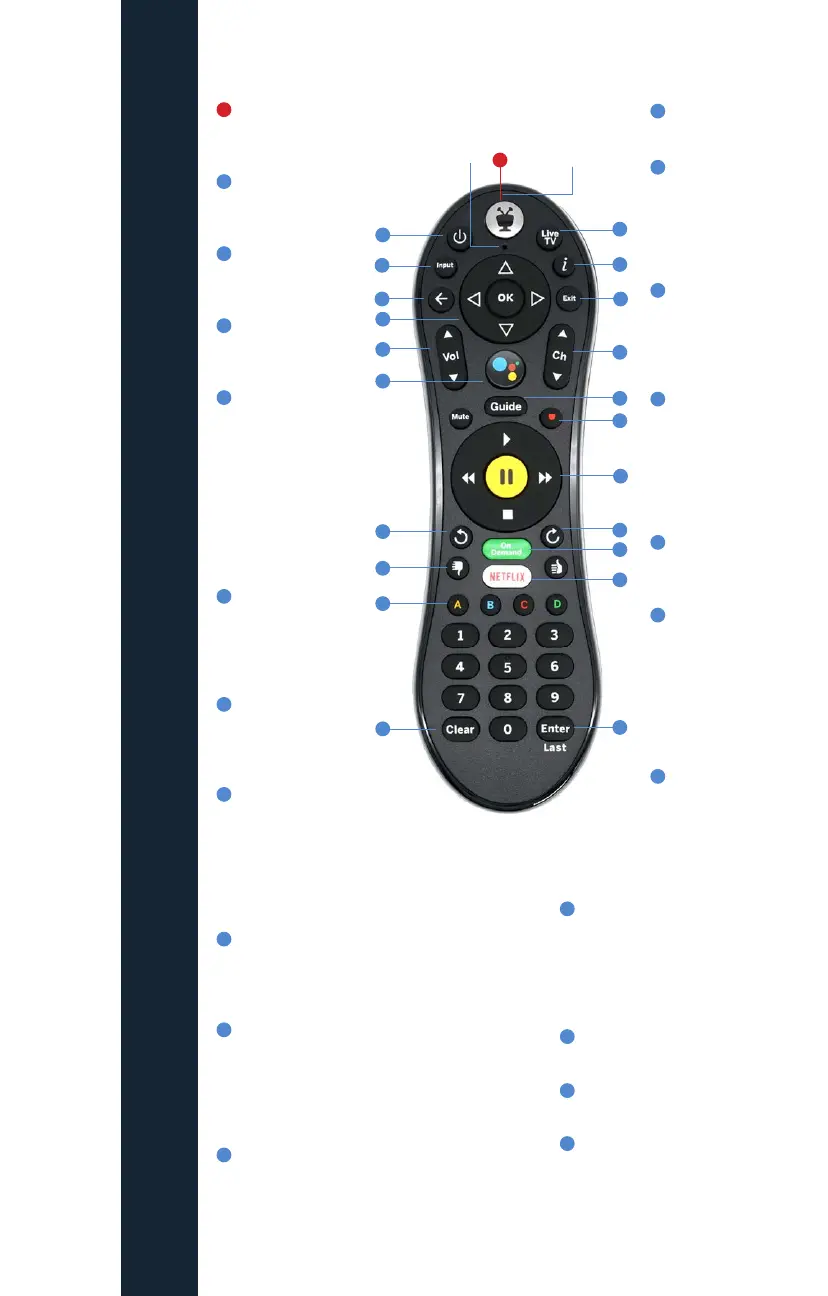
LIVE TV takes you
to live TV.
“i” shows the Info
banner while
watching a show.
Press and hold
for accessibility
options.
Use EXIT to go to
full-screen video
on Home screen
and to close
certain apps.
Use CHANNEL
UP/DOWN to
change the
channel or move
quickly through
lists and the
Guide.
GUIDE takes you
to the on-screen
program guide.
Press RECORD to
record the show
you’re watching,
or to set up a
recording for a
show selected in
the guide. (Cloud
DVR required)
Use the TrickPlay
buttons (REWIND,
FAST-FORWARD,
STOP, PAUSE, and
PLAY) to control
video.
The TiVo button
takes you to the
Home screen.
POWER button
turns the TV on
or o.
INPUT selects
the input for
your TV.
BACK goes back
to the previous
screen.
Use the ARROW
BUTTONS to
navigate the TiVo
menus. When
watching video,
press DOWN to
see Continue
Watching
and Favorite
Channels panels.
VOLUME and
MUTE control
the volume on
your TV or A/V
receiver.
Press and release
the Google
Assistant button
to talk to Google.
REPLAY repeats
the last eight
seconds of the
show. Press and
hold to jump to
the beginning of
a show.
THE TIVO REMOTE CONTROL
1
1
12
12
13
13
14
14
15
15
16
16
17
17
18
18
19
19
20
20
21
21
22
22
2
2
3
3
4
4
5
5
6
6
7
7
8
8
9
9
10
10
11
11
Activity lightMicrophone
Use the THUMBS UP and
THUMBS DOWN to confirm
certain commands, as
instructed on screen.
Press and hold A, B, and
C for accessibility options.
Additionally, the letter buttons
have various functions
depending on what you’re
doing. Look for on-screen tips.
CLEAR dismisses items
appearing over live TV and
deletes titles from My Shows
and the To Do List.
ADVANCE moves forward in
30-second increments; press
and hold to jump to the end
of the show. Or, press to jump
to the next tick mark when
fast-forwarding or rewinding.
ON DEMAND jumps to the On
Demand catalog.
The NETFLIX button launches
the Netflix app.
ENTER/LAST returns to the last
channel viewed.



 To Next Page