26
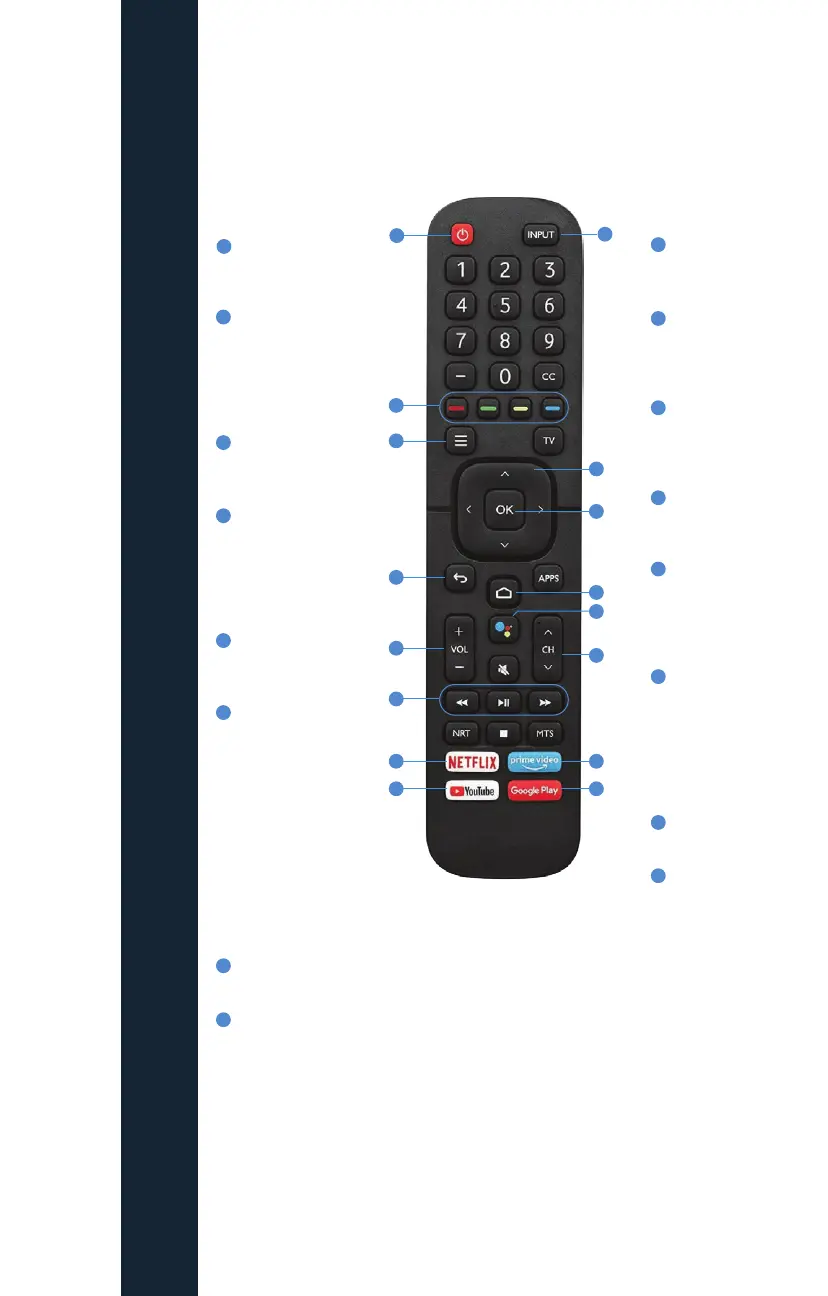
ANDROID TV REMOTE CONTROL
Remote image used for reference only. Button placement and images may
differ from TV manufacturer to manufacturer.
1
1
2
2
3
5
6
7
8
9
9
10
10
11
11
12
12
13
13
14
14
15
15
16
16
4
3
4
5
6
7
8
POWER button
turns the TV on
or o.
COLOR BUTTONS
(Red/Green/
Yellow/Blue)
Shortcut keys
for interactive
functions.
MENU brings up
Fioptics+ Home
Screen.
BACK brings up
Fioptics+ menu
when viewing
Video/TV. Backs
out one scrren at
a time.
VOLUME and
MUTE control the
volume on TV.
Use the TrickPlay
buttons
(REWIND/
FAST-FORWARD
Rewinds/
Advances
accordingly at
1x, 2x, and 3x
speeds, PLAY
cycles between
pause and play,
press STOP to go
to Live TV).
Access to
NETFLIX.
Access to
YouTube.
INPUT selects
the video
source.
NAVIGATION
Navigate
around menus
and guides.
Select ‘OK’
Button to select
highlighted
option.
HOME Returns
to Fire TV Home
Screen.
GOOGLE
ASSISTANT Voice
Search does not
integrate with
Fioptics+ Search.
Use CHANNEL
UP/DOWN to
change the
channel or move
quickly through
lists and the
Guide.
Access to Prime
Video.
Access to
Google Play.
DIRECTIONAL NAVIGATION TIPS while
Watching TV/Video
SELECT UP displays Mini Guide.
SELECT DOWN displays show information
screen/CC menu.
SELECT LEFT displays fast-forward/rewind
controls.
SELECT RIGHT displays fast-forward/
rewind controls.
OK BUTTON displays fast-forward/rewind
controls.
SECONDARY CONTROLS
While fast-forward/rewind controls are on
screen, SELECT DOWN to bring up Recently
Watched and Favorites.
FIOPTICS+ - Android Remote Control



 To Next Page