- 25 -
C141501700.fm
User's manual
GB
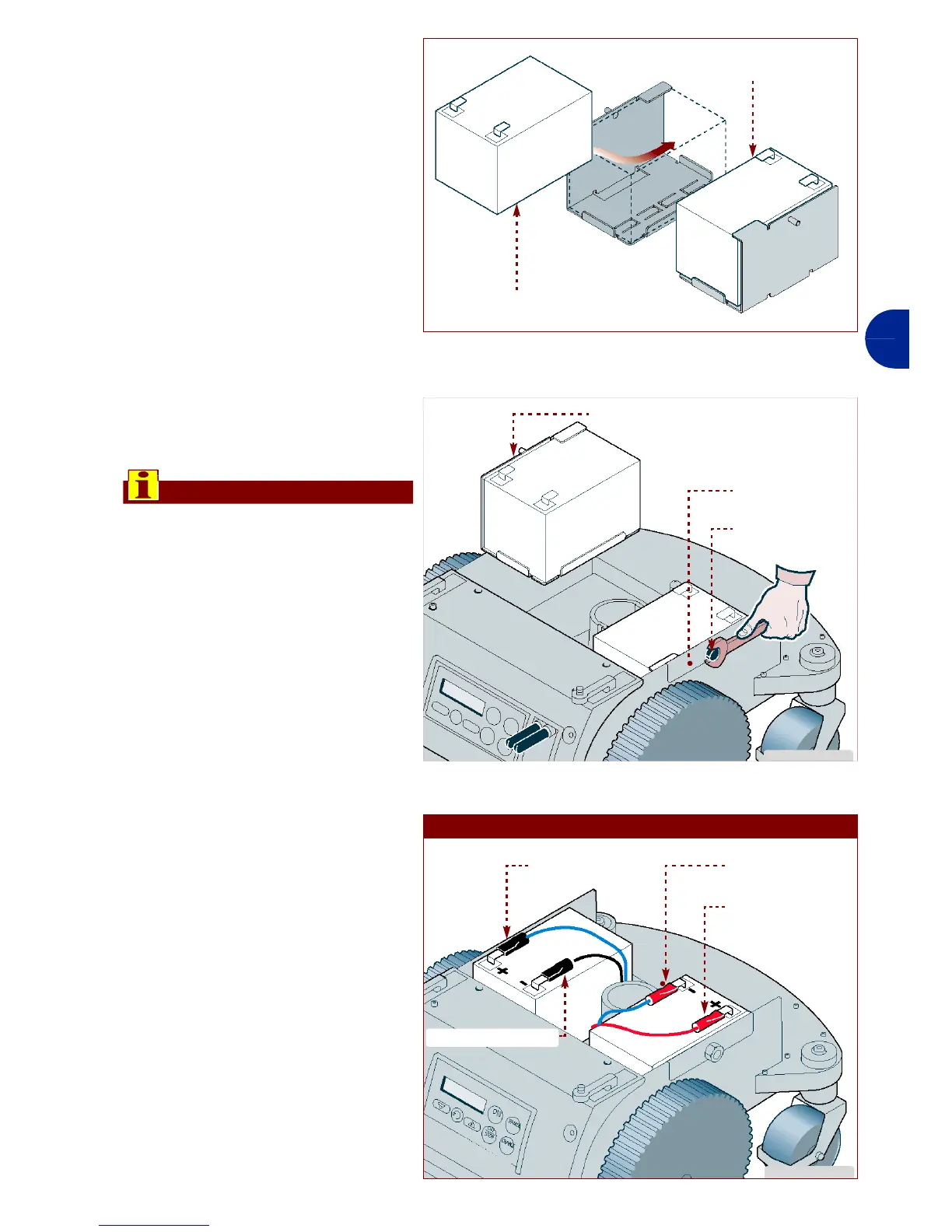
5-Insert the batteries (G) in the
appropriate positions.
6-Assemble the brackets (F)
complete with batteries.
7-Tighten the nuts (E).
Important
The connection must be carried
out in accordance with the pro-
cedures given, relative to the
type of battery installed (lead or
lithium).
Lead battery connection
1-Connect the connector (H)
(red colour with blue)
2-Connect the connector (L) (red
colour with red cable)
3-Connect the connector (M)
(black colour with blue cable)
4-Connect the connector (N)
(black colour with black cable)
IDM - 41501702300.tif
battery (G)
battery (G)
IDM - 41501702400.tif
nut (E)
bracket (F)
bracket (F)
IDM - 41501702500.tif
LEAD BATTERY
connector (H)
connector (L)
connector (M)
connector (N)



 To Next Page