Basic Features
10 Intellex® Ultra
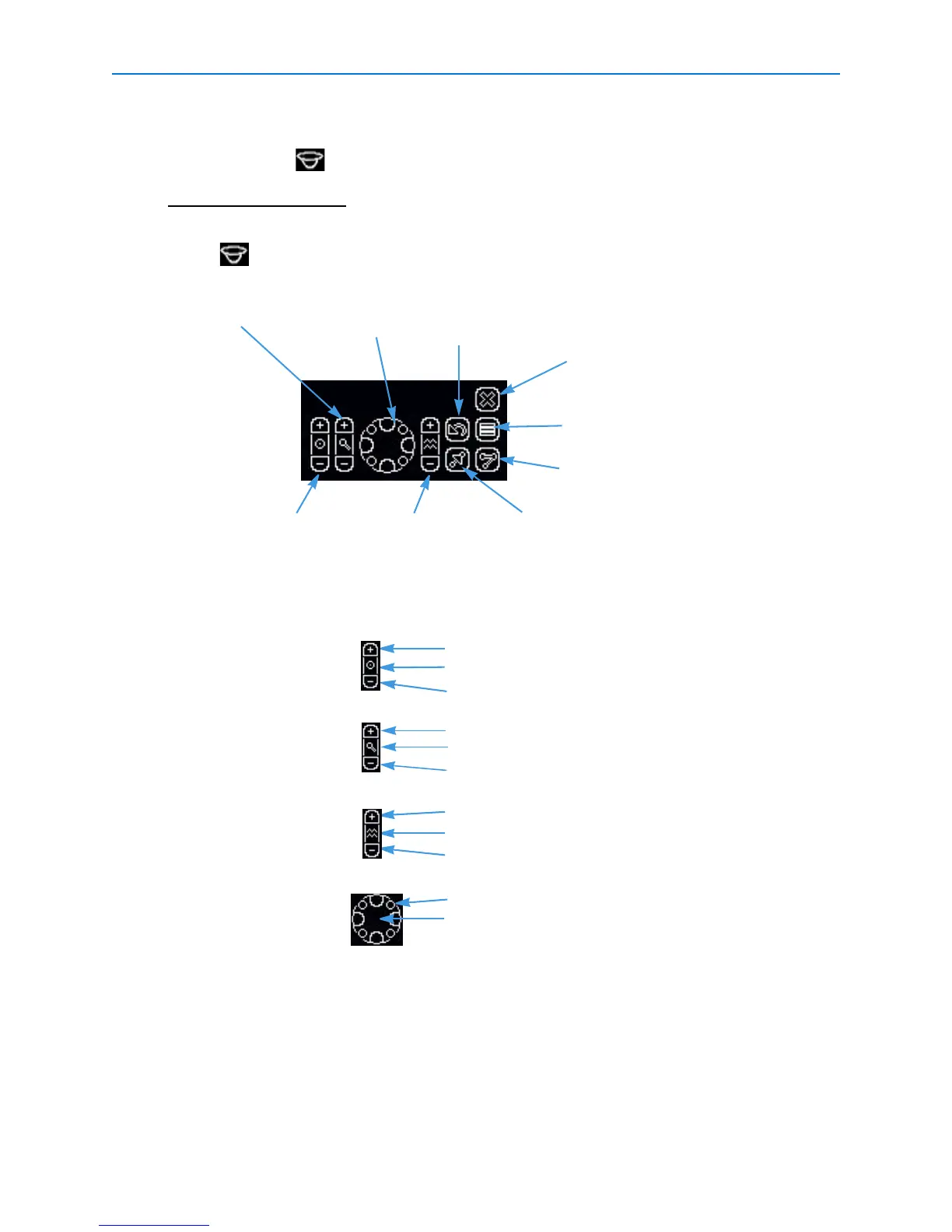
Controlling a Dome Camera
The dome symbol appears with video from a camera with dome control.
Note
If another user is operating the dome, you may not be able to control it.
• Click in the camera’s pane.
• Click the control item on the overlay.
.
These camera handlers enable access to these dome configuration menus:
Iris Open
Auto Iris and Focus
Close
Zoom In
(Future Version)
Out
Focus Near
(Future Version)
Far
Pan/Tilt Movement Pan / Tilt (outer rim)
Stop Camera Movement (middle)
Pan/Tilt control
Center buttons allow automatic control: auto iris, auto zoom, and auto focus. The center of the Pan/Tilt
Control stops camera movement.
Flips the camera
180°
Opens the preset menu
Zoom
FocusIris
Opens the pattern menu
Opens the dome configuration
menu
Closes the dome control overlay
(Exit)
•AD168/MP48 • AD1024 Matrix
•VM96RTT •RS422 Dome
• VM16/ADTT16 • VM16E/ADTT16E
• Pelco Matrix Switch • USB CCTV


 To Next Page