
 Need help?
Do you have a question about the AMP Mitre-Mite VN4 MemoryProgram and is the answer not in the manual?
Information about the manufacturer Alfamacchine-AMP and their experience.
Contact information for North American assistance and required machine data for service.
Machine conformity to pertinent European Community Norms.
Details on product warranty period, exclusions, and conditions for validity.
Customer responsibilities for machine setup, power, and air supply.
Purpose of the handbook, target audience, and how to use it.
Handbook provides information on technical aspects, working, maintenance, and safety.
Identifies operators and maintenance personnel as users and outlines responsibilities.
Instructions on how to store and protect the instruction handbook.
Explanation of symbols used in the manual for danger, warning, observation, etc.
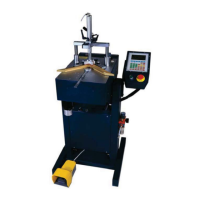
Explains how the VN4 Memory Program machine works and its capabilities.
Lists the primary components of the VN4 Memory Program machine.
Describes the movement directions (X and Y axes) of the machine.
Refers to overall dimensions shown in a complete drawing.
Specifies environmental requirements for machine installation and operation.
Requirements for premises lighting to ensure visibility and avoid reflections.
Information on vibration levels and their impact during normal operation.
Details on machine noise levels and factors affecting exposure.
Lists technical specifications and characteristics of the machine.
Lists standard accessories included with the machine.
Details the standard accessories to check after unpacking.
Discusses modular design and potential upgrades for mechanical parts.
Explains how the machine can be customized with optional accessories.
Information on electromagnetic compatibility standards the machine adheres to.
Operator must read and follow all safety precautions listed in the chapter.
Defines the intended use of the machine (frame junctions, semi-automatic).
Lists uses that are not permitted for the machine.
Defines the working area and dangerous zones of the machine.
Mentions the machine is equipped with adequate protection devices.
Explains the different stop categories (0 and 1) for the machine.
Provides instructions for safe operation and risk mitigation.
Identifies residual risks like finger crushing and electrical hazards.
Information about warning plates and their location.
Instructions for safe shipment and handling of the machine.
Guidelines for storing the machine during long inactivity periods.
Instructions for connecting the machine to the electrical network.
Steps to prepare the working area for machine installation.
Procedures for unpacking the machine and checking for damage.
Instructions on how to position and level the machine.
Steps for making the pneumatic connection, including oiling the lubricator.
Procedure to connect the control keyboard to the machine's main board.
Requirements for personnel operating the machine.
Identification of function keys and their meanings on the control panel.
Explains the color coding of keys and status diodes on the control panel.
Details the semi-automatic operating mode and machine startup display.
Lists and explains functions accessible via the F1 key.
Instructions for manually moving the V-nail driver.
Guide to testing input functions on the control board.
Guide to testing the output functions of the control board.
Procedure to set the V-nail driver to its zero position.
Accessing and using the menu for program editing, including password protection.
How to rename existing programs.
Procedure for duplicating existing programs.
Steps to delete existing programs.
How to search for programs by name or code.
Steps to create new frame programs.
Accessing and executing stored programs.
How to adjust the machine's working speed.
Accessing protected menus using access codes.
Accessing and configuring machine parameters.
Information on V-nail counters and consumption tracking.
Advice on achieving quality junctions using V-nails.
Methods for stopping the machine during operation.
Procedures for safely taking the machine out of service.
Step-by-step guide to creating a new frame program.
Using auto-learning to set V-nail positions.
Manually inputting V-nail insertion positions and parameters.
How to execute a program that was just created.
How to execute stored programs.
Adjustments to be made during program execution.
Instructions related to machine state for maintenance.
Procedures for isolating the machine from power and air supply.
Safety precautions to follow during maintenance operations.
Guidelines for cleaning the machine, avoiding water.
Recommendations for lubricating components like the driver blade.
Scheduled ordinary maintenance tasks and their importance.
Interventions for extraordinary maintenance like breakages.
General safety warnings for diagnostic procedures.
Troubleshooting guide for functional inconveniences and their remedies.
Common causes and remedies for pedal operation issues.
Troubleshooting when the machine fails to operate.
Addressing issues causing irregular machine operation.
Diagnosing issues with electric pedal operation.
Troubleshooting electronic component failures.
Resolving issues with V-nail stacking or tilting.
Information on how to request technical assistance.
List of recommended spare parts for the machine.
Procedures for ordering spare parts.
Instructions for the safe demolition and disposal of the machine.
List of attached declarations of conformity.
List of attached technical schemes (mechanic, pneumatic, electric).

 To Next Page
 General