10
7. PREPARATION BEFORE USE
7-1 Installing the battery
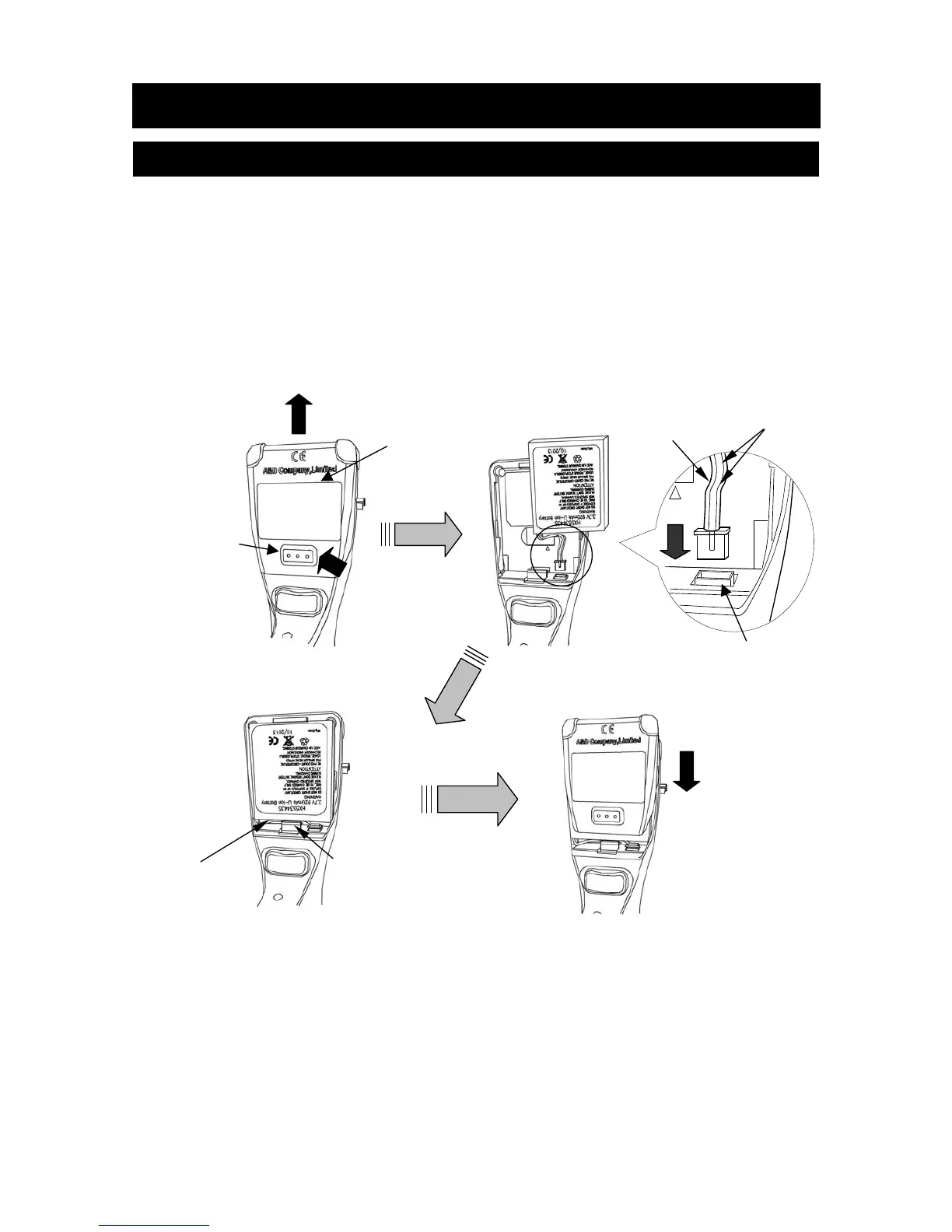
1. Remove the battery cover (2) by sliding it upward while pressing and holding the
battery cover release button (1).
2. Connect the terminal of the battery’s cable, as shown in the figure below, to the
connector for the battery in the bottom of the battery compartment. When
connecting the terminal, be sure it is connected in the proper direction.
3. Install the battery so that the battery cable is in the cable guide.
4. Attach the battery cover on the pipette by sliding it downward from the upside.
1. Open the battery cover. 2. Connect the battery connector.
3. Install the battery. 4. Attach the battery cover.
Note
When connecting the battery to the pipette, all illuminations on the
display illuminate and the pipette built-in piston automatically goes to the
initial default position. If a key is pressed, the pipette goes into the
operating mode.
(1)
(2)
Expanded
Cable
Cable guide
Red
Black
Battery cover
Battery cover
release button
Battery connector



 To Next Page