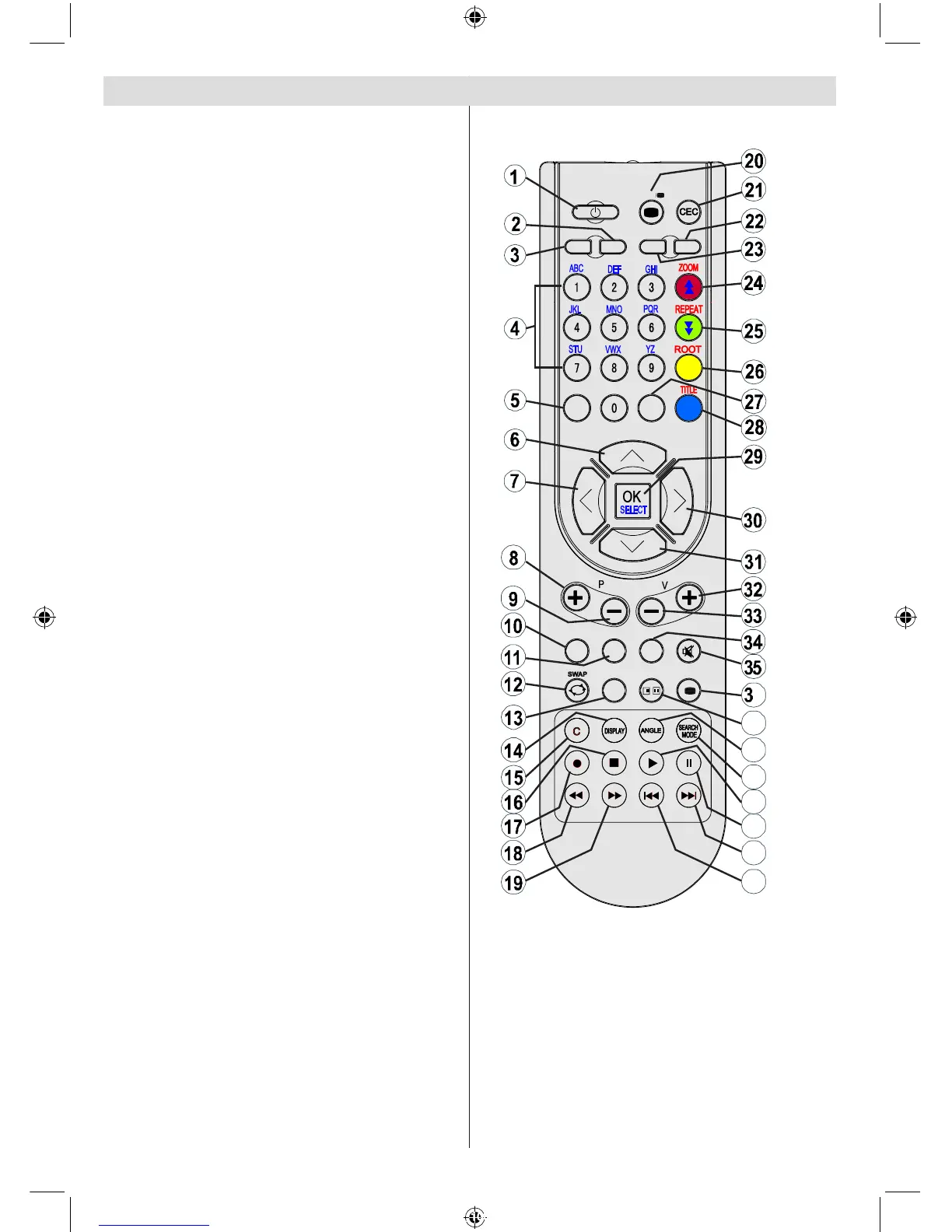
Standby1.
Image size2.
Sleep timer3.
Numeric buttons4.
Return 5.
Cursor up6.
Cursor left7.
Programme up8.
Programme down9.
No function in DVD mode10.
Audio-Language selection11.
Swap / DVD media selection12.
No function in DVD mode13.
Display time / DVD menu14.
Clear15.
Stop16.
No function17.
Rapid Reverse18.
Rapid advance19.
Info20.
No function21.
Picture mode selection22.
Source selection23.
Zoom24.
Repeat25.
Root26.
Menu27.
Title28.
OK / Select29.
Cursor right30.
Cursor down31.
Volume up32.
Volume down 33.
Subtitle 34.
Mute35.
No function in DVD mode.36.
No function 37.
Angle38.
Search mode39.
Play 40.
Pause / Play41.
Skip next42.
Skip previous43.



 To Next Page