EasyManua.ls Logo

Andersson A191D DVD - Connecting the Lcd Tv to a Pc

Andersson A191D DVD
Print Icon
To Next Page IconTo Next Page
To Previous Page IconTo Previous Page
Loading...
English - 76 -
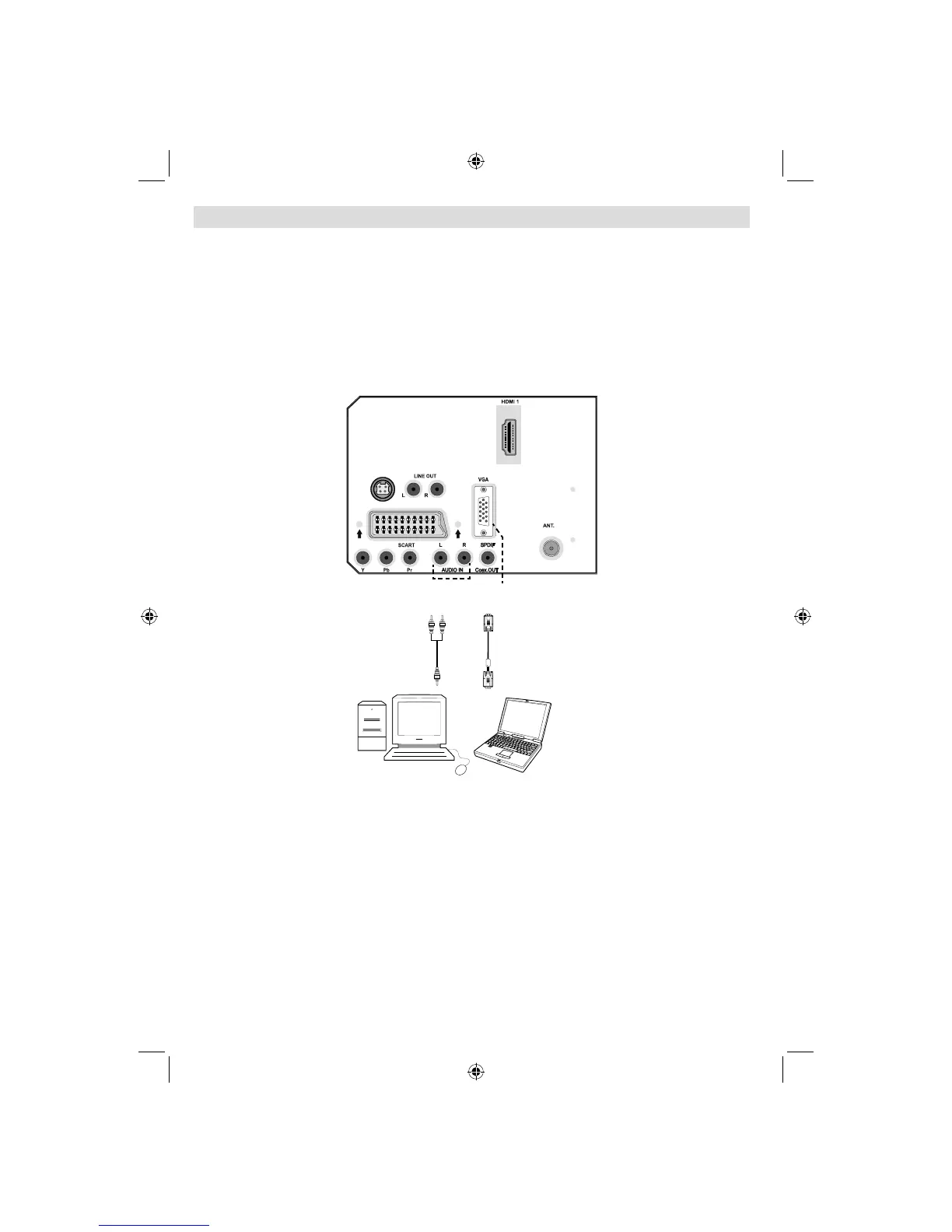
Connecting the LCD TV to a PC
For displaying your computer’s screen image on your LCD TV, you can connect your computer
to the TV set.
• Power off both computer and display before making any connections.
• Use 15-pin D-sub display cable to connect a PC to the LCD TV.
• When the connection is made, switch to PC source. See “Input selection” section.
• Set the resolution that suits your viewing requirements. Resolution information can be found in
the appendix parts.
REAR VIEW
(12V)

(12V)
DC IN
DC IN
5Vdc 60mA
PC audio cable
(not supplied)
to AUDIO INPUTS
on the TV
PC RGB cable
(not supplied)
to PC input
Audio
Inputs
PC Input
A02_MB25 [GB] (01-TV)_19855W_1900UK_IDTV_NICKEL5_10061155_50141077.indd 13A02_MB25 [GB] (01-TV)_19855W_1900UK_IDTV_NICKEL5_10061155_50141077.indd 13 25.02.2009 17:08:0825.02.2009 17:08:08

Table of Contents