EasyManua.ls Logo

Andersson A191D DVD - Connecting PC and DVD Player

Andersson A191D DVD
Print Icon
To Next Page IconTo Next Page
To Previous Page IconTo Previous Page
Loading...
English - 75 -
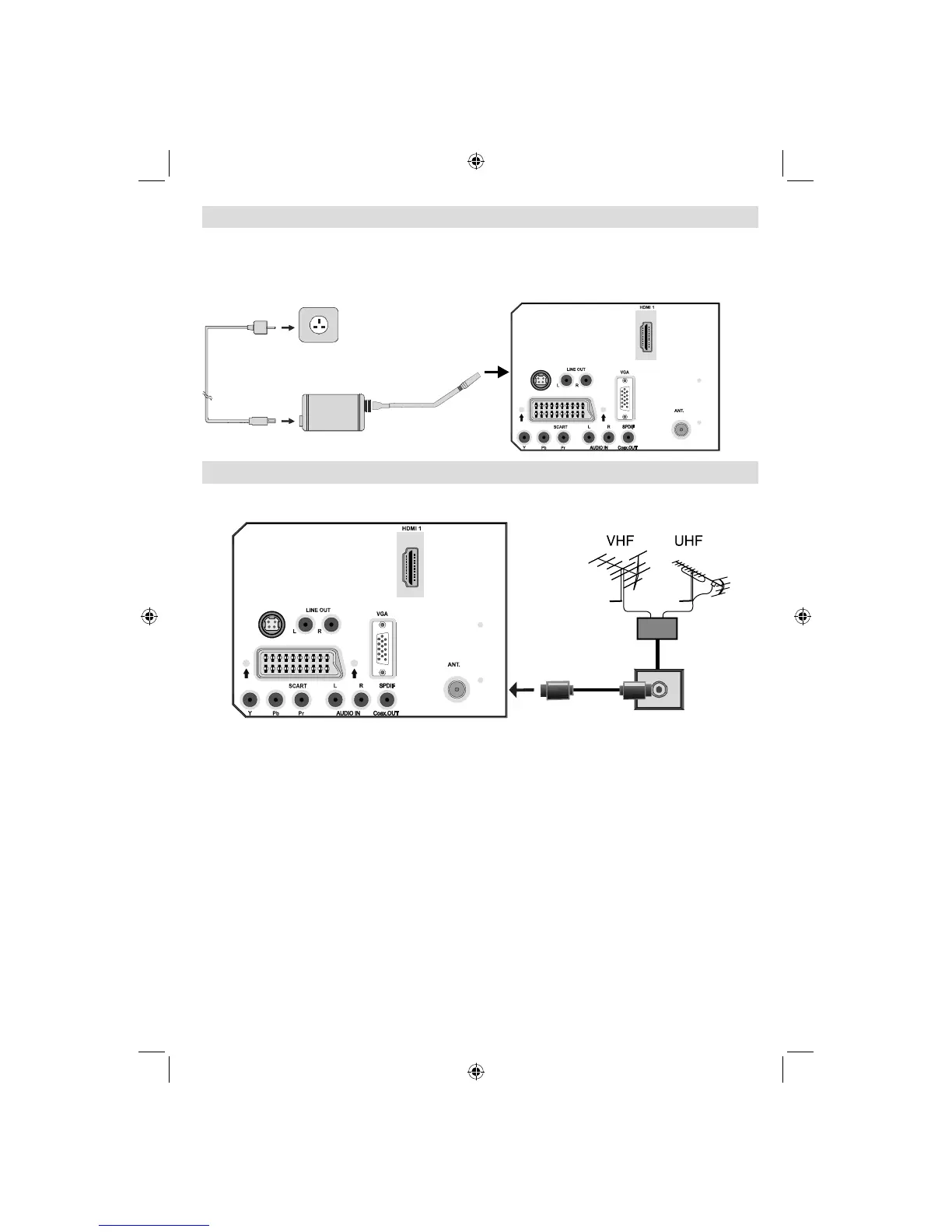
Power Connection
IMPORTANT: The TV set is designed to operate on 12 V DC. For this, an adaptor is used which
gives 12 V voltage. Connect this adaptor to a system that supplies 220-240V AC,50Hz.
After unpacking, allow the TV set to reach the ambient room temperature before you connect
the set to the mains .
AC adapter
To POWER
INPUT DC 12 V
terminal
(12V)
(12V)
DC IN
DC IN
5Vdc 60mA
Aerial Connection
• Connect the aerial or cable TV plug to the AERIAL INPUT socket located at the rear of the TV.
(12V)
(12V)
DC IN
DC IN
5Vdc 60mA
REAR VIEW
A02_MB25 [GB] (01-TV)_19855W_1900UK_IDTV_NICKEL5_10061155_50141077.indd 12A02_MB25 [GB] (01-TV)_19855W_1900UK_IDTV_NICKEL5_10061155_50141077.indd 12 25.02.2009 17:08:0825.02.2009 17:08:08

Table of Contents