CNC Motion Setup/Testing Utility
P/N 70000635C
NOTE: On 3200MK and 3300MK systems, the DSP
2
Board is located
inside the CNC console. On 3300M systems, the DSP
2
Board
is
located in the CNC chassis. Remove only the top cover of the
console to access the Board. Balance the DSP
2
Board with
the servos off, initially. Next, verify the DSP
2
Board balance
with the servos on, and correct for voltage offset as required.
1. Press Balance (F6) to output a zero voltage signal to the axis.
2. Press
START.
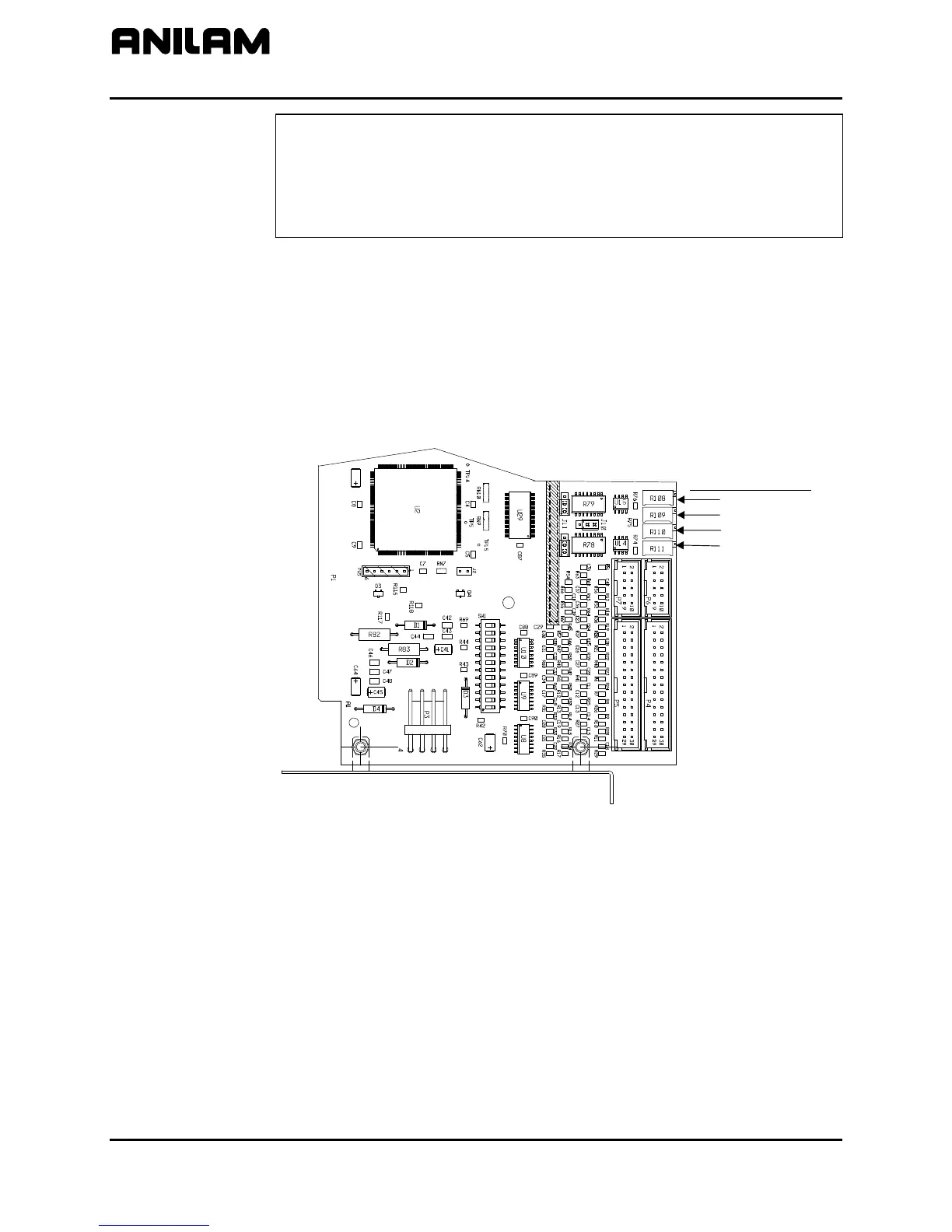
3. Refer to Figure 7. Make adjustments for axis outputs 0-3 on the
DSP
2
Board at potentiometers R108-R111 respectively.
4. Adjust the potentiometer for the selected axis until the voltage across
the pins is 0 VDC (± 0.001V).
5. Press MANUAL (F4) to cancel the test.
33000413
Output Balance Pot
Port 0
Port 1
Port 2
Port 3
Figure 7, ANILAM DSP
2
Board Balance Pots, P/N 33000413, DC Systems
All rights reserved. Subject to change without notice.
November 2009
12



 To Next Page