CNC Motion Setup/Testing Utility
P/N 70000635C
Activating the MST Screen
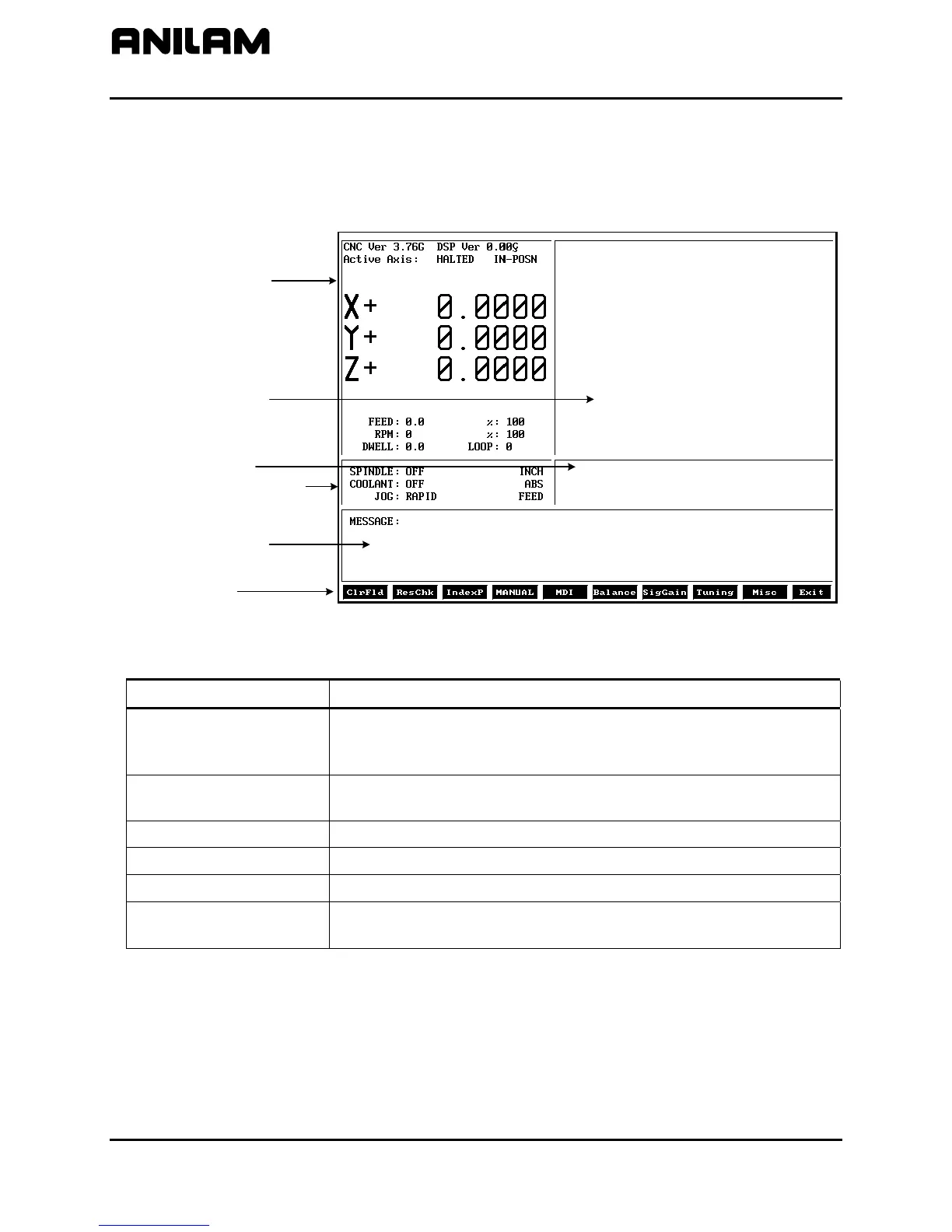
The axis positions displayed correspond to the current position. The
Graphics Area displays step responses for the Signal Gain and Tuning
functions. Refer to Figure 1 and Table 1.
General Status
Graphics Area
Active Status Codes
Prompt Area
Message Area
Soft Keys
3000MSTSCRN
Figure 1, CNC Motion Setup/Testing Screen
Table 1, MST Screen Areas and Explanations
MST Screen Area Description
General Status
Shows Active Modes, Machine Position for each axis, RPM,
Dwell, Spindle Speed and Feedrate, Active Axis, and other
information regarding the status of the CNC.
Graph Area
Displays step responses for the Signal Gain and Tuning
functions.
Prompt Area
Displays messages regarding information that must be entered.
Active Status Codes
Displays currently active status codes.
Message Area
Displays error messages.
Soft Keys Function keys (F1–F10) located below the LCD on the console to
activate the functions, as labeled.
All rights reserved. Subject to change without notice.
November 2009
2



 To Next Page