CNC Motion Setup/Testing Utility
P/N 70000635C
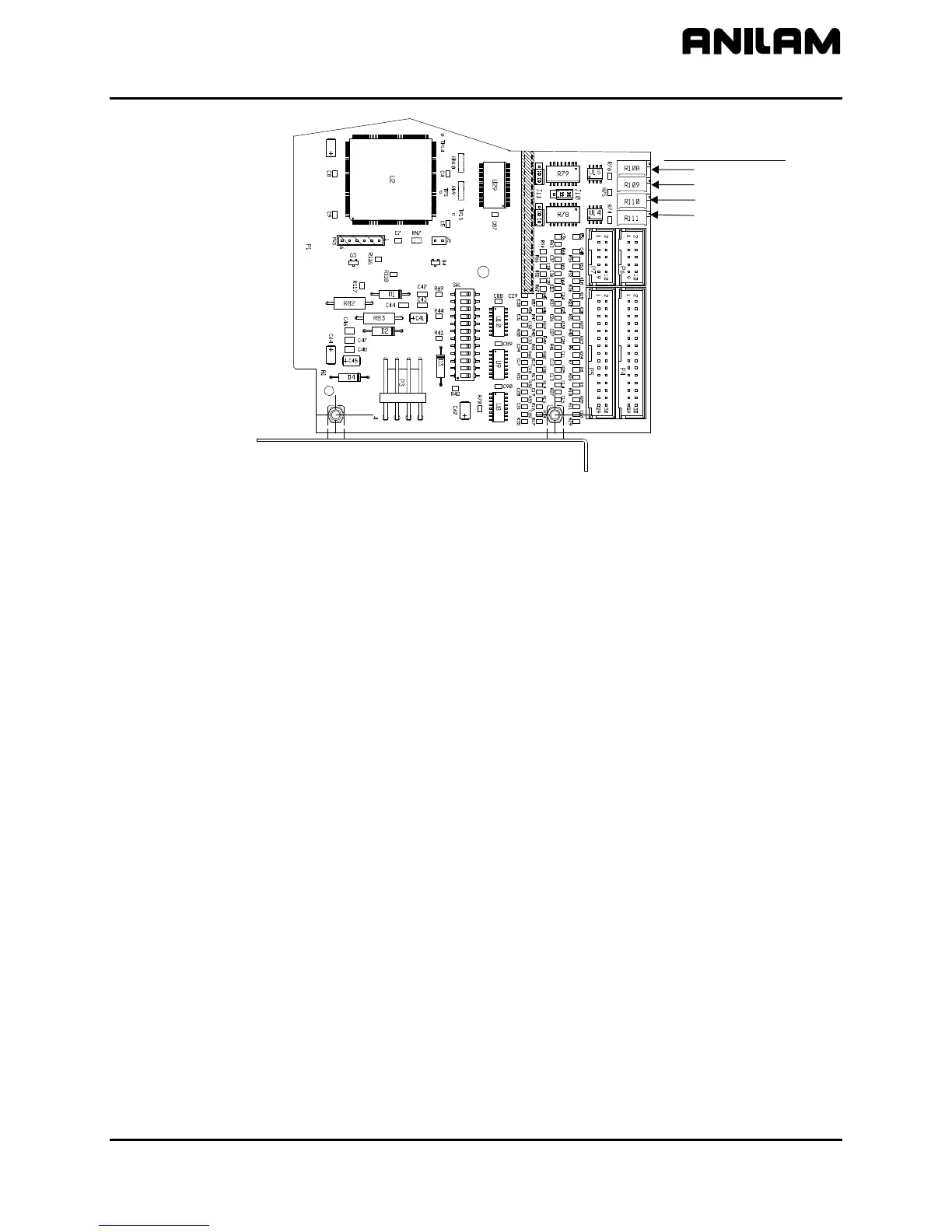
33001102
Output Balance Pot
Port 0
Port 1
Port 2
Port 3
Figure 13, ANILAM DSP
2
Board Balance Pots, P/N 33001102, AC Systems
ANILAM Amplifier Parameter Files
If using the ANILAM AC Brushless Servo Amplifier (refer to Figure 8,
Digital Brushless AC Servo Amplifier, P/N 33001279, AC Systems)
make sure that the amplifier's communications cable, P/N 33001389, is
connected between the amplifier J1 and the CNC. All servo amplifier
settings are done digitally through the communications cable and the
CNC. Parameter settings can be sent from the CNC to the amplifier and
vice versa. The parameter settings are saved on the CNC in C:\P3M
under the filename DIGAMP-*.BK (where * corresponds to the specific
axes).
It is recommended that after making any amplifier parameter settings that
these settings be saved on the CNC for easy restore, if needed. To save
the parameter settings on the CNC:
1. Select the Axes
2. Press Misc (F9)
3. Select Backup Amp Settings
For later restore of the saved parameter settings from the backup:
1. Select the Axes
2. Press Misc (F9)
3. Select Restore from Backup
All rights reserved. Subject to change without notice.
November 2009
23



 To Next Page