CNC Motion Setup/Testing Utility
P/N 70000635C
All rights reserved. Subject to change without notice.
November 2009
37
Saving Final Values
CNC Ver 3.70H DSP Ver 0.00C
ctive Axis : X
Misc
FEED : 0.0 % : 100
RPM : 0 % : 199
DWELL : 0.0 LOOP : 0
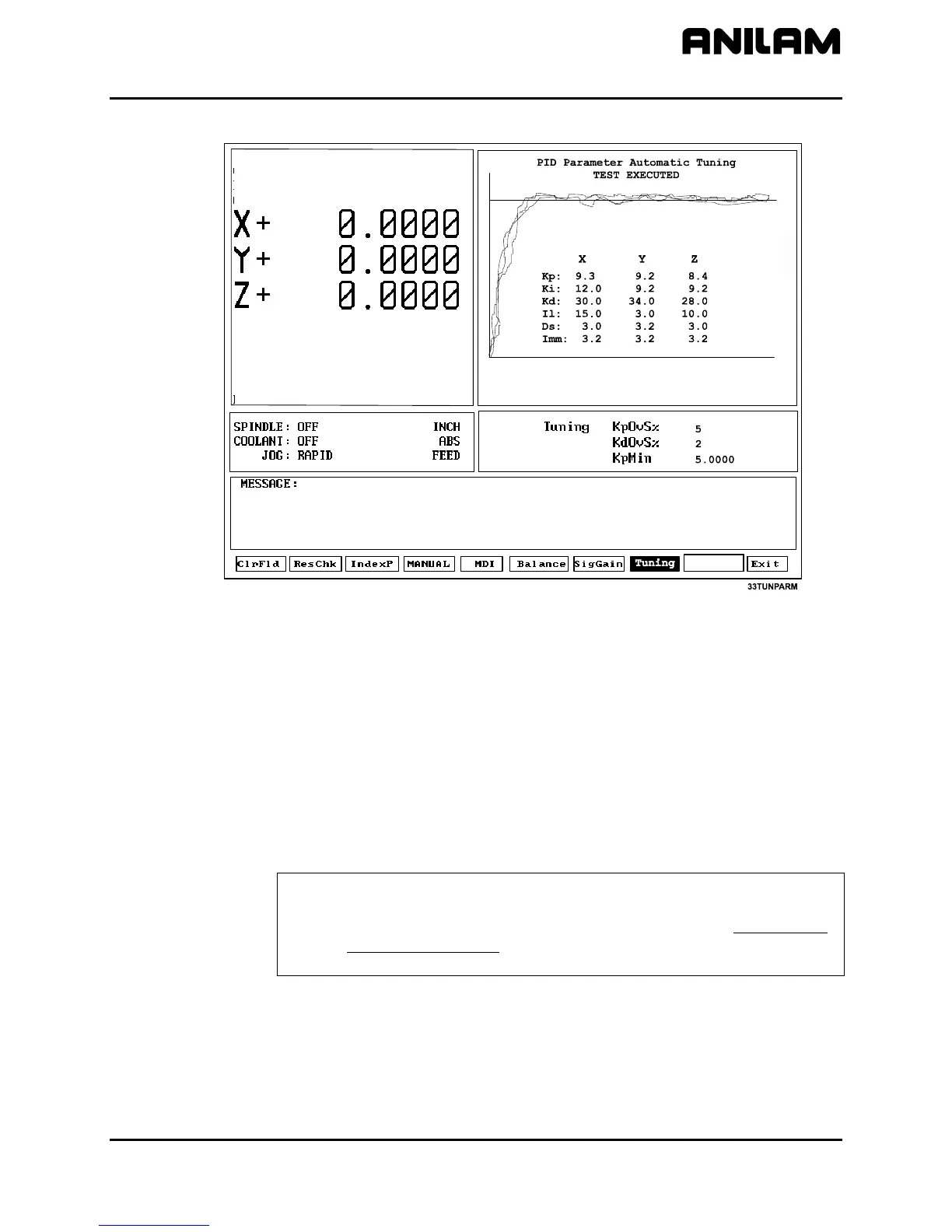
Figure 21, Tuning Parameters Test Results Screen
To save the Tuning Test values:
1. Refer to Figure 21. After the Tuning Test, the results are displayed in
the Graphics Area of the screen. Press TUNING (F8) and highlight
Save Results.
2. A pop-up is displayed with the following options: [No Motion],
[Feed], [Rapid], [ALL Tables]. Highlight the table to which you wish
to save the final values, and press
ENTER. This overrides the values
in the Setup Utility. Normally, choose All Tables.
3. The CNC stores the new values in the configuration file.
4. Or, press F9 to cancel.
NOTE: ANILAM recommends that you back up your configuration file
before you save tuning results. This will enable the filter
parameters to be recovered if necessary. Refer to 3000M CNC
Setup Utility Manual, P/N 70000499, for details on backing-up
and restoring setup parameters.
Exiting the MST Screen (F10)
Press Exit (F10) to exit the MST Screen and return to the Software
Options screen in the Setup Utility.



 To Next Page