2017/06 Rev. 2.0 95 EN
OptiBean (XL) Touch
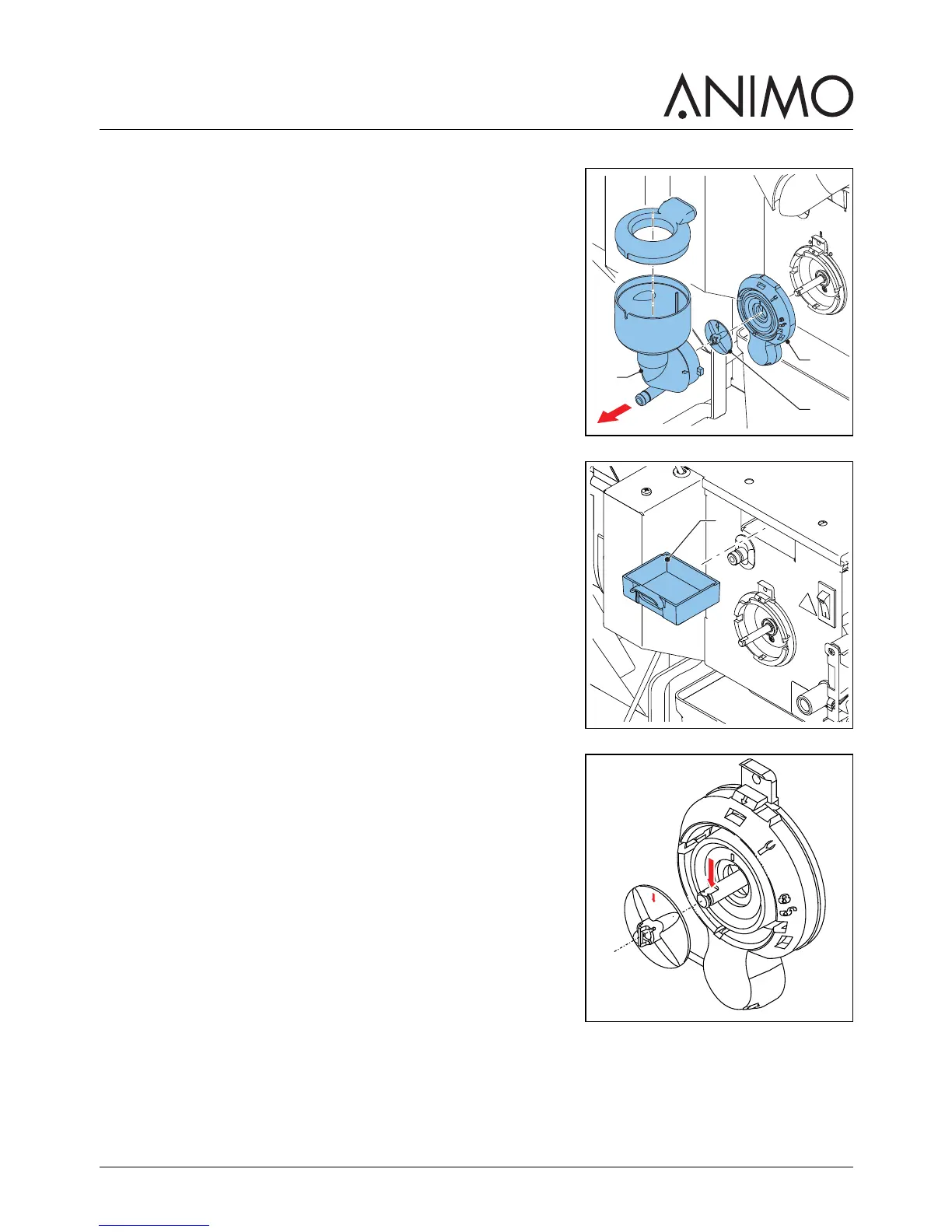
5.2.11 Cleaning the mixer
1 Turn the canister’s outlet upwards.
2 Remove the outlet hose from the mixer.
3 Turn the mounting ring (A) counterclockwise.
4 Take off the mixer housing (C).
5 Pull off the mixer fan (B).
6 Turn the mounting ring (A) further counterclockwise.
7 Remove the mounting ring.
8 Clean the parts.
9 Remove the dust tray (A).
10 Clean and dry the dust tray.
11 Replace the dust tray.
12 Replace the mounting ring and turn it clockwise to lock the
ring into place.
13 Replace the mixer fan. Make sure that the mixer fan locks
into place.
14 Replace the mixer housing.
15 Turn the mounting ring clockwise to lock the mixer into place.
16 Replace the outlet hose.
A
B
C



 To Next Page