64
03/2010 Rev. 0.1
03/2010 Rev. 0.1
65
1.9 Grinder
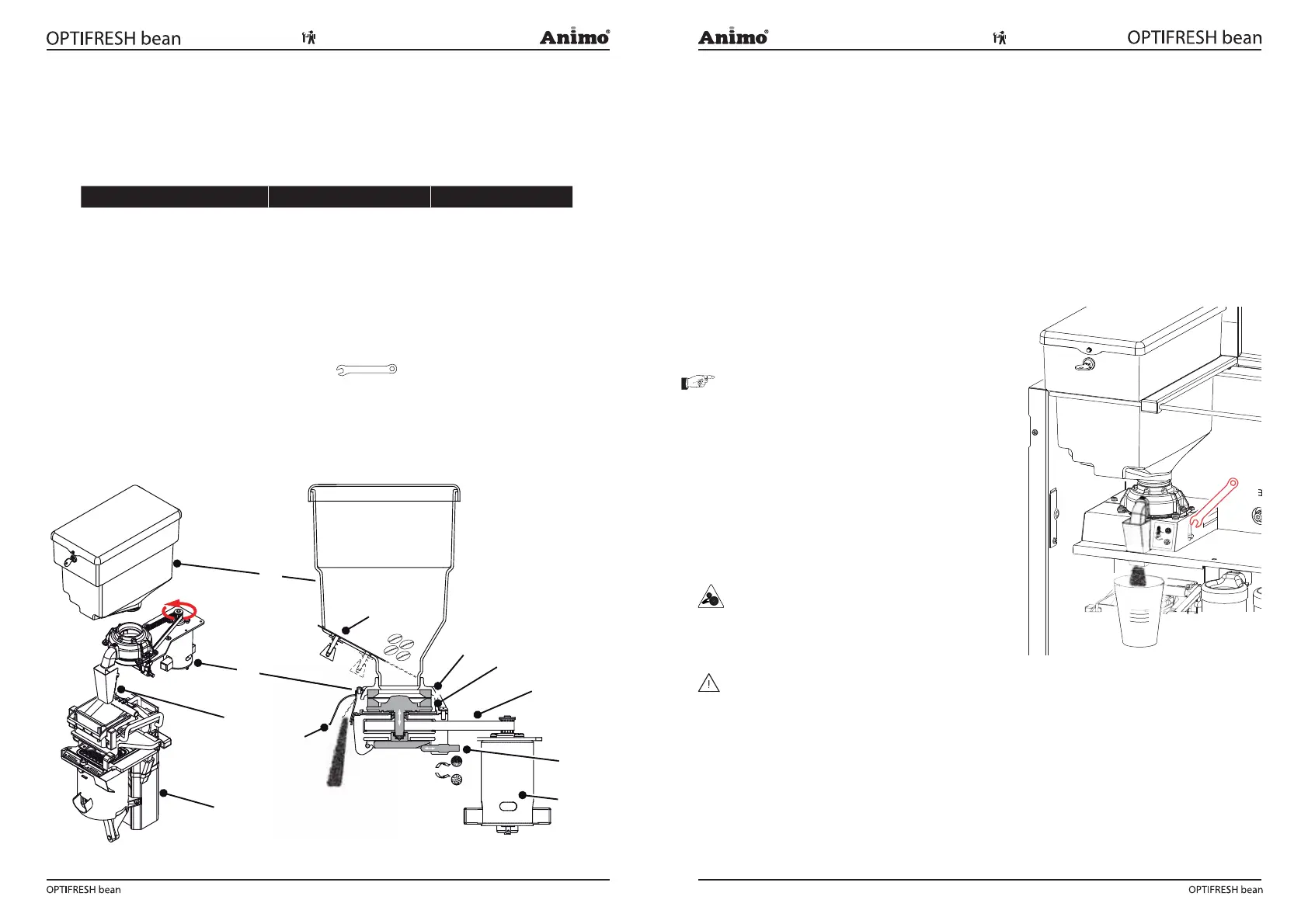
The coffee grinder (Fig. 8) is driven by a strong direct current (DC) motor [2.6]. The top grinding disc
[2.2] is xed. The lower grinding disc [2.3] is driven trough a belt. The neness of the coffee is set
with a adjustment screw [2.5]. If the adjustment shaft is turned clockwise, the distance to the top drive
reduces, increases counterclockwise. The ground coffee leaves the mill through the coffee spout [2.1].
A rubber ap prevents moisture comes in.
Major parts Technical data Material
1. Bean canister Capacity 2.5 kg / 6.4 liter PC
1.1 Bean stopper Stainless steel
2. Coffee grinder Sound 70 dB (A)
2.1 Coffee spout ABS
2.2 Grinding disc up Ø 65mm Ceramics
2.3 Grinding disc lower Ø 65mm Ceramics
2.4 Belt Rubber
2.5 Adjustment shaft
hexagon +
2.6 DC motor 230Vdc
3. Coffee outlet Stainless steel
4. Brewer unit See 1.8 brewer unit
1.9.1 Livetime
The life cycle of the ceramic grinding discs are about 3x times as long as steel grinding discs.
This life cycle is depending of the type of coffee* and is approximately 3000 kg of coffee beans.
At an average dose of 7.5 gr. / sec. these are around 400,000 shots.
We advise you to replace coffee grinder entirely when this grinding volumes are reached. Not only
the grinding discs need to be replaced, but also the bearings, motor brushes and the driving belt
has reached its maximum life cycle. In case of a damaged grinding disk (by stones or other foreign
objects) they can be ordered separately as a set and can be replaced.
* Light to dark roast, dry or oily, caramelized
1.9.2 Fineness adjustment
The coffee grinder is factory-set to the ideal grinding
nes which perfectly ts the brewer unit.
1. Close the bean stopper from the bean canister.
2. Hold a cup under the spout of the coffee grinder.
3. Grind the coffee grinder empty.
Tip: go to the service menu: 2.7 Hardware test /
Outputs / IM1. Keep recipe key 11 pressed to empty
the coffee grinder is emptied (motor speed increases).
4. Turn the adjustment shaft clockwise until the grinding
disks slightly touch each other.
5. Turn adjusting shaft 360 to 450 ° counterclockwise,
or 1 to 1 ¼ rotation! The dosing speed will be around
4.4 to 4.6 gr. / sec.
6. Please monitor the brewer functioning properly after
the adjustment of the grinding fineness. See chapter
1.9.3! If necessary, re-adjust fineness times!
WARNING
• Keep your fingers away from the grinder mechanism
when the machine is in operation.
WARNING
• I If there is a sound of sharpening stones on each
other can be heard, adjust the grinding coarser.
• De grinding discs shall never touch each other.
• The grinding adjustment and delivery can vary
according to coffee beans and roasting degree.
• Adjust the coffee grinder from coarse to fine always
a rotating- or empty mill. Adjusting from fine to coarse
is possible at standstill.
3
2.1
2.2
2.4
2.5
2.6
1.1
1
2
4
2.3
Fig. 8
Fig. 9













 To Next Page