66
03/2010 Rev. 0.1
03/2010 Rev. 0.1
67
1.9.3 Grinder ajustment tips
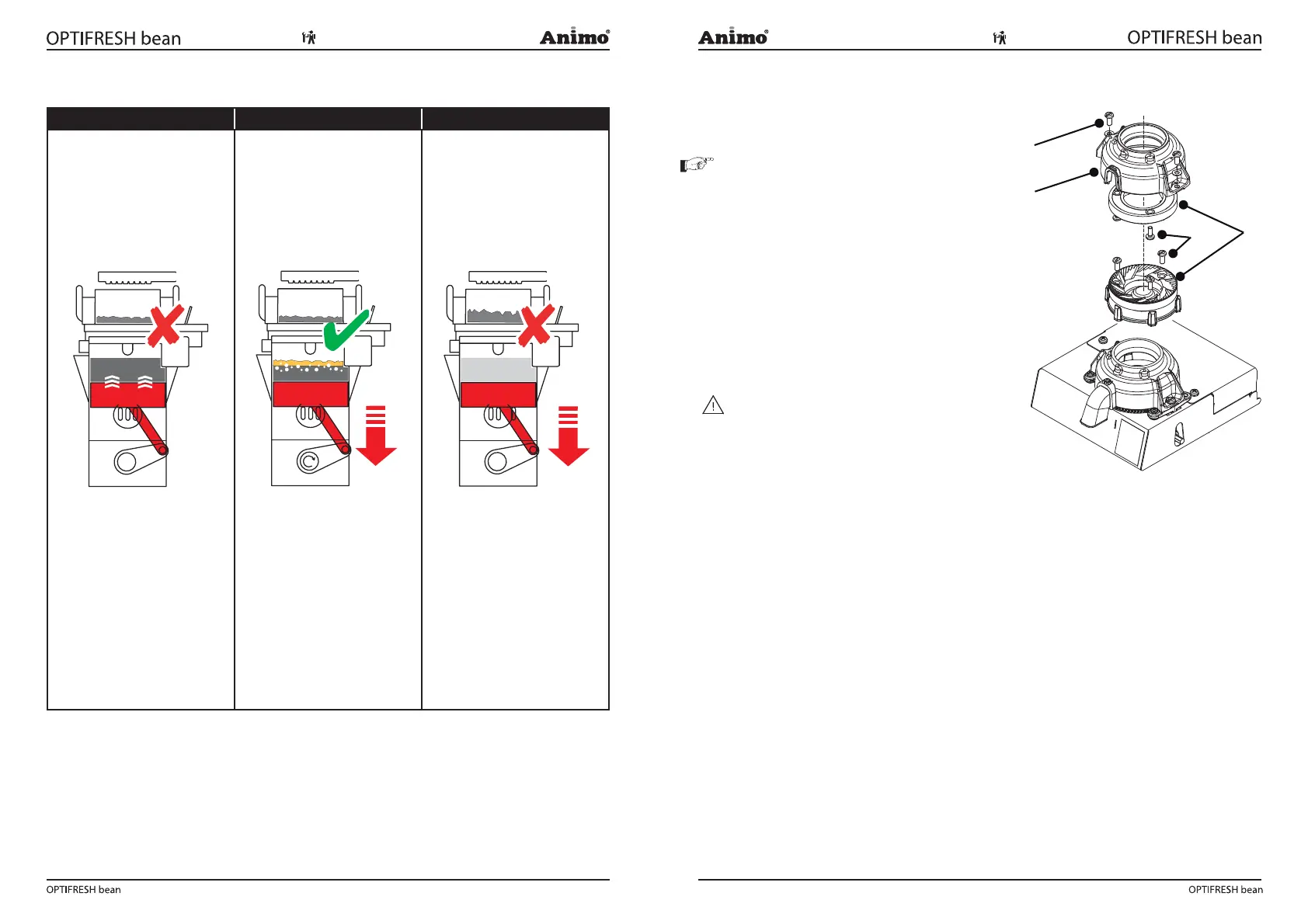
To ne (Fig.10) Ideal (Fig. 11) To coarse (Fig. 12)
Grain <650m;
Recognizable;
The brewer piston is pulled up
the pause mode 3 (Fig. 10) due
to a high vacuum in the brewer
cylinder.
The coffee is grinded too
ne, the avour extraction is
too extreme (too many bitter
substances).
The brewer is overloaded, and
can brake down!
Advice, adjust the coffee
grinder coarser (turn
adjustment shaft
counterclockwise).
Grain 650-800m;
Recognizable;
If the brewer piston runs down
in the start 3 position (Fig. 11)
a beige foam layer is (brie y)
creates on the coffee.
The grinding adjustment is
ok, the brewing process runs
perfectly.
Grain >800m;
Recognizable;
Weak coffee, High coffee dose.
The grain size is too large to
get good extraction. The coffee
will be under extracted.
To get a good cup of coffee the
coffee dosage must be extreme
high (too much) There is the
danger of overdose.
Advice, adjust the coffee
grinder ner (turn adjustment
shaft clockwise). Reduce the
coffee dosage in de recipe
menu.
1.9.4 Replace grinding discs
1. Close the bean stopper from the bean canister.
2. Hold a cup under the spout of the coffee grinder.
3. Grind the coffee grinder empty.
Tip: go to the service menu: 2.7 Hardware test /
Outputs / IM1. Keep recipe key 11 pressed to empty
the coffee grinder is emptied (motor speed
increases).
4. Lift the bean canister from the grinder.
4. Switch the machine off.
6. Unscrew the two screws [1] and remove the grinding
top [2].
7. Remove the grinding discs [4] by loosening the three
screws [3].
8. Clean all parts thoroughly.
9. Install the new grinding discs in the exact reversed
order.
WARNING
• Don’t drop the ceramic discs.
• De grinding discs shall never touch each other.
• Adjust the grinding after replacing the discs.
Pauze 3
Start 3
Vacuüm
Start 3
Fig. 10 Fig. 11 Fig.12
1
3
4
2
Fig. 13













 To Next Page