11
Fiber Visualizer
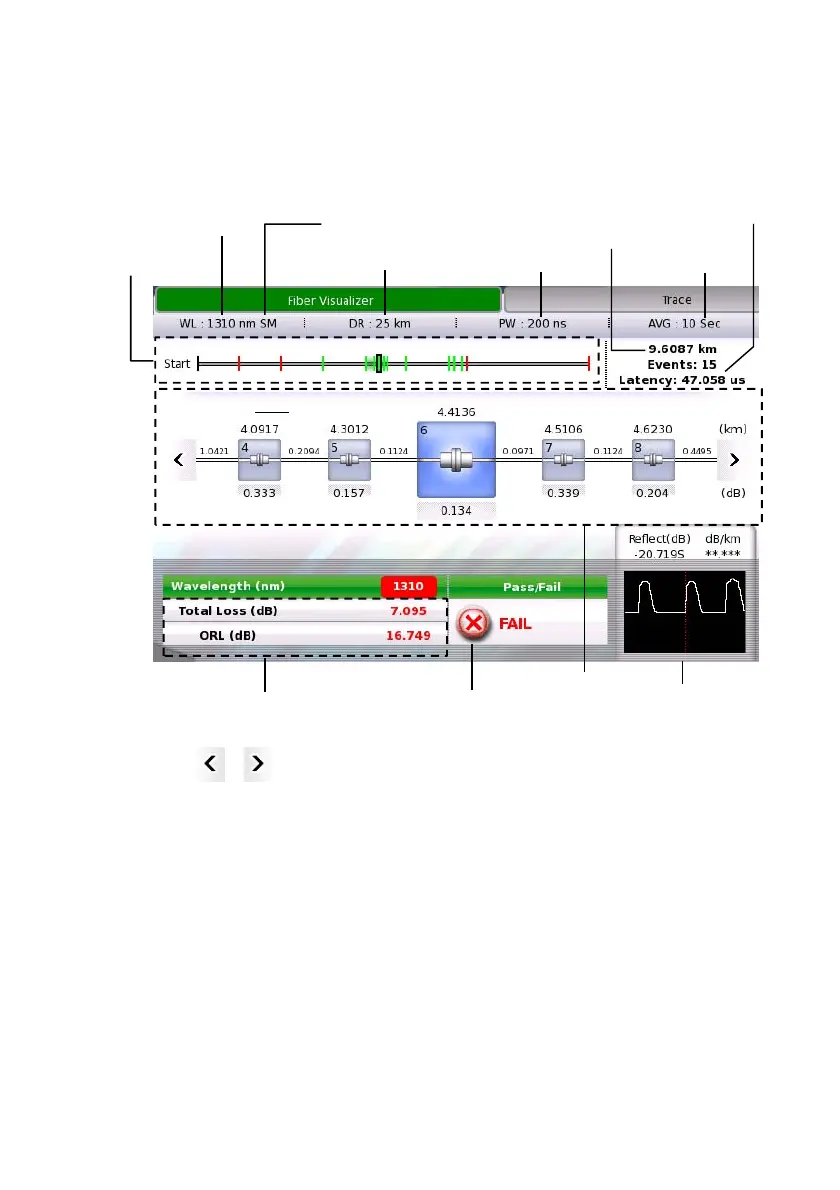
Touching the Fiber Visualizer button in the navigation area will display
the following screen.
Touching or in Event icon display area allows users to scroll the
icons to right or left. The event positions and displayed range are shown
in the Fiber Schematic.
The events judged as Fail are displayed in red icon. The Trace around
the event displayed enlarged in the center appears at right bottom.
Event Edit
Touch the event icon, and then touch Event Edit to opens the Event Edit
dialog box.
Note:
Start icon and End icon cannot be edited.
Fiber
Schematic
Event icon
dis
la
area
Total Results
Trace image of
the event
Distance of Far End even
Output Port
Pass/Fail result
Distance Range
Pulth Width
Average Time
Wavelength
Latenc
to Far End even














 To Next Page