Orion Studio supports sample rates higher than 48kHz for ADAT. The following table show what
the various options for ADAT implement in order to be consistent with the input/output of your
other devices connected via ADAT.
Clock Source ADAT options: (Note that there is no S-Mux check-box for ADAT as it is
automatically enabled when you select ADAT 2X or ADAT 4X):
Clock Source Mode ADAT Configuration
Sample Rate Channels
ADAT 44.1 kHz 8 ch
48 kHz 8 ch
ADAT 2X 88.2 kHz 4 ch
96 kHz 4 ch
ADAT 4X 176.4 kHz 2 ch
192 kHz 2 ch
6. Sample Rate select
7. Lock light
8. Settings
9. Info
10. Preamp / ADAT IN / S/SPDIF IN Gain Selection
11. Headphone (HP 1) volume slider
12. Headphone (HP 1) ‘Mute’ button
13. Headphone (HP 2) volume slider
14. Headphone (HP 2) ‘Mute’ button
15. Talkback active button/Indicator light & Talkback volume fader
16. ‘From’ Section (from Routing)
17. ‘To’ Section (from Routing)
18. Presets
19. Undo/Redo Routing; Save/Load Set Up Files (from Routing)
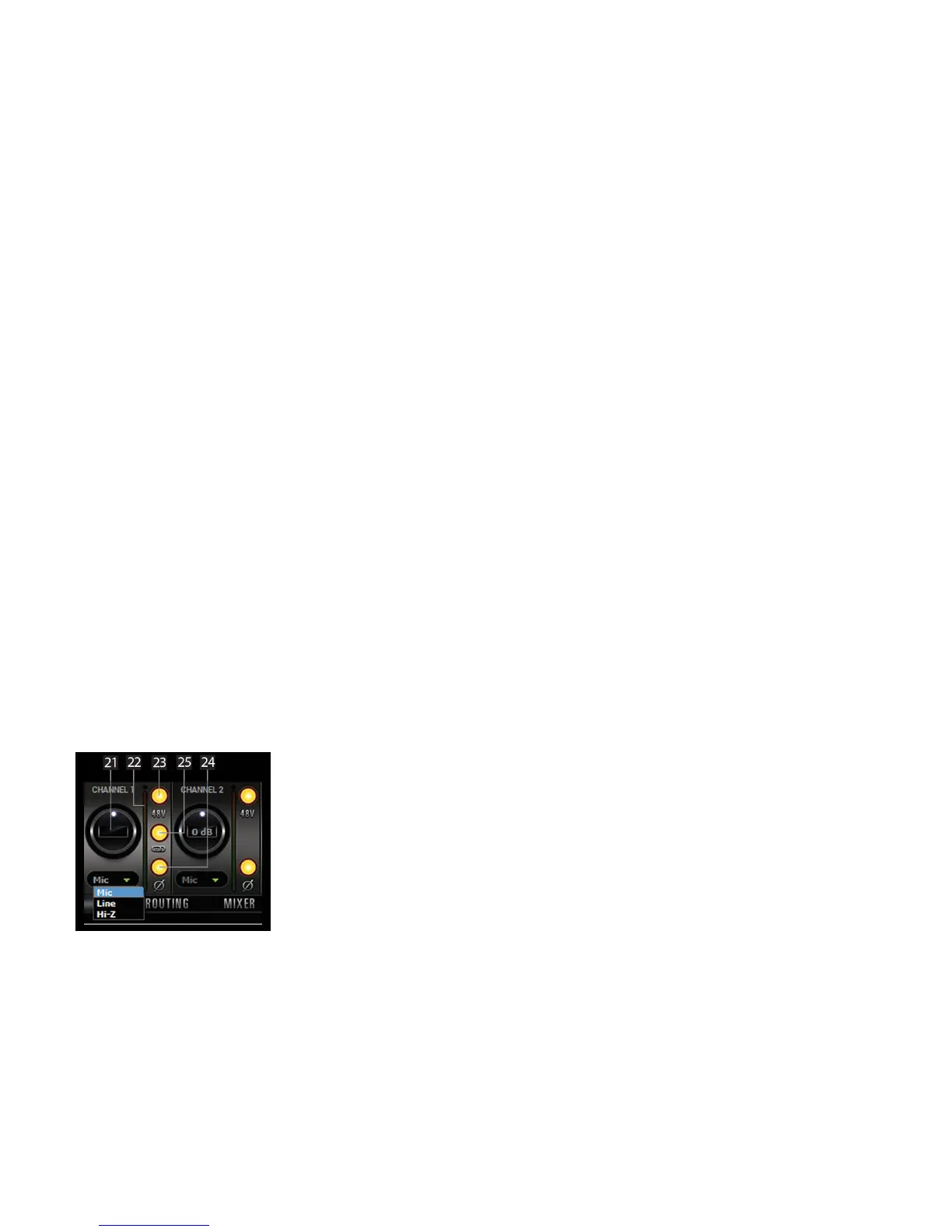
20. Mic, Line and HiZ (1, 2, 3 & 4, only) modes selectable via dropdown menu (please
ensure that your selection in the drop-down menu matches the type of signal being
inputted).
21. Channel gain (value can be adjusted in 1 dB steps)
22. Peak meter
23. Independently assignable 48V phantom power switch
24. Phase Reverse button
25. Stereo Link








 To Next Page