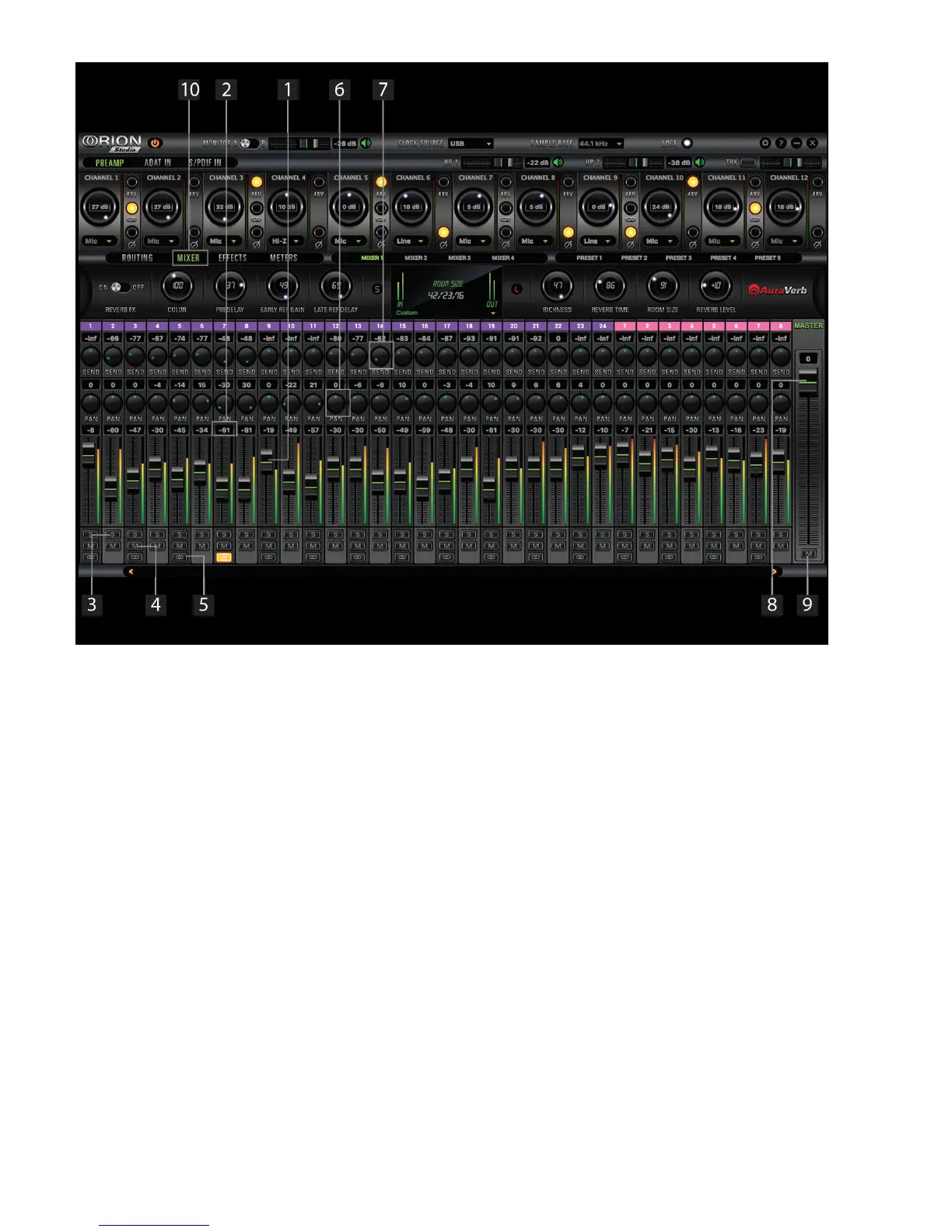
7.2. Mixer Tab
1. Fader (double-click to reset to zero)
2. Fader Level indication
3. Solo
4. Mute
5. Stereo Link
6. Pan
7. Send
8. Master Mix Fader
9. Mute Master
10. Mixer 1-4 Show/Hide
Orion Studio comes with four software low latency mixers which provide near zero latency mix
and monitoring that can be distributed using the control panel. The new Orion Studio allows a low
latency mix to be distributed to any output.
For example, you can drag all of the twenty-four USB play channels to Mixer 1 channels and then
drag and drop MIX 1 L/R to LINE OUT 1&2 providing a stereo bus mix to LINE OUT channels 1 and 2.
The low latency mixers provide the basic functions of a real mixer such as: Solo, Mute, Pan, Link
channels, Volume Level controlled by faders and a Master Fader, so you can easily make a stereo
mix, plus an Auxiliary send in order to use the DSP effects.
Maximum Number of Channels per Sample Rate:








 To Next Page