User Manual
70
The connection state should be normal. So please do communication operation with
machine (i.e. Synchronize time). When connection state is normal, terminal icon will
become blue ( ).
5.1.2 Modify Unit
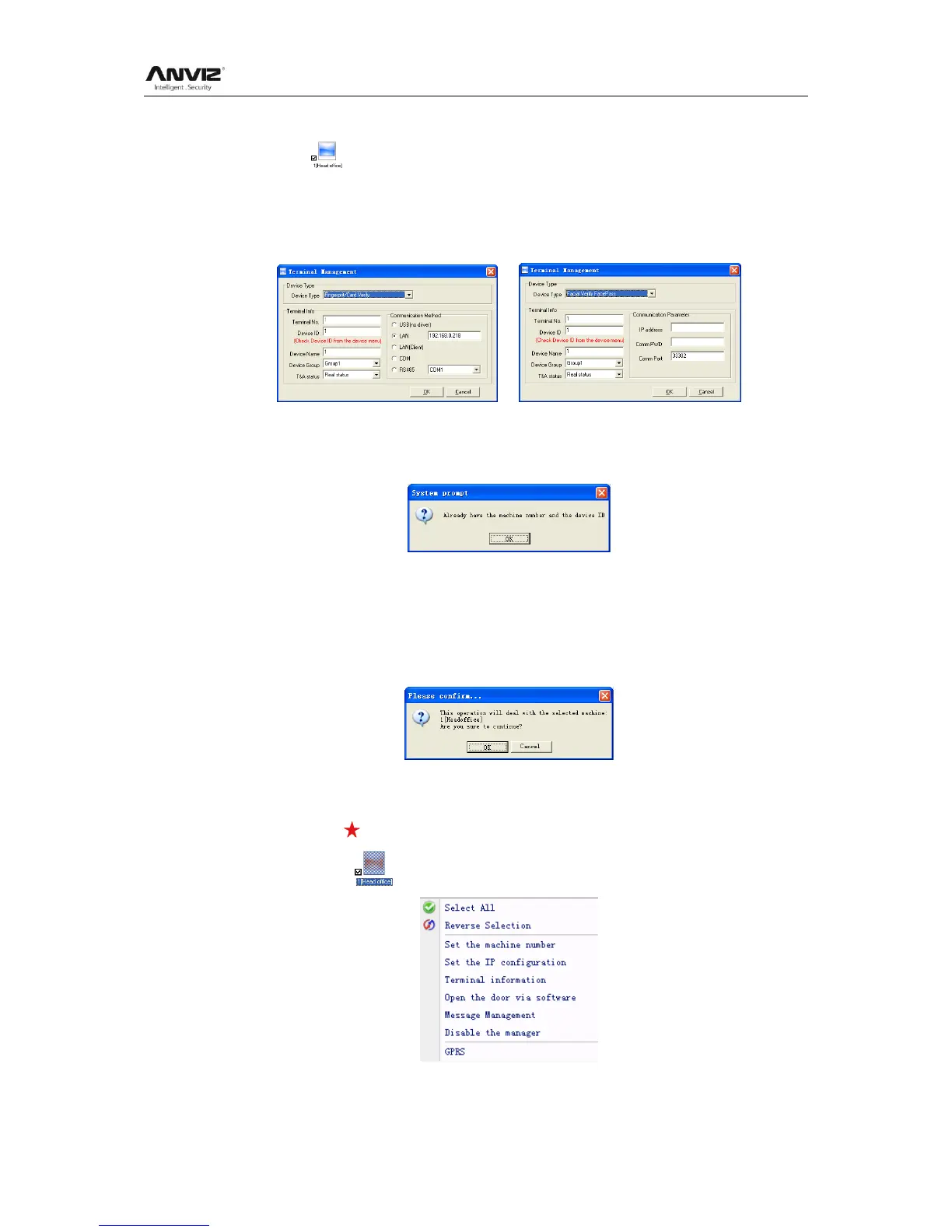
Choose the terminal and then click [Modify Unit], the following window pops up:
or
Modify the information and then click the button [OK] to save the modification. Click the
button [Cancel] to cancel the modification.
Notice: If the ―No‖ is already exist in the software, following message box pops up:
Click the button [OK] to set the Unit information again.
5.1.3 Delete Unit
Choose the T&A unit and then click the button [Delete Unit]. Following message box
pops up:
Click the button [OK] to delete or click the button [Cancel] to cancel.
5.1.4 Right Key Menu
Select terminal icon ,right click and perform the menu:
[Select All]: Select all the terminals.


 To Next Page